ACR122U NFC Reader
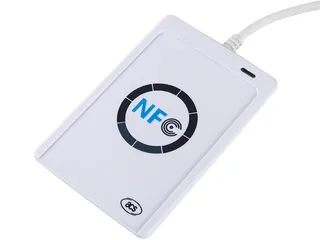
The ACR122U is the industry's reference USB NFC reader — the PC/SC device a generation of access-control and NFC software was written against — now discontinued by ACS but still supplied for maintaining existing deployments.

Choose your language
If this page is not available in your language, the link opens that language’s product catalogue.
Choose your language
If this page is not available in your language, the link opens that language’s product catalogue.
Desktop NFC reader/writers and a Bluetooth animal-ID scanner for integrators encoding and testing cards and tags. Alongside the ACR122U we supply ACS's current ACR1252U and ACR1552U for new PC/SC designs; the ACR122U page compares the three. Support varies by model across MIFARE, DESFire, NTAG, FeliCa, ISO 15693 (ACR1552U only) and 134 kHz FDX-B animal tags, with PC/SC or SDK interfaces. Confirm your card or tag, operating system, software interface and required operations, and ask which model we can quote and about sample evaluation before selecting one.
The ACR122U is the industry's reference USB NFC reader — the PC/SC device a generation of access-control and NFC software was written against — now discontinued by ACS but still supplied for maintaining existing deployments.
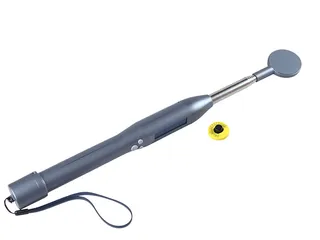
The R901 pairs a 134 kHz animal-tag reader with Bluetooth — read FDX-B ear tags in the field and the data lands on the phone or PC app — for livestock management without carrying a laptop to the pen.
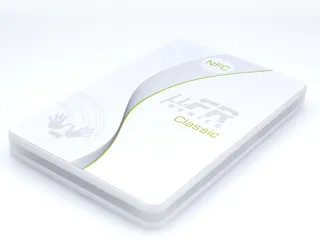
The µFR Classic CS is the reader for developers who'd rather call an SDK than send APDUs — free uFCoder libraries for MIFARE, DESFire, NTAG and JCOP — versus the ACR122U for software that already speaks PC/SC.
Selection & ordering guide
This catalogue includes desktop NFC readers and a Bluetooth animal-ID scanner. These are different integration paths. A purchasing decision needs the exact card or tag, host device and software interface; the connection type alone does not define compatibility.
Provide the precise chip or tag standard and explain whether the application reads an identifier, reads application data or writes and authenticates cards. Confirm each required operation against the selected reader’s documentation.
Specify the operating system and version, application stack, host interface and whether your software expects PC/SC or a manufacturer SDK. Ask the software developer to review the driver and API requirements before ordering.
We supply the ACR122U, which ACS lists as discontinued, and ACS’s current ACR1252U and ACR1552U for new designs that must stay in production for years. Confirm the µFR model offered with the quotation, then test a sample with your actual cards and application before approving a deployment quantity.
Work through the factors in the table below before choosing a model. For software that already talks PC/SC or libnfc, the ACR122U page covers host setup, the commands, the cards it reads and what changes on the ACR1252U and ACR1552U; where you are writing the host software against a manufacturer library, see the NFC reader/writer with free SDKs; the Bluetooth animal-ID scanner covers LF livestock workflows. Confirm the driver and API with your developer, and test a unit with your actual cards before ordering a deployment quantity. Bulk encoding is available through the RFID encoding service, which reads every encoded piece back and ships each encoded order with a data report.
| Reader attribute | What to confirm | Why it decides fit |
|---|---|---|
| Interface | USB, serial, Ethernet or Bluetooth to the host | Sets how the reader connects and whether it suits a fixed desk or a mobile workflow |
| Frequency band | 13.56 MHz HF/NFC, or 125/134 kHz LF (134.2 kHz for FDX-B animal ID) | A reader only reads its own band; an HF encoder cannot read an LF animal tag, and vice versa |
| Supported chips | The exact card standard, and whether you read a UID, read data, or write and authenticate | A reader listed for a family may still not perform every operation your application needs |
| Driver model | PC/SC versus a manufacturer SDK | PC/SC is the portable path for desktop HF readers; an SDK adds features but ties you to a language and version |
| Operating system | The exact OS build the host runs | Drivers diverge across Windows, macOS and Linux versions, and across ARM hardware |
| Keyboard-wedge output | Whether the reader can type a UID as keystrokes | A wedge needs no driver for simple ID capture, but cannot write or authenticate a card |
| Typical job | One-at-a-time issuance and encoding, or mobile field scanning | Match the reader to the dominant task rather than to the enclosure shape |
Include what you know. If the chip or product is undecided, describe the application and current equipment so we can review the options with you.