
MIFARE Plus is an NXP contactless chip family used in projects upgrading from MIFARE Classic. NXP documents AES-based security and migration features for specific Plus products. Those chip capabilities do not by themselves establish compatibility with an installed reader or a finished access system. Consult the NXP MIFARE Plus EV2 product documentation for the exact part’s features and ordering options.
For a batch order, start with the card specification accepted by your integrator. Browse MIFARE Plus cards or request a compatibility check with the reader model, current card and intended application.
Table of Contents
When to evaluate MIFARE Plus
An existing MIFARE Classic installation may be a candidate for a Plus migration, but the reader, firmware, application configuration and key-management process need to be reviewed together. Do not treat a new card as a substitute for that integration work.
Typical project questions include:
- Can the installed readers support the required chip and operating configuration?
- What card data and identifier format does the software expect?
- Which part of the migration requires a firmware, software or issuance change?
- Who owns the keys and approves the new configuration?
- How will old and new credentials be managed during the pilot and rollout?
For related credential formats, see RFID key fobs and access control. A card, fob or wristband still needs to meet the same system specification.
Specify the exact card before comparing prices
“MIFARE Plus” is not a complete purchase specification. Use the exact generation and part number accepted by the integrator, and confirm the offered configuration against its documentation.
| Item to confirm | Why it belongs in the enquiry |
|---|---|
| Chip generation and part | Prevents a different variant being quoted as an equivalent without review |
| Memory and data layout | Lets the integrator check the application’s required records and configuration |
| Identifier format | Helps validate the reader and backend’s handling of the presented identifier |
| Initial state and operating configuration | Defines what the supplier delivers and what the issuer must configure |
| Reader, firmware and software | Makes the intended compatibility test specific and repeatable |
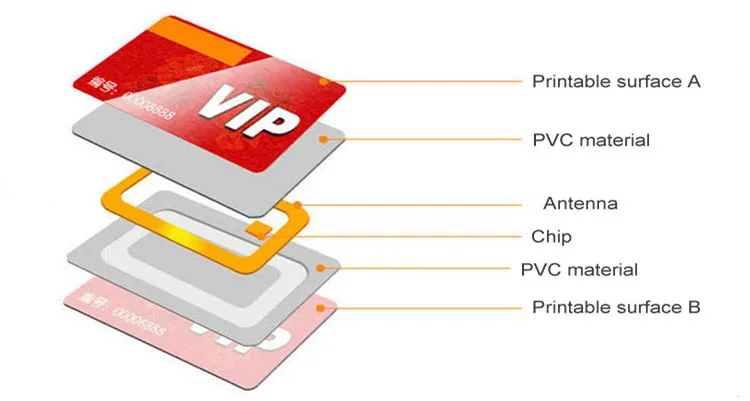
| Card construction and printing | Covers the physical credential, artwork and variable data |
For example, NXP documents both 4-byte NUID and 7-byte UID ordering variants for Plus EV2. Confirm the exact part instead of assuming every Plus card uses one identifier length. Reading an identifier also does not demonstrate that authentication and protected-data operations work in the application. NXP Plus EV2 datasheet
For an alternative family, compare MIFARE DESFire cards against the application’s requirements. Keep the current Classic card specification as a reference when documenting the migration.
Agree the encoding and key-management responsibilities
State whether the order is for blank cards or a specific configured state. The system owner or integrator should define the required data, permissions and issuance procedure.
Before approving the order, agree who performs personalisation and how the supplied configuration will be checked. At Proud Tek, every card we encode is read back, each encoded order ships with a data report, and numbered cards come with an Excel, CSV or XML list of UIDs against printed numbers. Confirm any supplier encoding service and its handover requirements in the quotation. Do not assume that printing or application provisioning is included merely because the card is described as programmable.
If the project requires certification, ask for the relevant document and check its holder, product identifier and evaluated configuration. A chip evaluation does not certify the complete installed access or payment system.
Test the migration with a controlled pilot
Use samples from the proposed configuration and the equipment that will be used after rollout. Record the expected outcome for each test before starting.
- Check issuance. Confirm that the sample can be enrolled or personalised using the intended process.
- Check normal operation. Test the actual access or transaction workflow, including any protected-data operations the application requires.
- Check identifier handling. Verify the value and format recorded by the reader and backend, including printed or exported identifiers where applicable.
- Check mixed deployment. Test the old and new credentials on every reader generation that will remain in service during migration.
- Check exceptions. Include revocation, replacement, denied access and any supported offline workflow.
- Approve the specification. Keep the card part, configuration, artwork and relevant reader/software versions with the batch order.
Resolve any failed tests with the system provider before ordering the rollout quantity. Repeat the affected checks if the supplier proposes another chip or card construction.
Prepare a useful MIFARE Plus quotation request
Include the exact part or integrator-approved specification, current card reference, reader model and software, quantity, artwork, destination and required arrival date. Add the sample configuration, encoding responsibilities and any numbering scheme; for numbered cards, Proud Tek’s UID list is included as standard.
Ask for current supply, MOQ, sample charges, proofing steps and batch lead time. Compare quotations against the same approved specification and request a clear description of any proposed substitution.
Common purchasing questions
Will MIFARE Plus work with every MIFARE Classic reader?
Do not assume this. Ask the reader provider to confirm the required Plus variant and operating configuration, and test the intended application. Radio detection or UID reading alone is not sufficient approval.
Which Plus variant should I buy?
Start with the integrator’s part number and required functions. Use the manufacturer’s documentation to check memory, identifier options and security features for that part. Approve an alternative only after compatibility testing.
Does a Plus card provide a ready-to-use payment or transit application?
No. The physical card must be issued and accepted by the relevant application or scheme. Confirm the software, keys, configuration and approval process with the operator or integrator.
What should I do when a sample reads an ID but the application fails?
Record the card part, reader and firmware, driver, software version and failing operation. Ask the integrator to check the credential configuration, application commands and identifier handling. Use a test case that can be repeated before approving the batch.
Request MIFARE Plus samples or send your specification for a quotation.