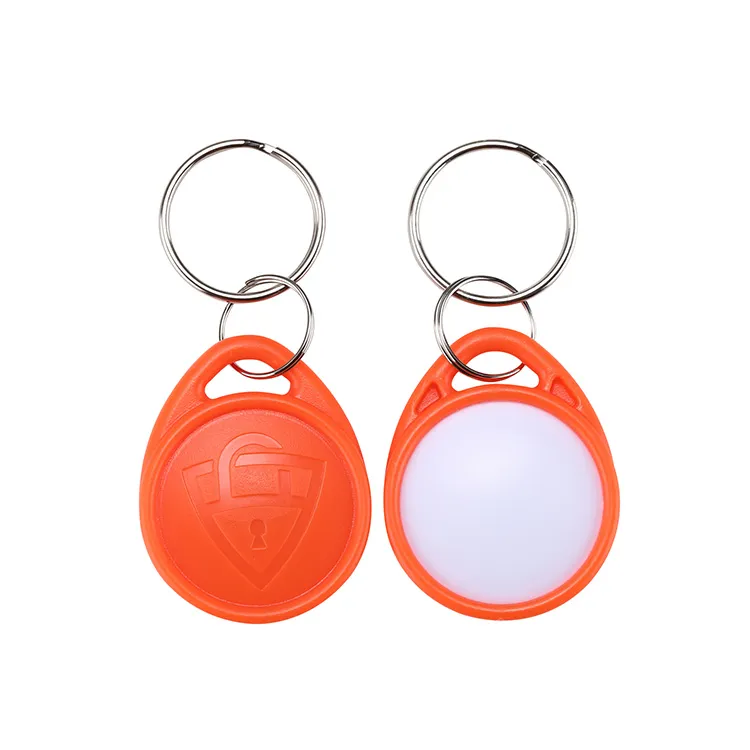
RFID Key Fobs
RFID Proximity Fobs
Proximity fobs are the 125 kHz 'wave and go' credential — no contact, no battery, just a chip and coil in a keyring housing — the default key fob for legacy access panels that read EM4100-format IDs.
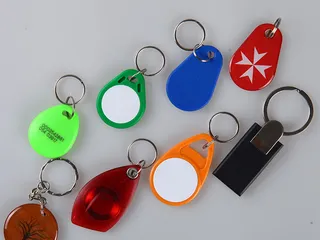
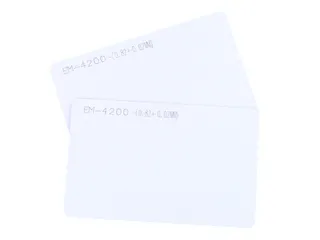
125 kHz proximity key fobs on EM4200 (EM4100 format), T5577, EM4305 and HITAG chips, in ABS, epoxy and leather housings with printed or laser-engraved numbers. Match the chip and ID format to your reader and controller, then test free samples before ordering.
Free standard samples · Quotation within one business day
Product details
What is a proximity fob?
A proximity fob is a 125 kHz low-frequency (LF) RFID key fob that a proximity reader reads when it is held a few centimetres away. It is the keyring credential for door entry, car-park barriers, lifts and time-and-attendance terminals on existing "prox" systems, and it is chosen by one rule: the chip and the ID format must be ones your reader and access controller already accept. Identify those first, then choose the housing and the printed number.
The fob has no battery. The reader's 125 kHz field powers the chip through a small copper coil inside the housing, and the chip answers with its identification code. The reader converts that code into the output the controller expects, and the controller decides whether the door opens. Because the fob only carries an ID, almost every compatibility question on this page is about the chip family and how the number is formatted, not the shape of the fob.
Proximity fob specification at a glance
| Item | Proximity fob (125 kHz) |
| Frequency | 125 kHz low frequency; the listed chips are rated across roughly 100–150 kHz |
| Read-only chips | EM4200, sending the EM4100 format (ID fixed at chip manufacture) |
| Rewritable chips | T5577 and EM4305, on genuine Microchip ATA5577C and EM Microelectronic chips |
| Other LF chips | HITAG 2 and other HITAG types for systems built on them |
| Read range | Typically a few centimetres; set mainly by the reader and the small fob antenna |
| Housings | ABS teardrop and key shapes, epoxy, leather; also silicone, PVC, glass-fibre and wood on request |
| Colours | Common stock colours such as black, white, blue, red, yellow and green; custom colours confirmed in the quotation |
| Marking | Laser-engraved or printed ID numbers, logos and sequential numbering |
| Delivery state | Fixed chip ID with a number list, or rewritable chips supplied blank or pre-encoded |
| Samples and lead time | Free standard samples; standard products 2–3 weeks; MOQ confirmed in the quotation |
Which 125 kHz chip should a proximity fob use?
"125 kHz" names a frequency band, not a chip. Several chip families share the band, and a reader built for one does not necessarily decode another. Match the chip to what your reader decodes and to whether anyone needs to write to the fob after delivery.
| Chip | Read/write | What the reader receives | Choose it when |
| EM4200 (EM4100 format) | Read-only, ID fixed at chip manufacture | A 64-bit EM4100-format frame carrying a 40-bit ID | Your system enrols whatever number the fob carries, which covers most EM-based door and attendance systems |
| T5577 | Rewritable, optional password and block locks | Whichever LF output it is configured for, EM4100 format included | You need a specific number or facility code written, or one blank that can be configured for more than one LF format |
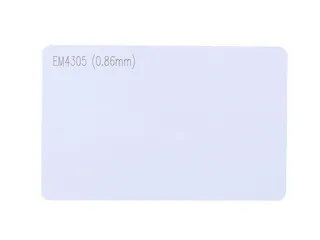
| EM4305 | Rewritable, 512-bit EEPROM, optional password | EM4100-format data in Manchester or Bi-phase encoding | An EM installation wants writable fobs with password protection and your writer supports EM4305 |
| HITAG 2 | Read/write, password or crypto mode | HITAG 2 protocol, or a public read-only mode | The readers are HITAG readers; an EM-format reader can read a HITAG 2 fob only if the fob is set to public mode A |
If your installer's specification says "EM", "EM4100", "EM-Marin" or "TK4100", the EM4200 fob is the standard answer. If the fob must carry a number you choose, or match a site code already used on your cards, order T5577 or EM4305 and tell us the format. T5577 and EM4305 use different programming commands, so pick the one your own writer supports if you will encode fobs yourself. The same chips are available as cards; see 125 kHz RFID cards when staff need a badge and a fob on the same system.
EM4100 key fobs: what the ID number contains
An EM4100-format fob, EM4200 included, sends 40 data bits in a repeating 64-bit frame, which the EM4200 card page lays out bit by bit.
Readers and software show those 40 bits in different ways, which is why two people can read the same fob and quote different numbers. The chip's number does not change; only its representation does.
| Representation | How it is derived | Where you see it |
| 10 hexadecimal digits | All 40 data bits | Desktop readers and programming tools |
| 10-digit decimal | The lower 32 bits as a decimal number | USB keyboard-emulation readers and many printed fobs |
| Facility code + card number (for example 3 + 5 digits) | The lower 24 bits split into 8 bits and 16 bits | Controllers that receive Wiegand 26-bit output |
| Other lengths | A different slice of the ID, set by the reader | Readers with configurable output |
ID formats: facility code, card number and Wiegand 26-bit
The access controller defines the format, not the fob. A reader wired to a controller usually sends the ID as a Wiegand message, and the controller only accepts messages of the length and structure it has been set up for. The number printed on the fob is useful only if it is printed in the same representation that your software shows when a fob is enrolled.
| Output | Structure | What to confirm |
| Wiegand 26-bit | 1 parity bit, 8-bit facility code (0–255), 16-bit card number (0–65535), 1 parity bit | Whether the controller checks the facility code, and which facility code your site uses |
| Wiegand 34-bit | 1 parity bit, 32 data bits, 1 parity bit | How the controller splits or displays the 32 bits |
| Keyboard emulation (USB or serial) | The ID typed as decimal or hex digits | Number length and whether leading zeros are kept |
| Proprietary LF formats | Format-specific modulation and data layout | Whether your system accepts a configured T5577 fob; see below |
Wiegand 26-bit leaves only 65,536 card numbers per facility code, so duplicates between sites are possible. If your system uses a fixed facility code, a read-only EM fob cannot be made to carry it; order T5577 or EM4305 fobs pre-encoded with your facility code and number range instead, and we print the same numbers on the housing.
Proprietary 125 kHz credentials use their own modulation and data structures, which differ from EM4100. The T5577's datasheet gives it FSK, PSK, Manchester, Bi-phase and NRZ output at a choice of data rates, but it names no proprietary credential format, and we do not claim compatibility with any. A fob configured to the format your reader expects is proven only by a sample test on your reader and controller; confirm the result with your system provider before a volume order.
Housings: ABS teardrop, epoxy, leather and more
The housing decides how the fob looks, how it survives a keyring and how it is marked; it does not change the chip or the format. Most access-control projects use a standard ABS shape, and other materials are chosen for branding, gifts or harsher use.
| Housing | Construction | Suits |
| ABS teardrop and key shapes | Two moulded shells closed around the coil and chip, with a keyring hole | Residential and office access; the everyday default, available in many stock colours |
| Epoxy fob or tag | A printed inlay under a clear resin dome | Full-colour artwork, promotional fobs and small adhesive tags |
| Leather fob | Leather wrapped around an inner fob, often with a metal ring or snap | Hotels, residences and premium branded key sets |
| Silicone and soft PVC | Moulded flexible bodies | Gyms, pools and colourful or character designs |
| Glass-fibre and wood | Rigid laminated or cut bodies | Rugged use, or projects avoiding plastic housings |
Colour-coding is an easy operational win: different colours for residents, staff, cleaners and contractors make a wrongly issued fob visible at a glance. For outdoor gates, pools or wash-down areas, ask for the water resistance of the specific housing, because ratings differ between moulds and materials and are confirmed per product rather than assumed. More shapes and dual-frequency options are listed under RFID key fobs.
Printed or laser-engraved numbering and logos
- Laser engraving: a permanent mark in the ABS surface, the usual choice for ID numbers because it does not wear off on a keyring.
- Pad or screen printing: one or two spot colours for a logo or short text on the flat face.
- UV printing: full-colour artwork on flat areas of the housing.
- Epoxy dome: full-colour print sealed under clear resin, for fobs where artwork matters more than the housing shape.
- Number list: a file in Excel, CSV or XML pairing each printed number with the fob's chip ID comes with every numbered order, so fobs can be enrolled in bulk instead of one at a time at a door if the controller software accepts an imported list.
Tell us the representation to print (decimal, hex, or facility code and card number), the number of digits and whether leading zeros are kept. On read-only EM fobs we print either the number read from each chip or a running number of your choice; on rewritable fobs we encode the number range you specify and print the matching numbers.
Can proximity fobs be copied?
Yes. A 125 kHz proximity fob sends its ID to any compatible reader with no authentication, so a handheld copier can read it and write the same ID onto a rewritable T5577 blank. A read-only EM4200 cannot itself be rewritten, but that does not stop its number being copied onto another fob. Password protection and block locks on a T5577 or EM4305 prevent that fob from being overwritten; they do not stop it being read and duplicated.
That makes proximity fobs a sensible match for existing LF readers and lower-risk doors, not for sites where a copied credential carries real cost. For higher security, move to 13.56 MHz fobs or cards on MIFARE DESFire, which authenticate with keys held by your system; the RFID key fob page covers DESFire fobs and dual-frequency fobs that carry an LF and an HF chip for sites upgrading readers in stages. We supply blank and pre-encoded fobs for the system owner's own issuing and do not duplicate credentials for systems the buyer does not administer.
Blank, pre-encoded or fixed ID: how are proximity fobs delivered?
- Read-only EM fobs: the ID is fixed at chip manufacture and cannot be chosen, so the printed number is the chip's own or a running number, and the number list pairs the two.
- Blank rewritable fobs: T5577 or EM4305 for installers who encode on site with their own writer.
- Pre-encoded rewritable fobs: we write the format, facility code and number range you specify, read each fob back to check it, print matching numbers and include a data report with the order; see the RFID encoding service.
- Protection settings: passwords and block locks are applied only if you ask for them, and only after the format has been approved on your sample, because a locked block cannot be corrected later.
How to check a proximity fob against your system
- Confirm the frequency. A 125 kHz fob is not detected by an NFC phone; if a phone reads your current fob, it is 13.56 MHz and this page is the wrong product.
- Send the reader or controller model, or a working fob, so the chip family and format can be identified.
- State the output the controller uses: Wiegand 26-bit, 34-bit, keyboard emulation or another format, plus any facility code.
- Test free samples on the actual reader and controller, including enrolment in the software, not only a beep at the reader.
- Approve the chip, format, printed number layout and housing, and keep that approved sample as the reference for repeat orders.
Ordering, samples and lead time
Proud Tek has manufactured RFID and NFC products in Shenzhen since 2008. Strong chip supply channels and our own production and quality control let us quote competitively against your chip, housing, marking and quantity, rather than against a generic catalogue price. A useful inquiry includes:
- Chip or reader model, and the output format and facility code if known.
- Housing shape, material and colours, with artwork for logos.
- Numbering: representation, digits and number range.
- Blank, pre-encoded or fixed-ID delivery, and any password or lock requirement.
- Quantity, destination and target delivery date.
Standard samples are free and can be requested through the sample pack; customised samples carry a setup fee confirmed in the quotation. Standard products generally ship in 2–3 weeks, and large orders are scheduled individually. MOQ, unit price and freight are confirmed in the quotation for your specification and destination. We reply within one business day and quote within one business day of a workable inquiry; send the details through the contact page. Certificates and supply terms are on the RFID card and NFC tag manufacturer page, and the RFID key fobs for access control guide covers reader, controller and lift planning.
Chip references: EM Microelectronic EM4205/EM4305 datasheet, Microchip ATA5577C datasheet and NXP HITAG 2. Chip documentation describes the IC; the finished fob specification is confirmed with your sample and quotation.
Plan the application
Frequently asked questions
What is the difference between a proximity fob and an RFID key fob?
"Proximity fob" normally means a 125 kHz low-frequency fob that sends a fixed ID to a proximity reader. "RFID key fob" is the wider term and also covers 13.56 MHz MIFARE and DESFire fobs and dual-frequency fobs; see the RFID key fob page for those.
Will a 125 kHz key fob work with my existing proximity reader?
Only if the reader decodes the fob's chip family and the controller accepts its format. Frequency alone is not enough: an EM4100 reader can read a HITAG 2 fob only if the fob is set to public mode A, and a controller set to a facility code will reject numbers outside it. Send the reader model or a working fob, then test a free sample on your system.
Is an EM4100 key fob the same as an EM4200 key fob?
They present the same 64-bit EM4100-format ID to the reader. The EM4200 is EM Microelectronic's current read-only chip for that format, and it is the chip in the fobs we sell as "EM4100" fobs. If your system reads EM4100 fobs, test a sample on your reader and controller before ordering.
Can you print the same number on the fob that my software shows?
Yes, if you tell us which representation your software uses: a 10-digit decimal, hexadecimal, or facility code and card number for Wiegand 26-bit. Send a photo or screenshot of an enrolled fob's number and we match the layout, digits and leading zeros.
Can proximity fobs be copied, and what is the alternative?
Yes. A 125 kHz fob sends its ID without authentication, so it can be read and written to a rewritable blank with a handheld copier. For doors where that matters, use 13.56 MHz MIFARE DESFire credentials, or dual-frequency fobs while readers are replaced in stages.
Do you supply fobs for HID Prox readers?
Not as a compatible product. HID Prox is a proprietary 125 kHz format that differs from EM4100, and we do not claim compatibility with it. A T5577 fob can be configured for other LF outputs, but its datasheet names no proprietary format, so whether your system accepts a configured fob is settled only by a sample test on your reader and controller, confirmed with your system provider.
Can a phone read a 125 kHz prox fob?
No. NFC phones work at 13.56 MHz and do not detect 125 kHz fobs. That is also a quick test: if a phone detects your current fob, it is a high-frequency fob and you need an HF chip rather than a proximity fob.
What do you need for a quotation, and are samples free?
The chip or reader model, the output format and facility code if known, housing and colours, logo artwork, the numbering you want printed, whether fobs are blank or pre-encoded, the quantity and the destination. We quote within one business day of a workable inquiry; MOQ, price and freight are confirmed in the quotation. Standard samples are free and customised samples carry a setup fee; standard products generally take 2–3 weeks, while large orders and custom housings are scheduled individually.
Buyer guides
- How to Read an RFID Tag Quotation, Line by Line What decides RFID card and tag prices, and how to compare quotations line by line: unit-price basis, tooling, encoding, samples, freight and Incoterms.
- RFID RFP Template: Questions to Ask Every Supplier An RFID RFP template for distributors: the supplier questions that produce comparable quotes, and how to read the replies against one specification.
- RFID MOQ, Explained: How Minimums Form and How to Discuss Them How RFID MOQ forms from chip lots, inlay rolls, print sheets and setup — and how buyers can discuss a smaller pilot or first order honestly.
Ready to specify your order?
Send the product, quantity and application so we can confirm the options and pricing for your project.