RFID Cards
Blank RFID Cards
Blank RFID cards are the print-them-yourself credential — white PVC or PVC/PET in ISO ID-1, chip of your choice embedded — for bureaus and integrators who personalise in-house on dye-sublimation or retransfer printers.
Blank white PVC and PVC/PET composite RFID cards in ISO ID-1 size, with the LF, HF/NFC or UHF chip your readers accept, ready for in-house printing on dye-sublimation or retransfer card printers. Test a free standard sample on your own printer and reader before ordering in bulk.
Free standard samples · Quotation within one business day
Product details
What is a blank RFID card?
A blank RFID card is an unprinted white card, usually graphics-quality PVC or a PVC/PET composite, with an RFID or NFC chip and antenna laminated inside and a smooth surface ready for your own card printer. It is made for system integrators, distributors and ID offices that print photos, names and numbers on demand and encode the chip on site. The selection rule is simple: choose the chip your readers already accept first, then the card body and surface your printer type handles.
“Blank” usually means two things. Nothing is printed on the surface, and nothing is written to the chip beyond what the chip maker sets during production, such as the unique identifier (UID). Unless you ask for pre-encoding, the chip ships in its factory-delivery state. Read-only chips such as EM4200 carry a fixed ID that your system enrols (a UID list helps here); writable chips such as T5577, MIFARE or NTAG ship unencoded, ready for your own data, keys and configuration.
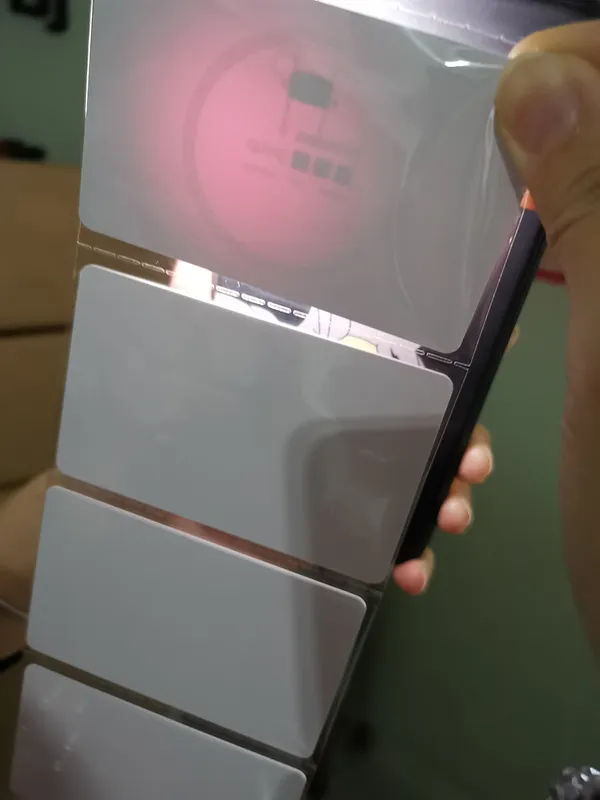
Blank RFID card specifications at a glance
| Item | Standard option | What to confirm |
| Size | ISO/IEC 7810 ID-1, 85.60 × 53.98 mm, rounded corners | Card holder or badge reel format, if not ID-1; non-standard sizes only if your printer supports them |
| Thickness | 0.76 mm nominal (ISO tolerance ±0.08 mm) | The thickness range your printer and encoder accept |
| Body | White graphics-quality PVC; PVC/PET composite for higher heat | Body material and composite construction, confirmed in the quotation |
| Surface | Smooth glossy finish on both sides, print-ready | Matte or other finishes only after a print test on your printer |
| Chip | 125 kHz LF, 13.56 MHz HF/NFC or UHF EPC Gen2 | Exact chip part, memory size and UID length |
| Chip state | Factory-delivery state, not encoded | Pre-encoding or a UID list, if required |
| Add-ons | On request: magnetic stripe, signature panel, slot punch, numbering | Availability and position relative to the antenna and chip, confirmed in the quotation |
| Samples and lead time | Free standard samples; standard products 2–3 weeks | Large-order schedules are confirmed individually |
Which card printers are blank RFID cards made for?
Desktop card issuance mainly uses two printing technologies, and each places different demands on the card. The chip and antenna sit inside the card, so the quality of the inlay lamination decides how flat the surface is over the chip area.
| Printer type | How it prints | What the blank card needs |
| Dye-sublimation, direct-to-card | The printhead presses a ribbon directly against the card and transfers dye into the surface | A flat, glossy graphics-quality PVC surface. A slight bump over the chip or antenna can leave pale spots or voids, so chip-area flatness matters most. |
| Retransfer (reverse transfer) | Prints the image onto a clear film, then fuses the film to the card with heat and pressure | More tolerant of minor unevenness and can print over the card edge, but the extra heat can bow pure PVC. A PVC/PET composite body resists warping. |
| Inkjet card printers | Sprays ink onto a coated surface | Standard glossy PVC does not hold the ink. Order an inkjet PVC ID card with an ink-receptive coating. |
| Printers with a contactless encoder | Prints and encodes the chip in one pass through a built-in encoder module | The encoder module must support the chip you order. Check the printer's encoder specification before you choose the chip. |
Printer compatibility is confirmed by a test print, not by a brand list: include your printer model and ribbon type in the inquiry and print the sample cards on that printer before a bulk order. Surface quality depends on the inlay and lamination of each construction, so a sample print on your own equipment is the reliable check.
Glossy, matte or composite: which surface?
- Glossy graphics-quality PVC: the default blank for dye-sublimation printing, smooth enough for photos, fine text and barcodes.
- Matte or satin finish: changes how dye and retransfer film bond to the surface. Order it only after a sample prints correctly on your printer.
- PVC/PET composite: the PET layer raises heat resistance, which helps cards stay flat through retransfer printing, lamination or overlay patches; check the sample in your own printer and handling.
- White body as standard: a coloured or pre-printed background, such as a logo or security pattern, is possible, but the card is then part-printed; see the comparison below.
Which chip should a blank RFID card have?
The card body is generic; the chip is not. Your readers, locks, software or printer encoder decide which chip the card needs, so start from the existing system rather than from the frequency. The common options by frequency are:
| Frequency | Chip | Memory and key feature | Typical use |
| 125 kHz LF | EM4200, the chip in our cards sold as EM4100 | Read-only ID (128-bit ROM, usually read in the 64-bit EM4100/EM4102 format); successor to EM4100/EM4102 | Proximity access, time and attendance |
| 125 kHz LF | T5577 (Microchip ATA5577C) | Rewritable, configurable data format, optional password | LF systems that need programmable cards or replacement credentials |
| 125 kHz LF | EM4305 (EM Microelectronic) | 512-bit rewritable EEPROM, 32-bit UID, password protection | LF access and membership with writable memory |
| 125 kHz LF | HITAG 2 | 256-bit EEPROM with password, crypto and read-only public modes | Access, vehicle identification and parking systems specified for HITAG 2 |
| 13.56 MHz HF | NXP MIFARE Classic EV1 1K or 4K | 1 KB or 4 KB in sectors protected by Key A and Key B | Installed access, hotel, campus and cashless systems |
| 13.56 MHz HF | MIFARE Ultralight EV1 or Ultralight C | Small memory (48 or 128 bytes on EV1); Ultralight C adds 3DES authentication | Tickets, visitor and limited-use passes |
| 13.56 MHz HF/NFC | NTAG213, NTAG215, NTAG216 (NFC cards) | 144, 504 or 888 bytes of user memory for NDEF records | Phone-readable cards, links and loyalty |
| 13.56 MHz HF | MIFARE DESFire EV2 or EV3 | Commonly 2, 4 or 8 KB; AES security; multiple applications | Secure access, campus and transit-style systems |
| 13.56 MHz HF | MIFARE Plus EV2 for new systems; the discontinued MIFARE Plus S only for installed systems that specify it (availability confirmed in the quotation) | Classic-compatible security level with a path to AES | Migrating MIFARE Classic systems |
| UHF 860–960 MHz | EPC Gen2 (ISO/IEC 18000-63) | EPC, TID and optional user memory, depending on the chip | Vehicle and long-range access, asset and staff tracking |
Frequency alone does not guarantee compatibility. Two 125 kHz cards can transmit different data formats, and a 13.56 MHz reader may not support every MIFARE command set. If you are not sure what your system uses, send the reader or lock model, or post a working card for identification. Where a system uses a proprietary credential format, order cards for systems that accept that format and confirm with your system provider before bulk issue.
Blank NFC cards for phone projects
For blank NFC cards that phones must read, choose an NTAG chip. NTAG213, NTAG215 and NTAG216 store standard NDEF records, such as a URL, contact card or text, which most current Android phones and iPhones can read when the record is correctly formatted. URL records open without an app on most phones; on iPhone, other record types such as text or a contact card may need an NFC reader app. MIFARE Classic is not supported by every phone's NFC hardware, so it is a poor choice for phone-first projects even though it works well with dedicated access readers.
What add-ons can blank RFID cards have?
Add-ons are available on request, and availability for your chip and card construction is confirmed in the quotation. Each add-on changes the surface your printer sees and the space available for the antenna, so decide them at inquiry stage. The inlay layout is then matched to the add-ons rather than cut through by them.
| Add-on | What it is | Check before ordering |
| Magnetic stripe, HiCo | High-coercivity stripe (typically 2750 Oe), hard to erase by accident | Track layout, and whether your printer has a magnetic encoder |
| Magnetic stripe, LoCo | Low-coercivity stripe (typically 300 Oe), easier to rewrite | Suited to short-life or low-use cards; confirm your encoder supports it |
| Signature panel | Writable panel, usually on the back | Position and size, so that it does not overlap areas you print |
| Slot punch | Pre-punched slot for a badge clip or lanyard | Vertical or horizontal slot; the position must clear the antenna and chip |
| Pre-printed numbering | Sequential number printed on the card (or laser-marked where the construction allows) | Number format, start number, position and colour |
| UID list | A list of each card's chip UID; on numbered cards, an Excel, CSV or XML file pairing each UID with the printed number | File format for unnumbered cards, byte order and decimal or hexadecimal notation |
| Pre-encoding | Application data or keys written before shipment | Data map and key handling; see the RFID encoding service |
How to test a blank RFID card before a bulk order
A short acceptance test on your own printer and reader prevents the two most common problems with blank cards: a chip the system does not accept, and a surface that does not print cleanly over the inlay.
- Confirm the chip requirement: get the chip model, UID length and data format from your reader or software supplier.
- Read the sample on the installed reader: check that it returns the UID or card number your system expects, at the normal presentation distance.
- Encode a test card: write your application data with your encoder or printer SDK, then read it back on the live system.
- Print a full-coverage test design: use solid colour and a photograph across the chip area on both sides, then inspect for voids, pale spots, ribbon wrinkles or colour shifts over the inlay.
- Check flatness after printing: lay printed cards on a flat surface. Heat from retransfer printing or lamination can reveal bowing that causes jams in hoppers and output stackers.
- Feed a stack through the hopper: watch for double feeds and static cling between cards.
- Test any add-ons you ordered: if the sample has a magnetic stripe, signature panel or slot punch, encode and read the stripe, write on the panel and fit clips to the slot.
- Record the approved sample: note the chip, body material, finish and add-ons so the bulk order is built to the same specification.
Packing and handling blank cards
Pack count, pack format and carton marking are confirmed in the quotation; tell us your printer's input hopper capacity if pack size matters. Keep cards sealed until use: dust, fingerprints and skin oils on a glossy surface cause print defects. Store cards flat, away from heat and direct sunlight, and let a cold shipment reach room temperature before printing to avoid condensation on the surface.
Blank, printed or inkjet: which card should you order?
Order blank cards when you print in-house on a dye-sublimation or retransfer printer and want full control over artwork, variable data and encoding. Order printed RFID cards when a fixed full-colour design is applied during card production, often combined with personalisation you add later. Order an inkjet PVC ID card when you print on an inkjet card printer. Many programmes combine them: a pre-printed background with a blank area left for your printer to add photos and names.
How to order blank RFID cards and samples
We match the chip you specify, drawn from our chip supply channels, with a card construction suited to your printer, and laminate and inspect every order in our factory in Shenzhen. Standard blank card samples are free; customised samples, for example with a pre-printed background, numbering or pre-encoding, carry a setup fee. Request samples through the sample pack page. Company background and certificates are on the company page.
Standard products generally have a lead time of 2–3 weeks, and large orders are scheduled individually. MOQ and prices are confirmed in the quotation, and freight is confirmed for your destination. We reply within one business day and send a quotation within one business day of a workable inquiry. Include:
- Chip model, or the reader, lock or printer encoder model if the chip is unknown
- Quantity and any planned repeat orders
- Body material (PVC or PVC/PET composite) and surface finish
- Printer model and ribbon type
- Add-ons, if any: magnetic stripe, signature panel, slot punch, numbering
- Chip state: blank, pre-encoded or with a UID list
- Delivery destination
Send the details through the inquiry form, by email or on WhatsApp.
Frequently asked questions
Can I combine a pre-printed background with in-house printing?
Yes. A logo, colour background or security pattern can be printed during card production, with a blank area left for your card printer to add photos, names and numbers. Print a sample on your own printer to check that the pre-printed surface and your ribbon work together, and confirm the setup fee for the customised sample in the quotation.
Can I print blank RFID cards on a dye-sublimation card printer?
Yes. The standard glossy PVC blank is made for dye-sublimation direct-to-card printing. Because the printhead touches the card, check the sample for pale spots over the chip area by printing a full-coverage design before you order in bulk.
Should I use PVC or PVC/PET composite blanks in a retransfer printer?
Retransfer printers fuse the image film to the card with heat, which can bow pure PVC cards. A PVC/PET composite body resists that heat better and is the safer choice for retransfer printing and lamination. Confirm with a sample print on your printer.
Which chip should I choose for blank NFC cards?
Choose NTAG213, NTAG215 or NTAG216 when phones must read the card. These chips store NDEF records such as URLs and contact details; URL records open without an app on most phones, while other record types may need an NFC app on iPhone. MIFARE Classic is not supported by every phone, so keep it for dedicated readers. See NFC cards.
Do blank RFID cards come encoded?
No. By default the chip is in its factory-delivery state: HF chips carry their fixed UID, read-only chips such as EM4200 carry their factory-programmed code for enrolment, and writable chips such as T5577, EM4305, MIFARE and NTAG are ready for you to encode on site. Pre-encoding and UID lists are available through our RFID encoding service. If you order pre-encoding, we re-read each card after writing it and include a data report in the shipment.
Can blank RFID cards have a magnetic stripe or a slot punch?
Magnetic stripes (HiCo or LoCo), signature panels, slot punches and pre-printed numbers can be requested. Availability and position are confirmed in the quotation, and the slot and stripe must be placed clear of the antenna and chip, so specify them at inquiry stage rather than punching cards afterwards.
What size and thickness are blank RFID cards?
Standard blanks follow ISO/IEC 7810 ID-1: 85.60 × 53.98 mm and 0.76 mm nominal thickness, the same format as a bank card. This is the size card printers, encoders and card holders are built for.
Are blank card samples free, and how long does a bulk order take?
Standard blank samples are free; customised samples carry a setup fee. Standard products generally have a lead time of 2–3 weeks, and large-order schedules are confirmed individually. MOQ and prices are confirmed in the quotation. Request samples from the sample pack page.
Buyer guides
- RFID OEM and White-Label: What to Ask For An RFID OEM and white-label guide for distributors: white-label vs OEM, artwork ownership, print-ready files, reorders and the clauses to ask for.
- How to Read an RFID Tag Quotation, Line by Line What decides RFID card and tag prices, and how to compare quotations line by line: unit-price basis, tooling, encoding, samples, freight and Incoterms.
- RFID RFP Template: Questions to Ask Every Supplier An RFID RFP template for distributors: the supplier questions that produce comparable quotes, and how to read the replies against one specification.
Ready to specify your order?
Send the product, quantity and application so we can confirm the options and pricing for your project.