RFID & NFC Labels
RFID Library Tags: HF & UHF Book Labels for Self-Checkout and Inventory
RFID library tags turn each book into a self-service item: a thin HF or UHF label inside the cover or on the spine that a self-checkout kiosk, a security gate or a shelf wand reads without opening the book. The catalogue record stays the same — the tag simply carries the book's identifier, so the loan, the return and the shelf count happen without handling each item by hand.
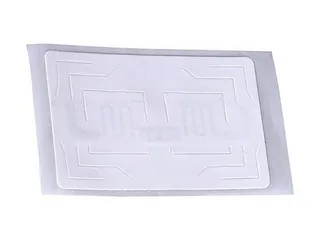
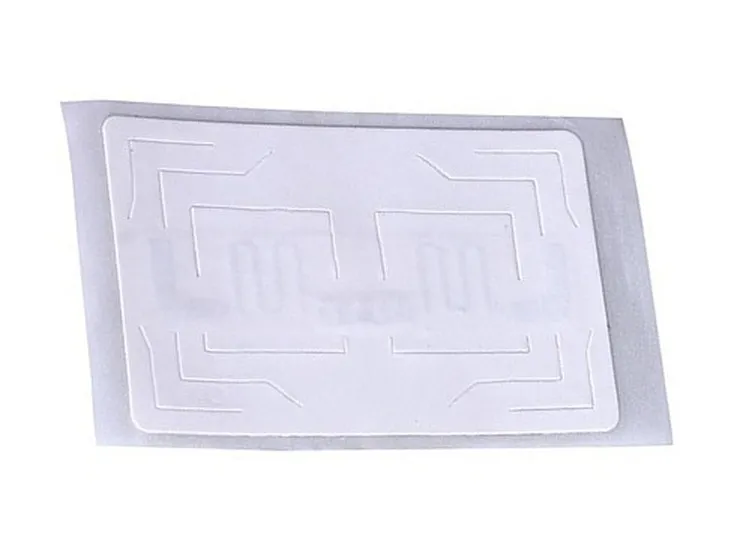
An RFID label for library books and media, in the HF 13.56 MHz ISO 15693 format libraries use most, with UHF available where bulk shelf inventory matters more than gate detection. The tag is a label, not a card: it sticks inside the front cover or on the spine and stays with the book for its life. Confirm the format, the chip and the placement against your library system and gate hardware, then test samples on your own shelves before ordering.
Free standard samples · Quotation within one business day
Product details
RFID library tags — in brief
An RFID library tag is a thin label with a chip and antenna that sticks inside a book's front cover or on its spine. It carries the book's identifier so a self-checkout kiosk can loan several books at once, a security gate can check that each item leaving is loaned, and a shelf wand can count a whole shelf without taking books down. HF 13.56 MHz to ISO 15693 is the format most libraries run; UHF is the alternative where fast bulk inventory counts matter most.
HF or UHF: which fits a library
HF at 13.56 MHz, standardised as ISO/IEC 15693, is the format libraries have standardised on for self-checkout and security gates. The kiosk and gate hardware in most library installations read this format, and the chips commonly used in library labels come from the ICODE SLIX family. If your library already runs self-checkout kiosks or gates, HF is the format they expect.
UHF, on the EPC Gen2 air interface standardised as ISO/IEC 18000-63, is the format to consider where the priority is counting a whole shelf or a whole collection quickly. A UHF wand can read many tags at once without handling each book, which suits stocktakes and shelf audits. Gate detection and multi-book checkout behave differently from HF, so a library that already has HF kiosks and gates should not switch formats for inventory alone.
| Format | HF 13.56 MHz (ISO/IEC 15693) | UHF (EPC Gen2, ISO/IEC 18000-63) |
| Typical use | Self-checkout and security gates | Bulk shelf inventory and stocktakes |
| Self-checkout | The format most kiosks read | Confirm your kiosk reads UHF before choosing it |
| Security gates | Standard library gate format | Gate behaviour differs from HF; confirm with the gate supplier |
| Shelf inventory | Reads book by book | Reads many tags at once for a fast count |
| Chip | ICODE SLIX family chips are commonly used in library labels | Confirm the offered chip, its memory and current availability |
Self-checkout and security gates
At a self-checkout kiosk, a borrower stacks several books and the kiosk loans them all in one read, without scanning each item or opening the covers. The tag sits inside the front cover or on the spine, where the kiosk can read it through the cover. The same tag is what the security gate at the exit checks: it reads the tags of the items being carried out and flags any item that has not been loaned, so the gate and the kiosk have to agree on the format and on how the loan status is written to the tag.
What to confirm before ordering: the kiosk and gate models and the library management system they connect to, the identifier scheme the chip should carry — usually the book's existing barcode number encoded on the tag — and the placement your hardware reads reliably. A sample trial on your own shelves, with your own kiosk and gate, settles the placement before a batch is ordered.
Shelf inventory with a wand
A shelf count with a wand is the other half of the value: instead of taking books off the shelf and scanning barcodes one by one, the operator walks the shelf with a handheld reader and the tags answer in bulk. UHF labels suit this best, because the wand reads many tags at once; the count then goes back into the catalogue as a shelf list, and missing or mis-shelved books show up as the exceptions. How fast and how complete the count is depends on the reader, the shelf material and how densely the books are packed, so trial the count on a real shelf first.
Inventory is also where the tag's other job shows up: the same label that serves the kiosk and the gate carries the item through its whole life in the library, from cataloguing to withdrawal. The UHF RFID labels page covers the label constructions, and the RFID inventory tracking solution describes how item-level reads fit a stocktake workflow. We supply the tags; the kiosk, gate and wand hardware come from your library system supplier.
Before you order
- Format and chip: HF 13.56 MHz to ISO/IEC 15693 or UHF EPC Gen2, with the exact chip and its memory, and confirmation that your kiosk, gates and library management system read that format.
- Items and placement: book and media types, tag position inside the front cover or on the spine, and the shelf material the tags will be read through.
- Identifier scheme: the number to encode on each tag — usually the book's existing barcode number — and how loan status is written, if your gates need it.
- Hardware on site: kiosk, security gate and wand reader models, so the sample trial uses the hardware the tags will actually meet.
- Quantity and samples: the size of the collection to tag, and a sample trial on your own shelves with your own hardware before ordering.
Ordering information
| Minimum order | Confirmed in the quotation |
| Samples | Free standard samples; setup fee applies to customized samples |
| Lead time | 2–3 weeks standard production |
| Pricing | Confirmed in the quotation |
| Quotation | Within 1 business day |
Plan the application
Frequently asked questions
HF or UHF — how do I choose for a library?
Choose the format your installed hardware reads. HF 13.56 MHz to ISO/IEC 15693 is the format most library self-checkout kiosks and security gates use, so a library with that hardware buys HF. UHF suits bulk shelf inventory and stocktakes, where reading many tags at once matters most. If your kiosks and gates are HF, do not switch formats for inventory alone.
Where does the tag go on the book?
Inside the front cover or on the spine, where the kiosk, the gate and the shelf wand can read it without the book being opened. The exact position depends on the book and on your hardware, so confirm the placement on samples with your own kiosk and gate before ordering the batch.
Can old books be tagged?
Yes. Tagging an existing collection is a retrospective conversion: each book is tagged as it passes through cataloguing or a conversion station, and its identifier is written to the tag and matched to the catalogue record. Plan the conversion as a project — the number of items, the staffing and the time per book — and trial the workflow on a small shelf first.
How does shelf inventory work?
The operator walks the shelf with a handheld reader and the tags answer in bulk, without taking books down or scanning barcodes one by one. UHF labels suit this best because the wand reads many tags at once. The count goes back into the catalogue as a shelf list, and missing or mis-shelved books show up as exceptions. Trial the count on a real shelf: speed and completeness depend on the reader, the shelf material and how densely the books are packed.
Can the R901 wand read library tags?
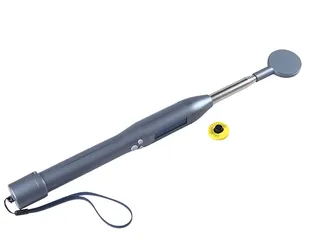
No. The R901 Bluetooth RFID scanner is a 134 kHz low-frequency reader for FDX-B animal ear tags to ISO 11784/11785; it does not read 13.56 MHz HF or UHF library tags, because those are different frequencies and protocols. Library shelf inventory needs a wand reader built for your tag format — HF or UHF — so tell us the format and we will point you to the right reader.
How many tags do I need per book?
One tag per book or media item: the tag carries that item's identifier for its whole life in the library. The total follows the size of the collection you are tagging, plus a small allowance for conversion losses and replacements. Tell us the collection size and we will quote against it.
What do I send for a quotation?
Send the format your system reads (HF 13.56 MHz ISO 15693 or UHF), the chip if you have a preference, the item types and placement, the identifier scheme to encode, and the quantity. The RFID encoding service explains how the identifier is written to each tag. Pricing is confirmed in the quotation, standard lead time is 2–3 weeks, and free standard samples are available for a trial on your own shelves.
Buyer guides
- How to Read an RFID Tag Quotation, Line by Line What decides RFID card and tag prices, and how to compare quotations line by line: unit-price basis, tooling, encoding, samples, freight and Incoterms.
- RFID RFP Template: Questions to Ask Every Supplier An RFID RFP template for distributors: the supplier questions that produce comparable quotes, and how to read the replies against one specification.
- RFID MOQ, Explained: How Minimums Form and How to Discuss Them How RFID MOQ forms from chip lots, inlay rolls, print sheets and setup — and how buyers can discuss a smaller pilot or first order honestly.
Ready to specify your order?
Send the product, quantity and application so we can confirm the options and pricing for your project.