
NFC Technology
How to Program NFC Tags and Stickers
Quick answer
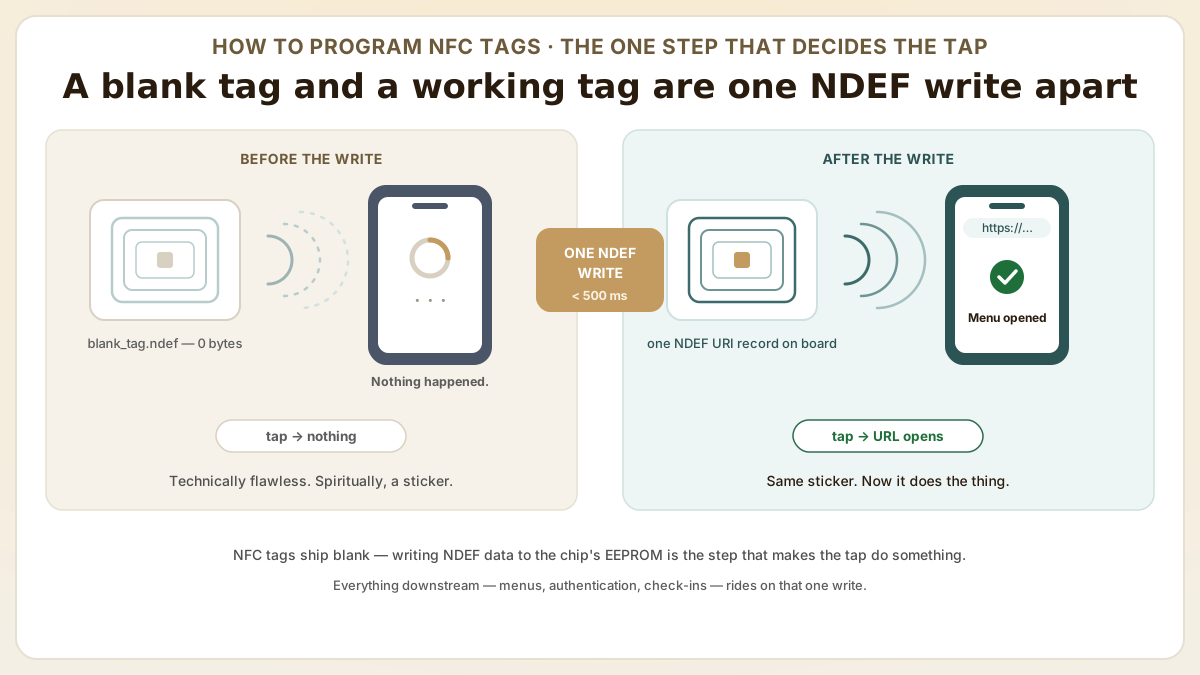
NFC tags are programmed by writing NDEF-formatted data to the chip's EEPROM with an NFC reader/writer — one write, confirmed in under 500 milliseconds. That single step decides whether a tap does something or nothing at all. A field guide for ops and IT teams: tool selection by volume, URL records step by step, batch encoding at 200-400 tags per hour, and the write-protection decision that has no undo.
- NFC tags ship blank. Writing an NDEF record is the one step that decides whether a tap does something magical or absolutely nothing — and a successful write confirms in under 500 milliseconds.
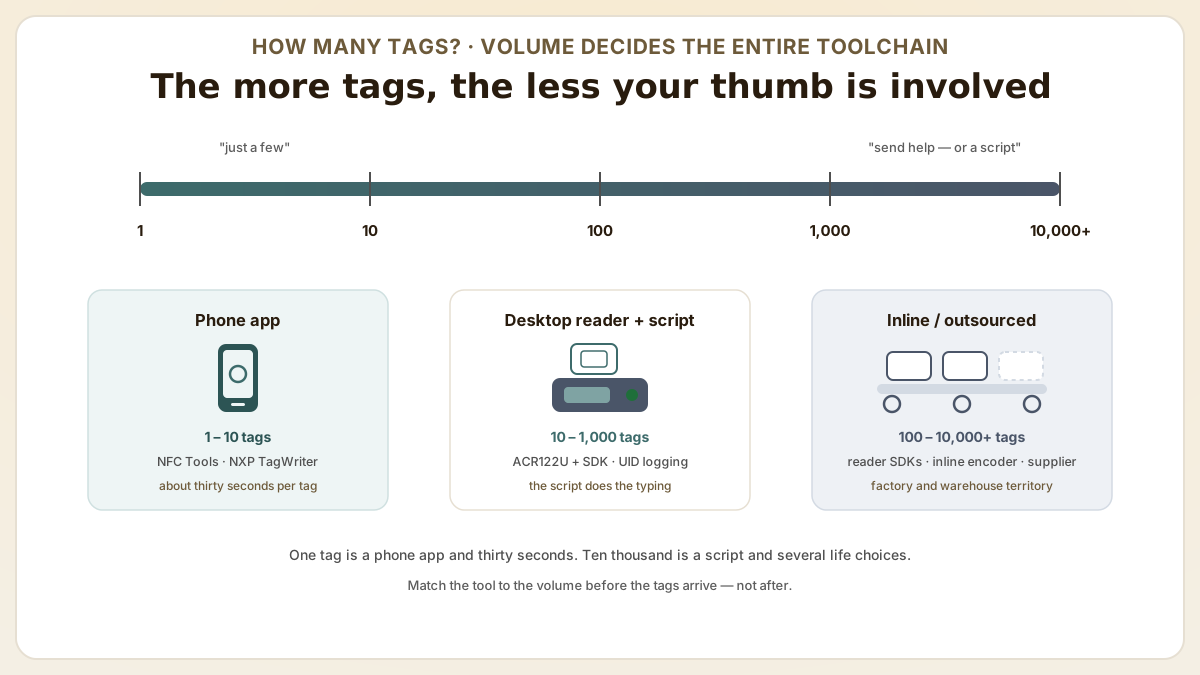
- Volume is destiny: a phone app like NFC Tools handles 1-10 tags, an ACR122U desktop reader with a script sustains 200-400 tags per hour, and past 1,000 tags per day you want an inline encoder or your supplier.
- Locking stops tampering but freezes the URL forever. Password protection (32-bit, NTAG21x) keeps tags updatable — permanent OTP lock bits do not, and 'forever' is a long time to regret a typo.
At a glance
Use these short answers to decide whether this page matches the project before moving into the detail.
Key takeaway
NFC tags ship blank. Writing an NDEF record is the one step that decides whether a tap does something magical or absolutely nothing — and a successful write confirms in under 500 milliseconds.
How do you handle tools for NFC tag programming?
NFC tags are programmed by writing NDEF-formatted data to the tag's EEPROM memory using an NFC reader/writer — and the right tool depends entirely on how many tags stand...
Next step
Ready to move forward? Start your inquiry to get specific answers for this project.
Get programming supportHow do you handle tools for NFC tag programming?
NFC tags are programmed by writing NDEF-formatted data to the tag's EEPROM memory using an NFC reader/writer — and the right tool depends entirely on how many tags stand between you and freedom. An unprogrammed tag is the saddest object in the supply closet: you tap it, full of hope, and nothing happens. No web page, no animation, not so much as a courtesy buzz. It just sits there being a sticker, which is technically all it was ever contractually obligated to be. Everything that later makes it feel like magic — the tap that opens a menu, authenticates a handbag, or checks someone into a conference — happens in exactly one short write step, the step almost everyone forgets to plan for. One tag is a phone app and thirty seconds; ten thousand tags is a desktop reader, a Python script, and a quiet reevaluation of several life choices. Everything else lives on the spectrum between those two moods.
| Tool | Platform | Volume | Features | Best for |
|---|---|---|---|---|
| NFC TagWriter (NXP) | Android | 1 – 10 tags | GUI-based, URL/vCard/text templates | Quick single-tag programming |
| NFC Tools | Android / iOS | 1 – 10 tags | Read/write/copy, multiple record types | Cross-platform single-tag use |
| ACR122U + NFC SDK | Windows / Mac / Linux | 10 – 1,000 tags | Scriptable batch encoding, UID logging | Production-volume programming |
| NFC reader with SDKs | Windows / Mac / Linux | 100 – 10,000 tags | High-speed encoding, API integration | Factory and warehouse operations |
| Web NFC API | Chrome on Android | 1 – 50 tags | Browser-based, no app install | Field programming and demos |
How do you program a URL record step by step?
Writing a URL record that opens a web page when tapped is the most common NFC programming task by an enormous margin. Here is the ceremony using a desktop ACR122U reader — the workflow applies to any reader with NDEF writing capability; the ACR122U is simply the one everybody already owns and keeps in a drawer.
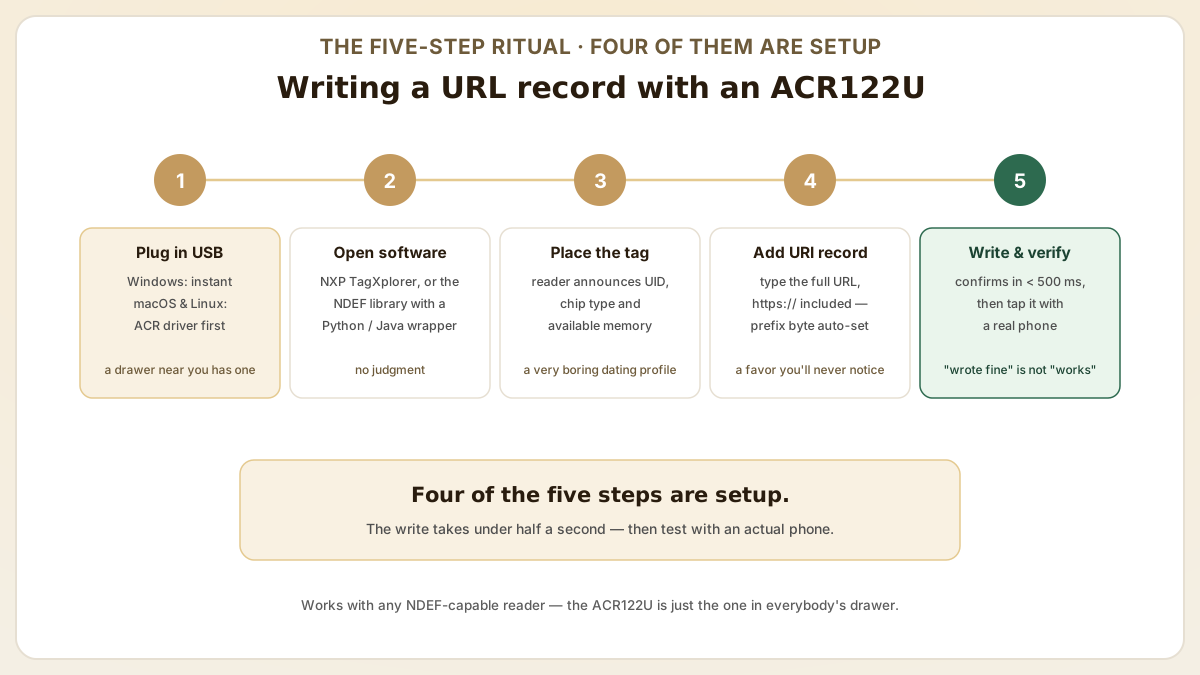
- Step 1 — Connect the ACR122U reader to your computer via USB. Windows usually recognizes it instantly, a rare and touching display of Windows recognizing anything instantly; macOS and Linux want the ACR driver package installed first.
- Step 2 — Open your NFC writing software. NXP's TagXplorer works well, or the open-source NDEF library with a Python/Java wrapper if you are the kind of person who enjoys that. No judgment; some of our best engineers are.
- Step 3 — Place the NFC tag on the reader. The software should detect it and announce its UID, chip type and available memory — essentially a very small, very boring dating profile.
- Step 4 — Create a new NDEF URI record and enter the full URL, https:// prefix and all. The software automatically selects the URI prefix byte to optimize memory usage, doing you a favor you will never notice or thank it for.
- Step 5 — Write the record to the tag. A successful write is confirmed in under 500 milliseconds — faster than you can feel smug about it. Then test with an actual smartphone, because 'it wrote fine' and 'it works' are two very different sentences.
How do batch encoding workflows work?
Batch workflows automate encoding with a scripted desktop-reader session, because programming tags one at a time is fine for ten and a hostage situation for ten thousand. The script does the boring part; the human keeps the one job humans are still better than scripts at: physically moving small objects.
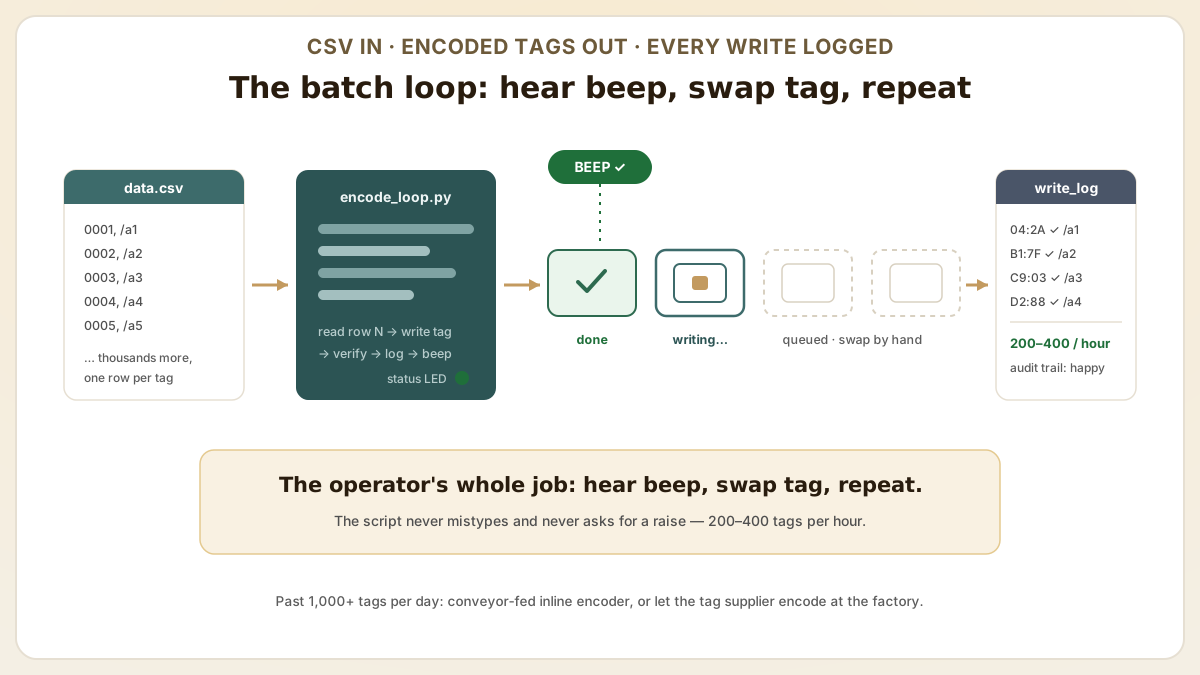
The pattern is always the same. A script loops through a data source — CSV file, database query or API response — writes a unique URL to each tag, logs the tag's UID alongside the URL it just wrote, and beeps. The operator's entire role collapses to 'hear beep, swap tag, repeat', a job a reasonably motivated golden retriever could nearly do.
- Step 1Feed it a CSV with columns for tag sequence number, URL and any variable data. The script reads row N, writes to the current tag, increments N and waits for the next one. Tireless; never asks for a raise.
- Step 2Log every write operation with timestamp, UID and write status. Future-you, debugging a field failure at 11 p.m., will want to send present-you a fruit basket for this audit trail.
- Step 3Set up audio or visual feedback (beep or LED) on successful write so the operator knows when to swap tags without babysitting the screen.
- Step 4Typical throughput with a trained operator is 200-400 tags per hour using a single desktop reader. Coffee not included but strongly implied.
- Step 5For higher volumes (1,000+ tags per day), escalate to a conveyor-fed inline encoder — or outsource encoding to the tag supplier and reclaim your entire weekend.
What write protection and security options exist?
After programming, you face a genuinely consequential decision: lock the tag against future writes, or leave it open. Lock it and it is tamper-resistant but frozen; leave it and anyone with an NFC phone can overwrite your carefully crafted URL with something regrettable. There is no universally correct answer — only a correct answer for your use case, which sounds like a cop-out and isn't.
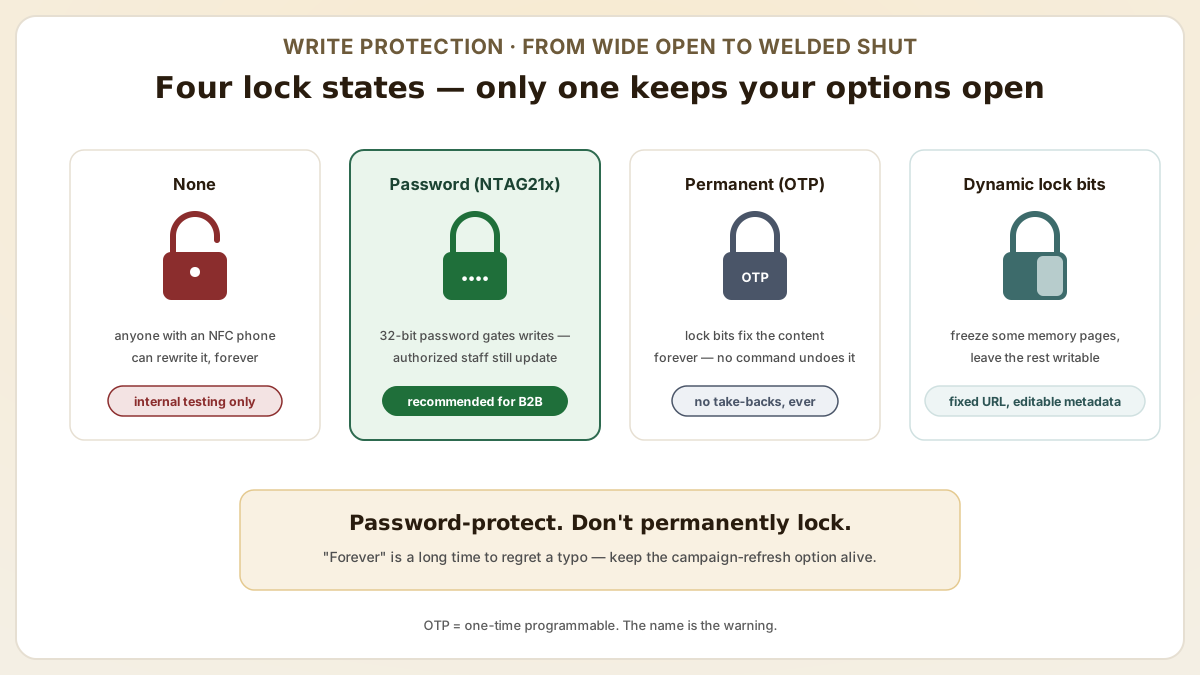
- No protection: the tag remains fully writable by anyone, forever. Fine for internal testing and personal tags; terrible for anything a stranger can physically reach.
- Password protection (NTAG21x): set a 32-bit password that must be presented before writes are accepted. Authorized personnel can still update the tag; casual vandals cannot. The Goldilocks option.
- Permanent lock (OTP bits): the NTAG21x lock bits can be set to permanently prevent writes to specific memory pages. This is irreversible — the content is fixed forever, as in heat-death-of-the-universe forever. There is no command to undo it, because there is no undo.
- Dynamic lock bits: allow selective locking of individual memory pages while leaving others writable. Useful for tags that need a fixed URL but updatable metadata.
- Recommendation for most B2B deployments: use password protection rather than a permanent lock. It prevents casual tampering while preserving the ability to update content for campaign changes or URL migrations — a luxury permanent locks explicitly, cheerfully, irreversibly do not offer.
What are common programming errors and how do you avoid them?
Programming errors during batch encoding are costly precisely because they hide: everything looks fine on the bench, and the mistakes surface only after the tags are deployed in the field — a genuinely memorable way to start a Friday. These are the most frequent offenders and their preventions.
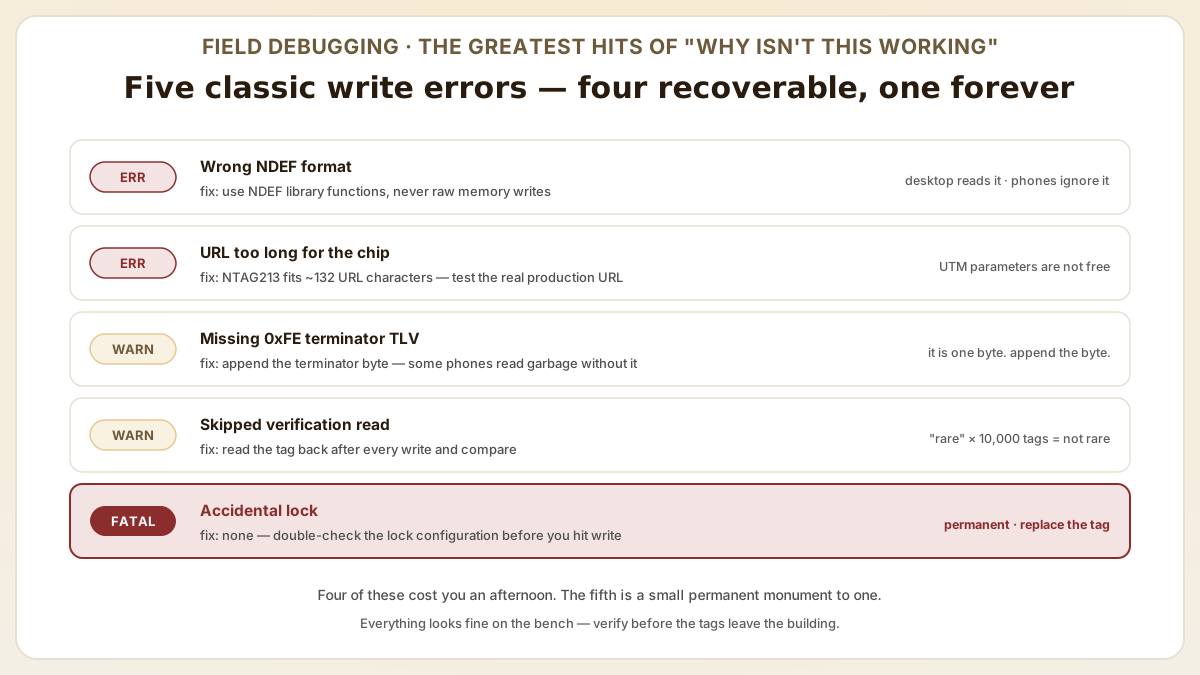
- Wrong NDEF format: writing raw bytes instead of formatted NDEF messages produces tags that desktop readers parse happily while every smartphone politely ignores them. Always use NDEF library functions, not raw memory writes.
- URL too long for chip memory: NTAG213 holds ~132 URL characters; your marketing team's URL with its full complement of UTM parameters may not fit. Test the complete production URL, not a shortened demo version.
- Missing NDEF terminator TLV: some low-level writing tools do not append the terminator (0xFE) after the last NDEF record, and without it some phones read corrupted data. It is one byte. Append the byte.
- Skipped verification read: always read back the tag after writing to confirm the data was stored correctly. Memory errors during write are rare — and 'rare' stops being comforting around the ten-thousandth tag.
- Accidental lock: setting lock bits when you meant to set a password — the one error on this list with no undo button, no Ctrl-Z and no support ticket that ends in good news. Double-check the lock configuration before writing; a permanent lock cannot be reversed, and the tag can only be replaced.
How is NTAG 424 DNA SUN provisioning different from plain NDEF programming?
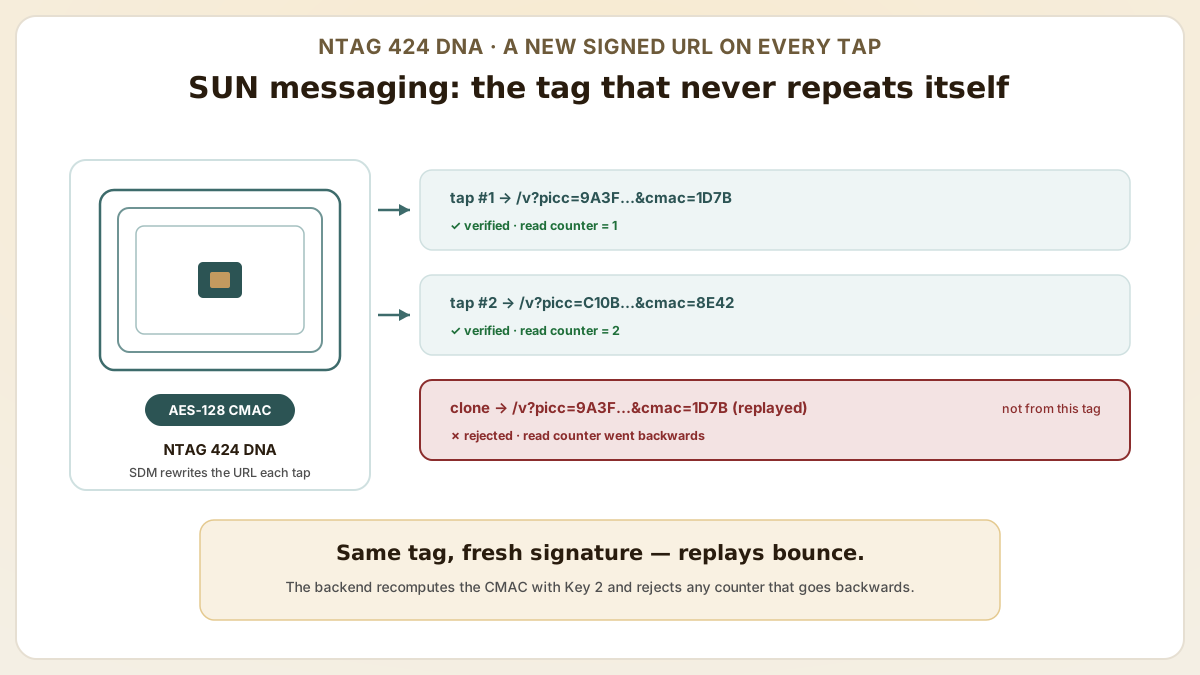
Plain NTAG21x programming writes a static NDEF record — the tag says the same thing on every tap, like a parrot with one line. NTAG 424 DNA's Secure Unique NFC (SUN) message changes the URL on every tap and signs it with an AES-128 CMAC: here's a link, cryptographically notarized, that expires the instant you use it. Provisioning therefore involves keys, counters and a verification backend. Skipping these steps in pilot leaves brands shipping 'authentic' chips that any cloned UID will satisfy — which rather defeats the purpose of buying the expensive chip.
- Five AES-128 application keys per chip: Key 0 (Master/Origin), Key 1 (App), Key 2 (Read), Key 3 (Write), Key 4 (Change). Most production deployments only program Keys 0 + 2; the rest stay at default unless your application demands tiered access. Each is 16 bytes of 'do not lose this'.
- Secure Dynamic Messaging (SDM): the on-chip feature that injects the rotating PICC data + CMAC into the URL on each tap. SDM enables confidentiality + integrity without a preceding mutual-authentication round trip — that's why a smartphone can verify with one tap, no app. It is a magic trick, and like all magic tricks it is just math you can't see.
- Two provisioning paths: (1) NXP Trust Provisioning Service — chip-individual AES keys derived from Master keys in FIPS 140-2 Level 3 HSMs at NXP's secure factory, delivered as encrypted key files; (2) post-issuance encoding — you receive default-key chips and program your own keys via a Change Key command. Trust Provisioning is preferred for high-volume luxury / DPP programs; post-issuance is fine for medium-volume marketing.
- URL template at encoding time: pre-set the SDM URL template (`https://brand.com/v?picc={picc_data}&cmac={cmac}`), the SDM read counter file, and tamper status file (for NTAG 424 DNA TT). These three settings are what the chip dynamically populates on each tap — get the template wrong and your verification backend has literally nothing to validate.
- Backend verification stack: your authentication endpoint must store the per-chip Key 2 (AES-128), recompute the CMAC over the PICC data, compare to the chip's signature, and reject taps where the read counter goes backwards (replay attack). Open-source SDKs from sweetTango (Python), Klingele (Node) and the NXP TapLinx SDK (Java) are the common starting points.
Useful next pages
Use these linked product, guide and comparison pages to keep the next click specific and practical.
NFC tags for programming
Blank NFC stickers and cards ready for custom NDEF programming.
NFC readers and development tools
Desktop NFC readers with SDK support for batch programming workflows.
FAQ
Can I program NFC tags with an iPhone?
Yes, since iOS 13 (2019) — the year iPhones grudgingly agreed to write tags, not just read them. You need a third-party app that uses Apple's Core NFC writing APIs, such as NFC Tools or NFC TagWriter. iPhone NFC writing is slower and supports fewer tag types than Android, so for batch jobs use a desktop reader and spare yourself the character development.
How many times can I rewrite an NFC tag?
NTAG21x chips are rated for 100,000 write cycles. Reprogram a tag every single day and it would still last over 270 years — it will outlive you, your company, and quite possibly the URL scheme. Write endurance is not a practical concern for any real-world application.
What happens if I write-lock a tag and need to change the URL later?
With permanent lock bits (OTP), the tag cannot be rewritten — it is now a very small, very expensive paperweight and must be physically replaced. With password protection, you unlock with the password and rewrite. This is the entire reason password protection is recommended over permanent locking for most applications.
Can I program different data on each tag in a batch?
Yes — that is the whole point of batch encoding. Scripts read unique data (URLs, serial numbers, vCard details) from a CSV or database and write different content to each tag. The ACR122U SDK and most NFC reader SDKs support this workflow natively through their programming APIs.
How do I verify that a tag was programmed correctly?
Perform a read-back verification immediately after writing by reading the tag's NDEF content and comparing it byte-for-byte against the intended data. Then test a sample of tags with an actual smartphone, because the ultimate spec is 'does it do the thing when a human taps it', not 'did the script return exit code 0'.
Should we order pre-programmed tags or program them in-house?
Pre-programmed tags are best when volume exceeds ~10K units; in-house is best for low volume and frequent URL changes. Specifically, pre-programmed (vendor-encoded) tags are best when (1) volume exceeds ~10K units and you can lock the URL template, (2) you need NTAG 424 DNA with chip-individual keys derived from NXP Trust Provisioning Service in FIPS 140-2 Level 3 HSMs (the only path with cryptographic guarantees you didn't manufacture yourself), or (3) you require GS1 Digital Link encoding and EPCIS event registration that the vendor handles end-to-end. In-house programming is best for (1) low volume and frequent URL changes, (2) variable per-tag data your vendor doesn't have, or (3) confidential payloads. Many brands run a hybrid: keys + base URL provisioned by vendor, per-unit serial appended in-house at the labeling step.
What's the realistic encoding throughput at production scale?
A trained operator with a single ACR122U or Identiv reader sustains 200-400 tags per hour for desktop NDEF writes. NTAG 424 DNA SUN provisioning (with key change, SDM template setup and verification read-back) drops to 100-250 tags per hour because each chip needs more round-trips. For volumes >1000 tags per day, switch to (1) inline encoders integrated into a label printer like Zebra ZD621R or SATO CT4-LX-RFID at 800-2,000 tags/hour, (2) a multi-head desktop encoder array, or (3) factory-side vendor encoding. Industrial inline encoders amortise the capex over 50K-200K tags/year before they beat outsourcing.
Proud Tek is a Shenzhen-based RFID & NFC manufacturer supplying hotel chains, transit operators, event venues and retail brands worldwide. Every order includes free samples, RF testing and dedicated project support.
Get a Quick Quote
Tell us about your project and we'll respond within one business day. Fields marked (asterisk) are required.