
Access Control
Access Card Copied? How to Upgrade Security
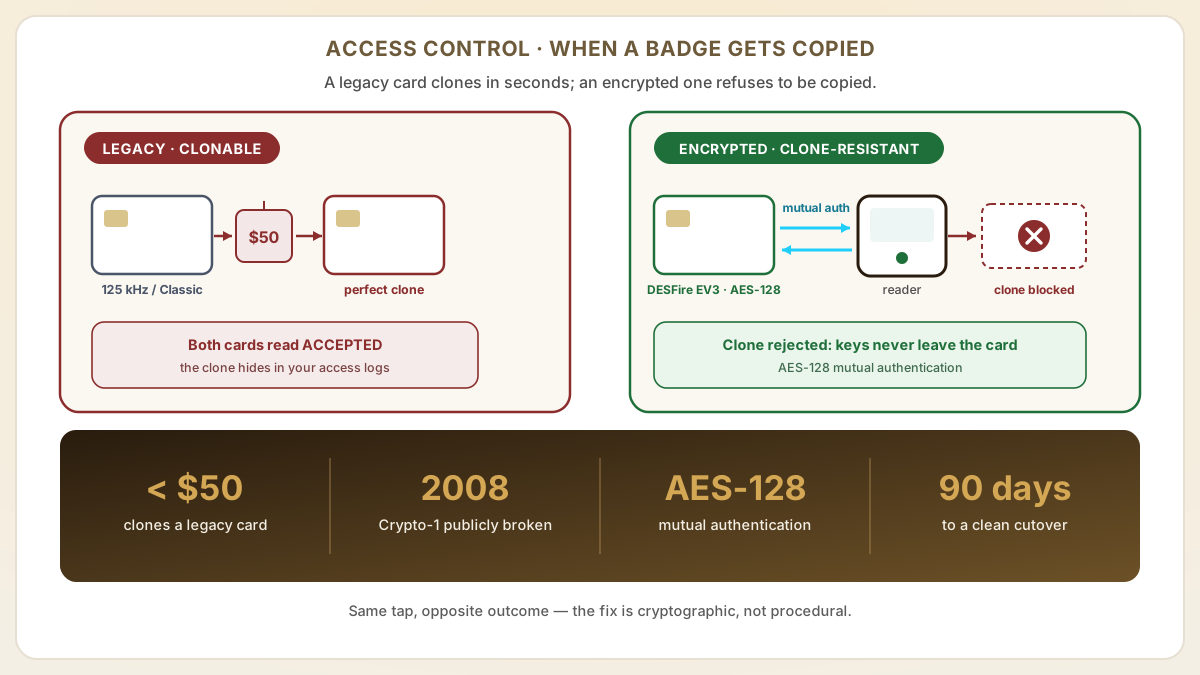
Quick answer
An access card can be cloned in seconds with a device costing less than $50, and the copy reads exactly like the original, hiding in your access logs. Here is how to respond in the first hours, and how to upgrade to AES-128 encrypted cards so it cannot happen twice.
- 125 kHz proximity cards and MIFARE Classic cards can be cloned in seconds using devices costing less than $50, making them a significant liability for building security.
- Immediate response after a suspected cloning breach: audit access logs, revoke compromised credentials, and implement temporary access controls while planning a technology upgrade.
- Long-term fix: migrate to AES-128 encrypted cards (MIFARE DESFire EV3 or HID SEOS) that use cryptographic mutual authentication, making card cloning computationally infeasible.
At a glance
Use these short answers to decide whether this page matches the project before moving into the detail.
Key takeaway
125 kHz proximity cards and MIFARE Classic cards can be cloned in seconds using devices costing less than $50, making them a significant liability for building security.
How to respond to a suspected card cloning incident
The first sign is rarely dramatic. It is usually a single line in an access log that has no business being there — the same badge opening the lobby and a restricted floo...
Next step
Ready to move forward? Start your inquiry to get specific answers for this project.
Order encrypted access cardsHow to respond to a suspected card cloning incident
The first sign is rarely dramatic. It is usually a single line in an access log that has no business being there — the same badge opening the lobby and a restricted floor moments apart, or a credential belonging to someone who left the company months ago. A card has been copied, and the duplicate works exactly as well as the original. The unsettling part is not that it happened; it is how little it took, because cloning a legacy credential is less a heist than a photocopy. What matters now is doing things in order: contain the exposure first, reconstruct what happened second, and only then fix the technology that made copying so trivial — and the first hours decide how much of that you get to control.
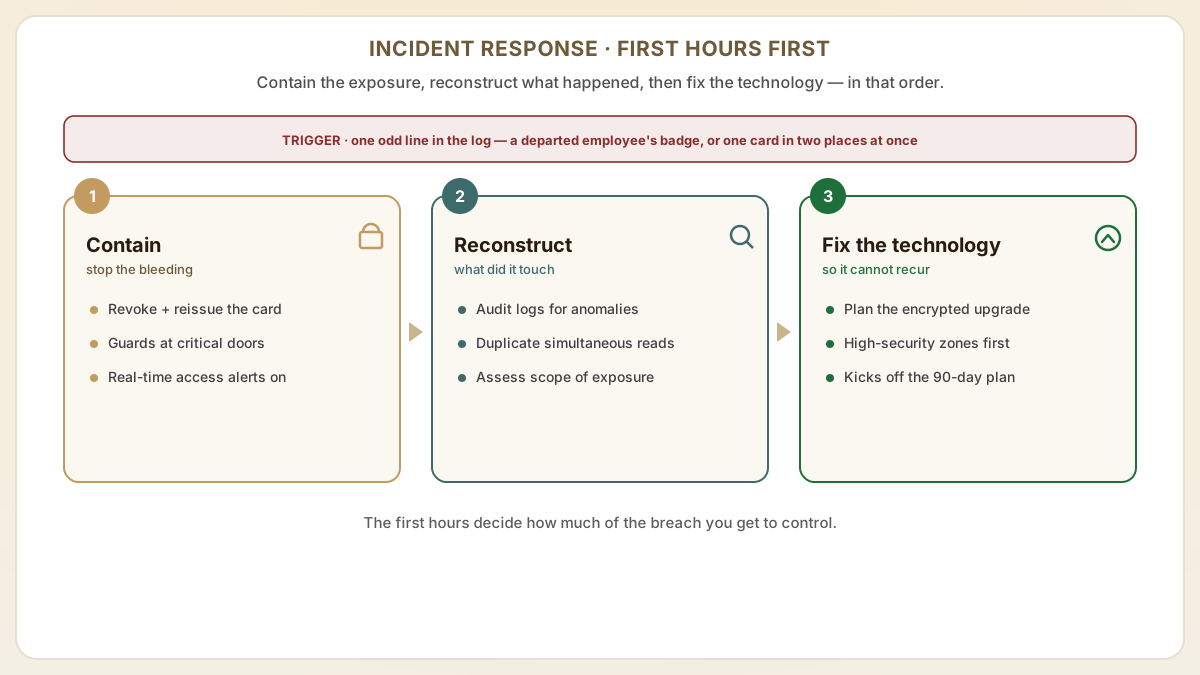
- Audit access logs immediately. Review all entry records for the affected access points looking for anomalies: entries at unusual hours, entries by credentials that should not have been present, duplicate simultaneous reads of the same card at different locations, or entries by former employees whose cards should be deactivated.
- Revoke and reissue affected credentials. Deactivate the suspected cloned card number in your access control software and issue a new credential on a fresh card. If you cannot determine which specific cards were cloned, consider a mass reissuance for high-security zones.
- Increase monitoring temporarily: station security personnel at critical access points and enable real-time alerting for unusual access patterns while the vulnerability is being remediated through a technology upgrade.
- Assess scope of exposure. Determine which areas the cloned card could access, what assets or information may have been compromised, and whether the incident requires reporting under your organization's security policies or regulatory obligations.
Why your cards were vulnerable to cloning
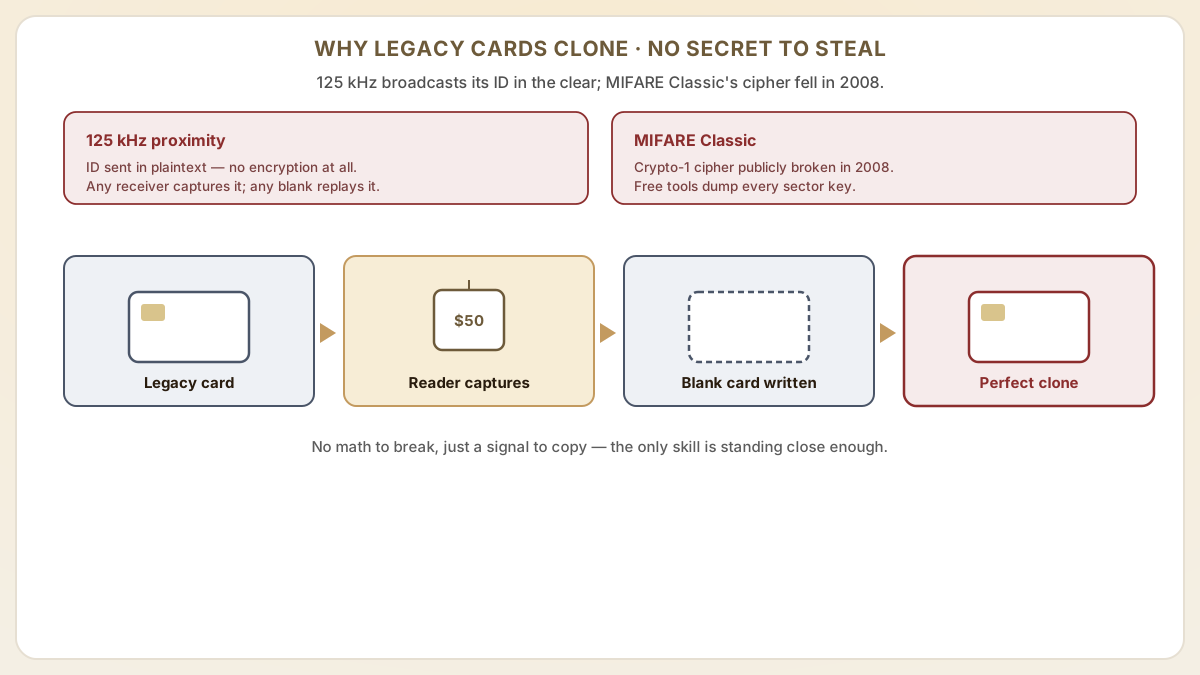
- 125 kHz proximity cards (EM4100, HID Prox) broadcast their ID number in plaintext with zero encryption. Any device that can receive the 125 kHz signal can capture the full credential, and any compatible blank card can be programmed with that same ID.
- MIFARE Classic 1K/4K uses Crypto-1 encryption that was publicly broken in 2008. Free software tools can extract sector keys and dump entire card contents, creating perfect clones.
- These technologies were designed in the 1990s and early 2000s before card cloning tools were widely available. They remain in widespread use because upgrading access control systems requires planning and investment, but the security risk they pose is now well documented.
- The proliferation of compact, affordable cloning devices means the barrier to entry for card duplication is essentially zero. This is not a sophisticated attack requiring expertise; the only genuine skill involved is getting close enough to a badge without anyone wondering why.
How do you upgrade to clone-resistant access cards?
- MIFARE DESFire EV3 — the recommended upgrade for most commercial and corporate access control systems. AES-128 encryption, mutual authentication, and anti-replay protection make cloning computationally infeasible with current technology.
- Phased migration approach: start by upgrading readers and cards for high-security zones (server rooms, executive floors, cash handling areas) first, then expand to general access points over a planned timeline.
- Multi-technology readers: during the transition, deploy readers that accept both legacy cards and new encrypted cards. This allows gradual card replacement without disrupting building access for all users simultaneously.
- Proud Tek supplies MIFARE DESFire EV3 cards with custom printing and pre-encoding at competitive pricing, enabling organizations to execute a security upgrade without excessive card procurement costs.
Which clone-resistant credential family fits which building
Not every facility has the same threat model, budget, or installed reader base. Choosing the right successor to your cloned cards is less about picking the most expensive credential and more about matching encryption strength, vendor lock-in tolerance, and migration cost to the building you actually operate. Use the families below as a 2026 short-list when scoping a real upgrade with your integrator.
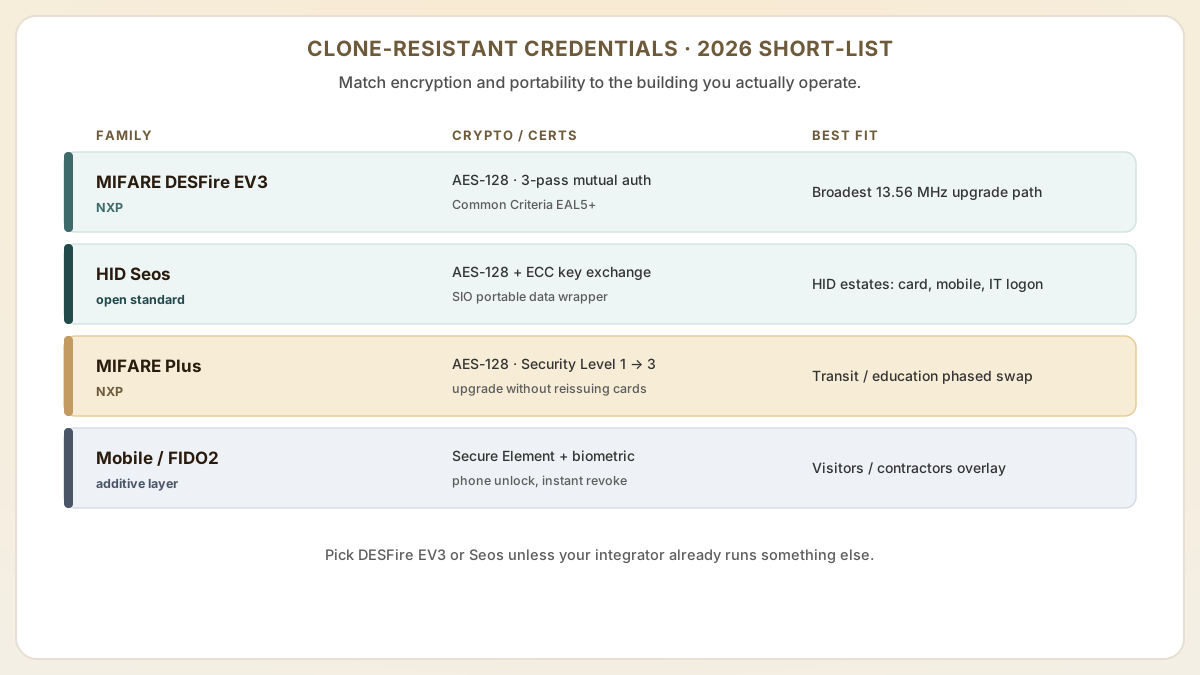
- MIFARE DESFire EV3 (NXP) — the broadest-compatibility 13.56 MHz upgrade. AES-128 encryption, mutual three-pass authentication, optional Transaction MAC, and Common Criteria EAL5+ certification on the 4K SKU. EV3 is functionally backward compatible with EV2/EV1 readers per NXP application note AN12752, so most multi-vendor sites can swap cards before swapping readers. The DESFire EV3C variant maps a Classic 1K layout into a DESFire file, which lets a building keep partial Classic compatibility during a long phased rollout.
- HID Seos — the strongest mainstream commercial credential. Uses open-standard AES-128 plus Diffie-Hellman ECC key exchange and HID's Secure Identity Object (SIO) data wrapper, so the credential is portable across cards, fobs, smartphones (HID Mobile Access), and wearables. Best fit when you already run HID multiCLASS SE / Signo readers and want one credential type for badges, mobile, and IT logon. iCLASS SE is the older sibling — still secure, but uses HID's proprietary key system rather than open AES, which limits future portability.
- MIFARE Plus — a less-common middle path used by transit and education sites that need Classic 1K/4K backward compatibility on day one. Operates in Security Level 1 (Classic-compatible) and can be migrated upward to Security Level 3 (full AES-128) without reissuing the cards, which is useful when budgets force a multi-year reader swap.
- LEGIC advant / NXP UCODE DNA / Inside Secure Vaultic — niche options for European OEM lock platforms, brand-protection programs, and converged physical/logical environments. Specify these only when your integrator already supports them; otherwise stick with DESFire EV3 or Seos to avoid orphaned credentials.
- Mobile credentials and FIDO2 / passkey overlays — Apple Wallet keys, Google Wallet keys, HID Mobile Access, and Wavelynx Ethos all add a second cryptographic layer (Secure Element + biometric unlock on the phone) on top of the underlying AES card system. Treat them as an additive control rather than a replacement, especially for visitor and contractor populations that change frequently.
Building a 90-day post-breach remediation plan
After a confirmed or strongly suspected cloning incident, the worst outcome is a slow, partial response that leaves the original vulnerability live for months. The 90-day plan below borrows from common physical-security incident-response playbooks and is tuned for buildings still running 125 kHz Prox or MIFARE Classic. Adjust durations to your scale, but keep the sequencing — readers and credentials must be swapped together inside each protected zone, not piecemeal across the whole building.
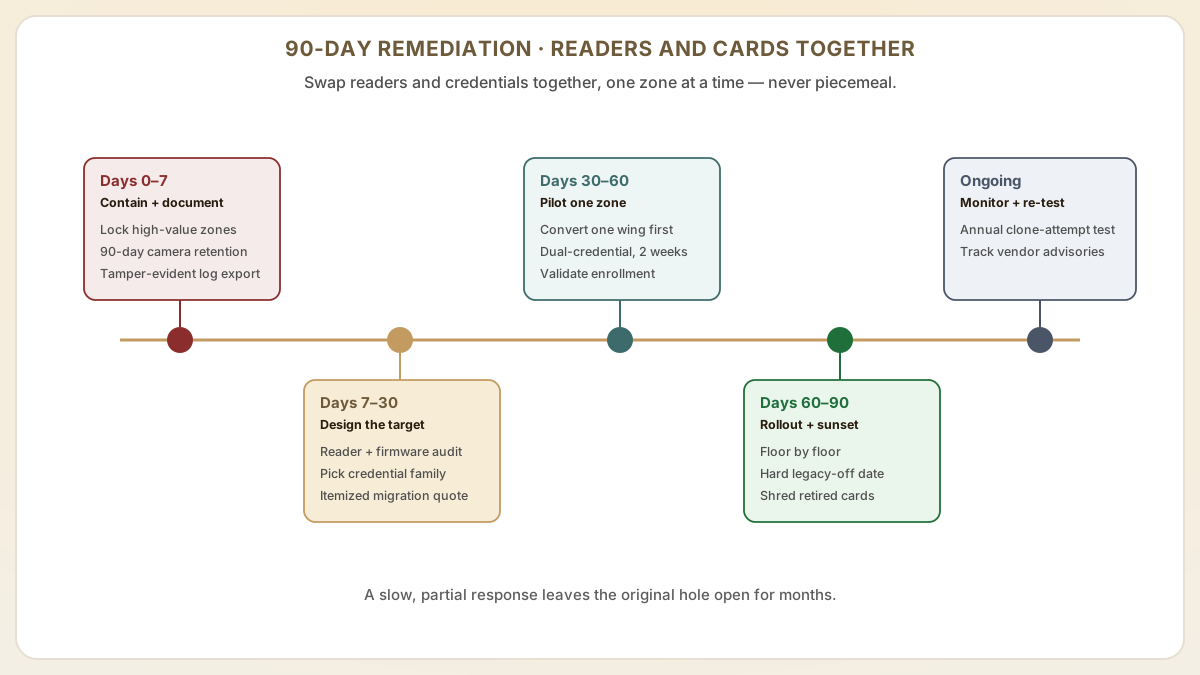
- Days 0-7 — contain and document. Lock down high-value zones to a smaller approved-card list, escalate camera retention to 90+ days for the affected doors, and capture every cloned-card hit in the access log to a tamper-evident export. This evidence becomes the basis for any later insurance claim or law-enforcement report and is far harder to assemble retroactively.
- Days 7-30 — design the target architecture. Run a reader inventory (model, firmware, supported card families, OSDP vs Wiegand), pick the credential family from the previous section, and request a written migration quote from your integrator broken into hardware, encoding, and labor lines. Decide now whether the Wiegand backhaul will be replaced with OSDP v2 Secure Channel, because Wiegand is itself sniffable and will undermine even an AES card.
- Days 30-60 — pilot in one zone. Convert a single floor or building wing first: replace readers, encode and issue new DESFire EV3 or Seos cards to that population, and run dual-credential mode (legacy + new) for two weeks while you validate enrollment, mobile credential provisioning, and any panel firmware updates. Pilots routinely surface encoder-driver mismatches and OSDP wiring polarity issues that would otherwise stall the full rollout.
- Days 60-90 — production rollout and legacy sunset. Roll the validated configuration out floor by floor, set a hard date for legacy-card deactivation in the access control software, and physically collect or render unreadable any retired cards (a handheld degausser is not enough — DESFire and Seos cards have no magnetic stripe, so retired cards must be cut or shredded). Close the project with an after-action review that updates the visitor, contractor, and lost-card policies to assume cloning is always a possibility.
- Ongoing — monitor and re-test. Schedule annual penetration tests that include a credential-cloning attempt against the new system, and subscribe to vendor security advisories (NXP PSIRT, HID Global Security Bulletins) so you learn about new chip-level findings before they become public exploits.
Useful next pages
Use these linked product, guide and comparison pages to keep the next click specific and practical.
Secure access card products
Upgrade to encrypted RFID cards that prevent cloning.
Vendor security references
Primary-source documentation on the credential families discussed above.
FAQ
How quickly can we migrate from legacy cards to encrypted ones?
A phased migration can begin within 2-4 weeks. Proud Tek can deliver custom-printed MIFARE DESFire EV3 cards within 7-10 business days. The total migration timeline depends on the number of access points, reader compatibility, and organizational logistics for distributing new cards to all users. Most facilities complete a full migration within 3-6 months.
Is it worth upgrading if we have not detected a cloning incident yet?
Yes. The absence of a detected incident does not mean one has not occurred. Cloned cards produce access logs identical to legitimate cards, making detection extremely difficult. Upgrading proactively is far less costly and disruptive than responding to a confirmed security breach after the fact.
Can we use the same card for access control and other applications?
Yes. MIFARE DESFire EV3 supports multiple independent applications on a single card. You can partition the chip for building access, elevator control, parking garage access, cashless vending, and print management, each with its own security keys and data partitions.
Do we also need to replace the wiring between readers and the access control panel?
If you are running classic Wiegand between the reader and the panel, the answer is usually yes. The Wiegand protocol transmits the card number in the clear over a short-distance copper run, which means an attacker who can briefly access the cabling can sniff valid credentials regardless of how strong the card encryption is. The modern replacement is OSDP v2 with Secure Channel (AES-128 between reader and panel). Most current HID, Allegion, ASSA ABLOY, dormakaba, and Mercury Security panels and readers support OSDP, but the install requires a firmware check, a wiring change to RS-485, and configuration on the panel side.
How do mobile credentials and Apple Wallet keys fit into a post-cloning upgrade?
Mobile credentials are an additive layer rather than a complete replacement. A modern Apple Wallet or Google Wallet key uses the phone's Secure Element together with biometric unlock, which makes it far harder to copy than a plastic card and lets you revoke a lost credential instantly from the access management portal. They also reduce the number of physical cards you have to recall during a breach response. The trade-off is reader compatibility — most legacy 125 kHz panels need a Bluetooth or NFC-capable reader added (HID Signo, Allegion Schlage MTB11, dormakaba RCI, or Wavelynx Ethos are common choices) before mobile credentials become an option, so plan the reader refresh and the credential migration as one project.
Sources & references
Primary standards, OEM datasheets and regulatory documents cited by this article. All URLs were verified on the access date shown below.
Proud Tek is a Shenzhen-based RFID & NFC manufacturer supplying hotel chains, transit operators, event venues and retail brands worldwide. Every order includes free samples, RF testing and dedicated project support.
Get a Quick Quote
Tell us about your project and we'll respond within one business day. Fields marked (asterisk) are required.