
NFC Wedding Favor Tags
NFC Wedding Favor Tags with Photo Sharing
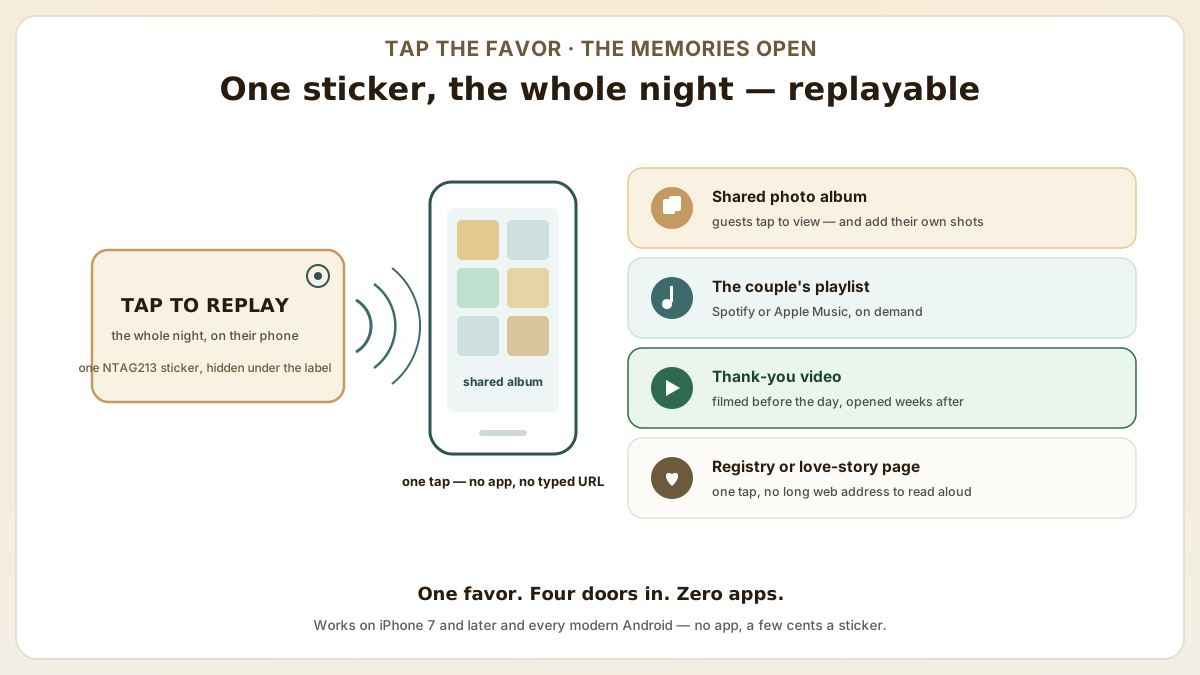
Quick answer
NFC wedding favor tags are NTAG213 stickers guests tap with any iPhone (7 and later) or Android phone to open your shared photo album, playlist, or thank-you video — no app, a few cents each. Program them once, hide them under the printed label, and let the favor keep talking long after the cake is gone.
- Photo sharing made effortless. Program NFC tags with a link to your shared wedding photo album. Guests tap to view and contribute photos, creating a collaborative album without sharing complex URLs.
- Couples playlist: link an NFC tag to your curated Spotify or Apple Music wedding playlist. Guests tap to listen to your love story in music whenever they want.
- No app required: NFC works on iPhone 7+ and all modern Android phones. Guests simply tap the tag with their phone to open the linked content instantly.
At a glance
Use these short answers to decide whether this page matches the project before moving into the detail.
Key takeaway
Photo sharing made effortless. Program NFC tags with a link to your shared wedding photo album. Guests tap to view and contribute photos, creating a collaborative album without sharing complex URLs.
How do NFC wedding favor and reception ideas work?
Picture the gift table at the end of the night. A guest taps their phone to a beautifully printed favor box, and a shared wedding photo album blooms onto the screen — or...
Next step
Ready to move forward? Start your inquiry to get specific answers for this project.
Order NFC wedding stickersHow do NFC wedding favor and reception ideas work?
Picture the gift table at the end of the night. A guest taps their phone to a beautifully printed favor box, and a shared wedding photo album blooms onto the screen — or nothing happens, and they set it back down without a word. That gap, between the tap that delights and the tap that embarrasses, is the whole game. The reassuring part: it's settled by a handful of choices made weeks before the reception, not by luck on the night. The five touchpoints below map where a tag actually earns its tap.
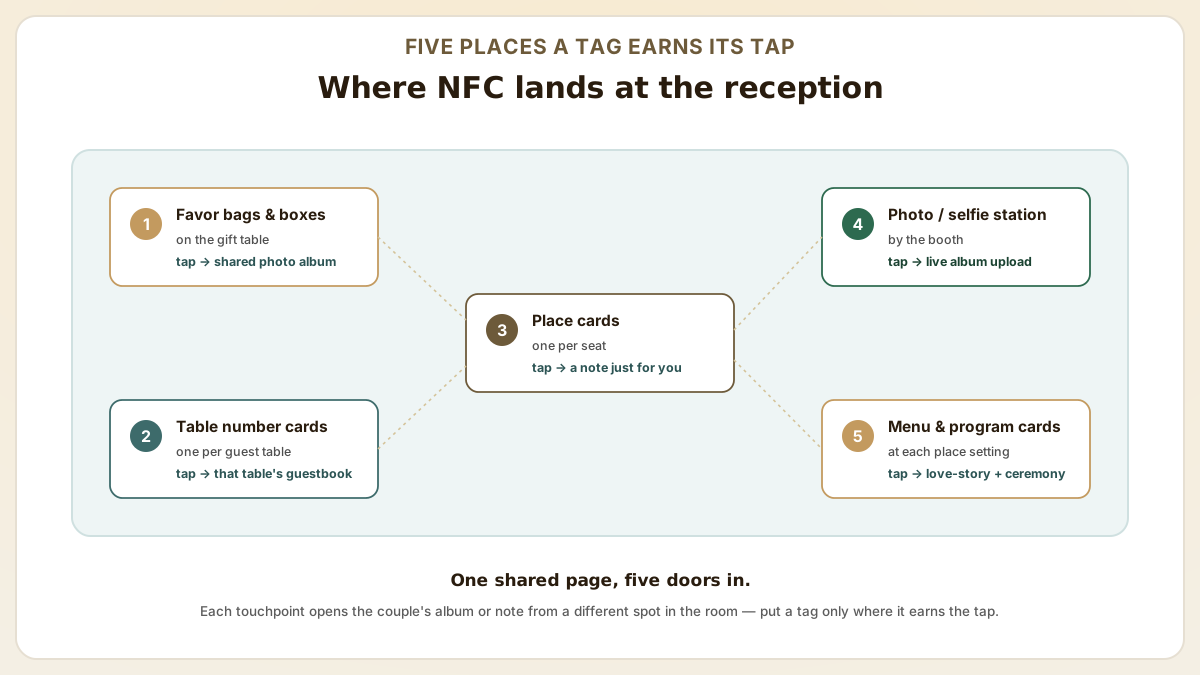
- Favor tags: attach NFC stickers to wedding favor bags or boxes. Program each tag with a link to your shared photo album, thank-you video, or honeymoon fund page. Guests take the favor home and tap whenever they want to relive the memories.
- Table number cards: embed NFC tags in table number displays. Each table's tag links to a shared album or guestbook page where table guests can upload their photos and leave messages.
- Place card tags: individual NFC-enabled place cards programmed with a personalized message or memory link for each guest. Tap to read a custom note from the couple.
- Reception photo station: place NFC tags at a photo booth or selfie station. Tapping the tag opens a direct upload link to the wedding's shared album, making it easy for guests to contribute photos in real time.
- Menu and program cards. NFC tags on menu cards link to the couples' love story page, wine selection notes, or a digital version of the ceremony program with photos and music.
How to create NFC wedding favor tags
The programming itself is almost anticlimactic: pick a link, tap a sticker, done. What actually decides whether the favor works is everything around that — choosing a URL that still resolves long after the cake is gone, and hiding the tag so it reads through the decoration instead of being defeated by it. The five-step build below takes about as long as addressing one envelope; if you've never written a tag, our iPhone and Android programming walkthroughs cover the taps.
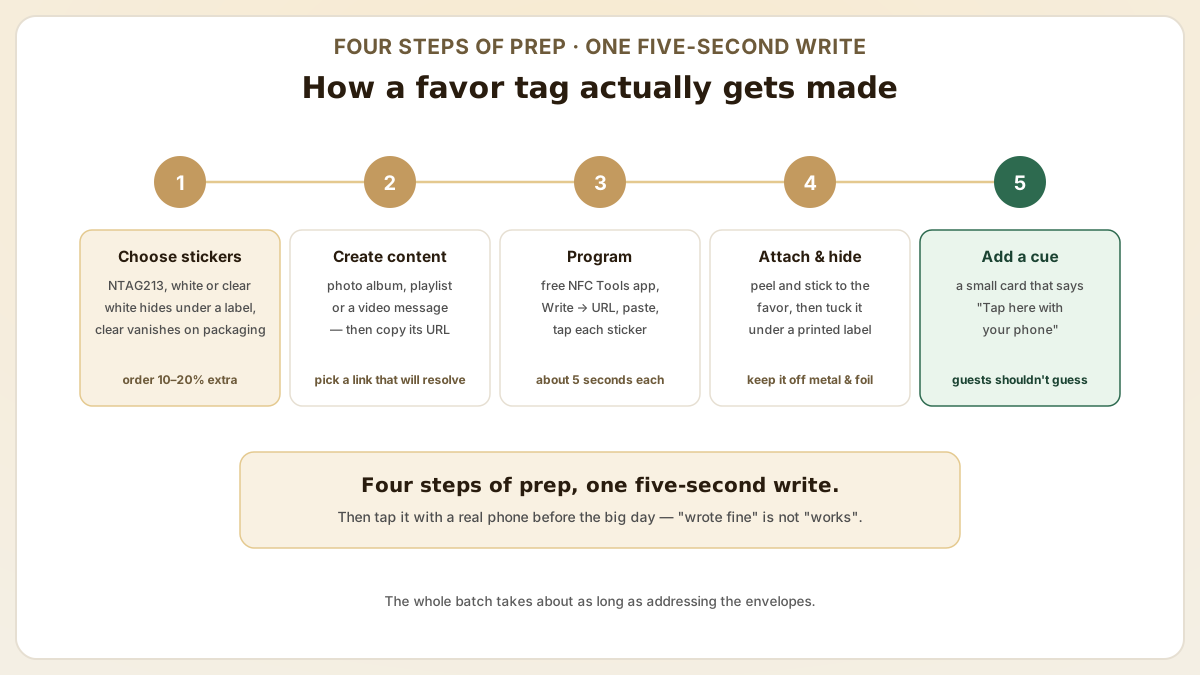
- Choose your NFC stickers. NTAG213 white or clear stickers are ideal. White stickers can be decorated or hidden under a printed label. Clear stickers are invisible on favor packaging. Order 10-20% extra for testing and errors.
- Create your digital content. Upload wedding photos to Google Photos, create a Spotify playlist, or record a video message and upload to YouTube (unlisted). Copy the sharing URL.
- Program with your phone. Download free NFC Tools app, select 'Write > URL,' paste your link, and tap each NFC sticker to program it. Each sticker takes about 5 seconds.
- Attach to favors: peel and stick NFC stickers onto favor boxes, bags, wine bottles, candles or any smooth surface. For a cleaner look, hide the NFC sticker under a decorative printed label.
- Add instructions: include a small card or print on the favor that says 'Tap here with your phone' with a phone icon pointing to the NFC tag location, so guests know how to interact.
What NFC wedding favor pitfalls should couples avoid?
NFC favors look effortless on Pinterest but fail at the reception when 30% of guests cannot tap them. These five common pitfalls prevent wedding-day disappointment and minimize day-of support requests.
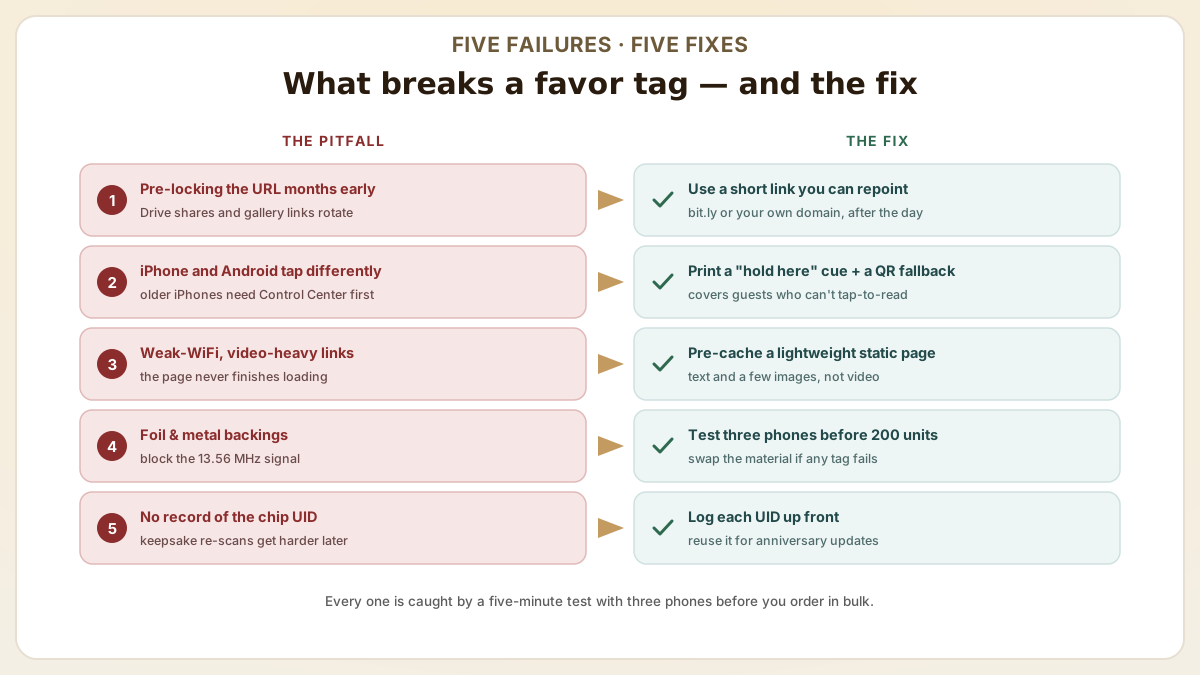
- Pre-locking the URL too early: NFC tags programmed 6 months in advance often link to URLs that change (Google Drive shares expire, photo gallery URLs rotate). Use a stable short link (bit.ly, your domain) that you can repoint after the wedding.
- Underestimating iPhone vs. Android difference: older iPhones (pre-iPhone XS) require Control Center NFC reader; newer iPhones tap automatically. Print a small instruction ("Hold phone here") and a QR code fallback for non-NFC guests.
- Skipping a battery-powered backup link: if the venue has weak WiFi, video-heavy NFC links fail. Pre-cache the favor experience as a static HTML page so the URL works offline once cached.
- Choosing decorative materials that block NFC: foil-wrapped tags, metal-backed laminates and thick wood blocks attenuate the 13.56 MHz signal. Test the favor design with three different phones before ordering 200 units.
- Forgetting to record the chip UID for memory: many couples want to keep the favors as keepsakes that still scan years later. NTAG chips have factory-programmed UIDs that can be reused as login tokens for future anniversary updates.
Beyond favor tags: 7 NFC wedding touchpoints couples are using in 2025-2026
Wedding planners and DIY couples have moved well past 'NFC favor sticker' as the only application. The most-shared 2025-2026 wedding NFC ideas turn the entire guest journey into an interactive layer — from save-the-date through the morning-after thank-you. Each touchpoint below is repeatable with NTAG213 stickers and free programming software, and several use cases come from real Etsy seller patterns and Australian planner Laser Creator's published catalog. The seven touchpoints below follow one guest from save-the-date to the morning-after thank-you.
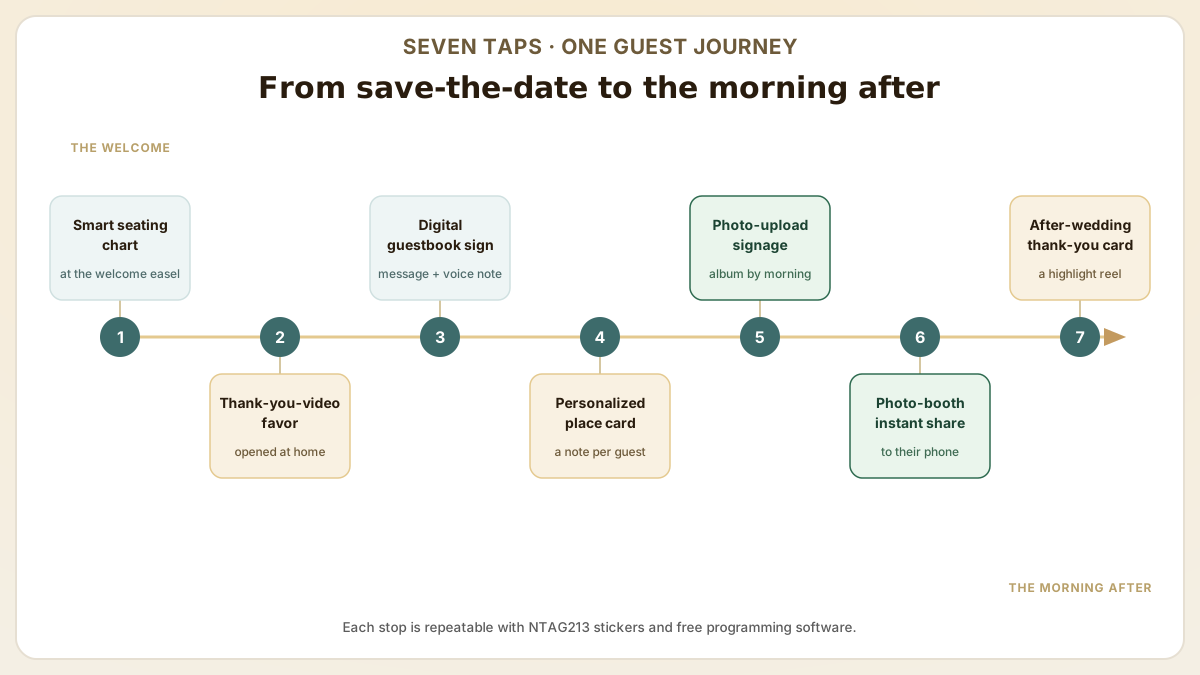
- Smart seating chart: NFC tag at the welcome easel — guests tap to see their assigned table on the couple's wedding website. Replaces the printed escort-card wall and works for last-minute reseating without reprints.
- Interactive favors with a thank-you video: NFC sticker on the inside of a candle box or wine bottle gift tag links to a 60-second couple's thank-you video filmed before the wedding. Guests tap days or weeks later when they unwrap the favor at home — extends the emotional moment past the reception.
- Digital guestbook (NFC sign on each table): replaces the traditional paper book. Guests tap an NFC sign on the table, land on a wedding-website page where they leave a written message + voice note. Wedibox and similar platforms automate this. Conversion rates are higher than a paper guestbook because the prompt happens during the reception, not in a passing-by moment.
- Personalized place cards: each place card carries an NTAG213 with a unique URL — the couple writes a short personal note for each guest. Tap reveals the note. Wedding planners report this drives 'most memorable moment' feedback in post-event surveys.
- Wedding signage with photo upload: NFC tag at signs near the bar, dance floor, or photo booth links to a Google Photos shared album with upload permissions. Guests upload candid shots in real time; couple gets a populated album by the next morning instead of waiting weeks.
- Photo booth instant share: NFC tag at the photo booth links to the print's digital twin (Dropbox folder or photo-share service). Guests tap, instantly receive their photo, and can share to Instagram with the wedding hashtag pre-loaded.
- After-the-wedding thank-you: NFC tag on the thank-you card mailed to guests post-honeymoon, links to a private highlight reel from the videographer. Recipients tap weeks after the wedding and the experience continues to evolve as the couple uploads honeymoon photos and the one-year anniversary update.
DIY vs hire-a-pro: when to bring in a wedding NFC specialist
Most NFC wedding setups are DIY-friendly — NTAG213 stickers cost cents, NFC Tools is free, programming takes 5 seconds per sticker. But three scenarios push the project past DIY into needing a wedding planner with NFC experience or a specialty laser-cut shop like Laser Creator (Australia) or Etsy NFC sellers. Knowing the line saves stress in the final 4-6 weeks of planning. The ladder below shows exactly where a project tips from DIY into hire-a-pro.
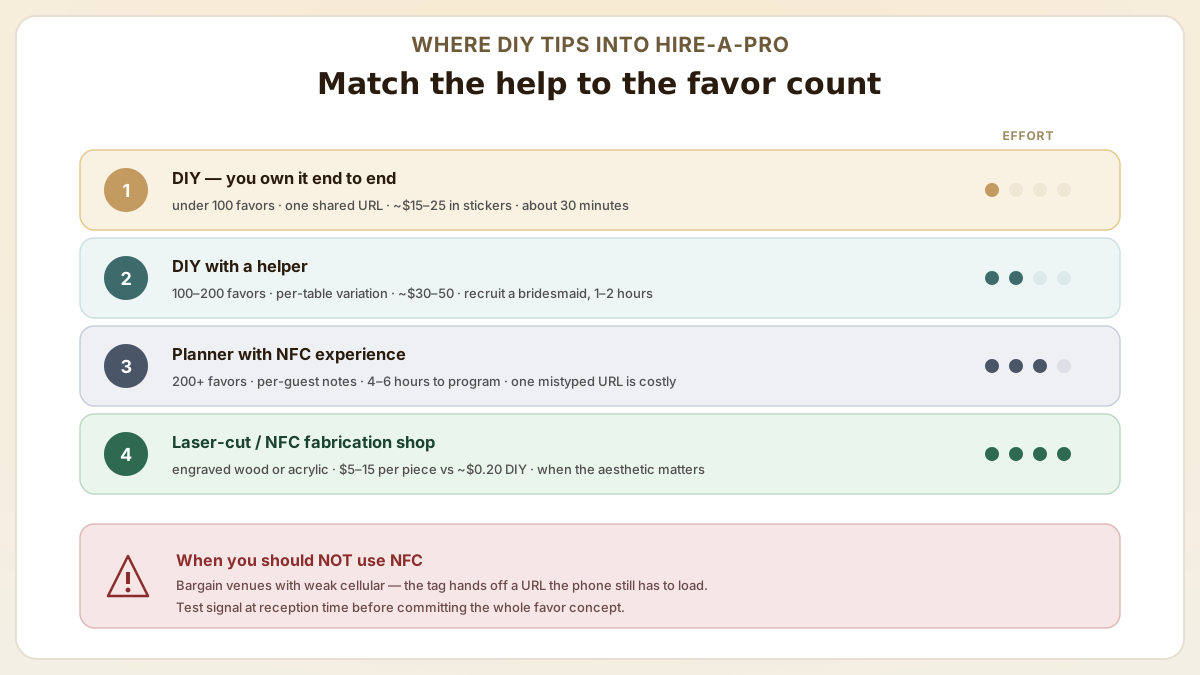
- DIY-friendly: under 100 favors with one shared URL, all linking to the same photo album or playlist. ~$15-25 in NFC stickers + 30 minutes of programming. Couple owns the experience end-to-end.
- DIY with help: 100-200 favors with per-table or per-couple variation (different table names, song dedications). ~$30-50 in stickers + 1-2 hours programming. Recruit a tech-savvy bridesmaid or family member; pre-plan a programming spreadsheet (sticker ID → URL) before the day.
- Hire a planner with NFC experience: 200+ favors with per-guest personalization (individual notes, photo memories per guest). The combinatorics get unwieldy fast — programming 200 unique URLs takes 4-6 hours and the failure cost (one mistyped URL) is high. Wedding planners now bundle NFC programming into premium packages.
- Hire a laser-cut / NFC fabrication shop: when the project requires custom wood/acrylic engraved place cards or seating charts with embedded NFC chips. Shops like Laser Creator (Australia) and similar US Etsy sellers handle the laser cut + chip embedding + URL programming as one workflow. Cost: $5-15 per custom piece vs ~$0.20 per DIY sticker — defensible only when the physical aesthetic matters.
- When you should NOT use NFC: bargain venues with poor cellular reception (NFC tags rely on the guest's phone loading the URL — no signal = broken experience). Test cellular at the venue at the time of day matching the wedding before committing the entire favor concept to NFC.
Useful next pages
Use these linked product, guide and comparison pages to keep the next click specific and practical.
NFC stickers for weddings
Blank NFC stickers perfect for DIY wedding projects.
Wedding NFC examples and tools
Real-world wedding NFC product catalogs and free NFC writer apps for DIY couples.
FAQ
How many NFC stickers do I need for my wedding?
For favor tags, order one sticker per guest plus 10-20% extra for testing and errors. For table display tags, one per table is sufficient. For a 150-guest wedding with 15 tables, order approximately 175-180 favor stickers plus 15 table stickers. At $0.05-0.10 per sticker, the total NFC budget for a 150-guest wedding is approximately $10-20.
Can I program all NFC stickers with the same link?
Yes. If you want all favor tags to link to the same photo album, playlist or webpage, you can program every sticker with the same URL. Each sticker takes about 5 seconds to program with the NFC Tools app. For 150 stickers, budget about 15-20 minutes of programming time.
Will NFC wedding favor tags work years from now?
NFC tags have an essentially unlimited lifespan. The chip requires no battery and does not degrade. As long as the linked content remains online (your photo album, playlist, or video stays published), guests can tap the favor tag years later to access the wedding memories. Consider using a permanent hosting solution for your digital content.
What if the venue has weak WiFi or cellular coverage?
NFC tags themselves work without internet — the chip transfers the URL to the phone in milliseconds. The bottleneck is the phone loading the destination page (photo album, playlist, video). Three mitigations: (1) test the venue's cellular at the actual reception time before committing to NFC, (2) host the destination as a lightweight static page (text + a few images, not video) so it loads on slow connections, (3) provide a printed QR code as fallback — same URL, different access path, same offline-pages-cache benefit.
Can the same NFC favor tag stay useful for years after the wedding?
Yes — that's one of the strongest wedding NFC use cases. NTAG213 chips have 10-year data retention and 100,000+ rewrite cycles. Couples who pick a stable destination URL (their own wedding-anniversary website, or a redirect they control through bit.ly or a custom subdomain) can update the destination annually — first anniversary photos, baby announcements, 5-year vow renewal videos. Avoid Google Photos shared links as the long-term destination — Google occasionally rotates share URLs. A short link you control is more durable.
Sources & references
Primary standards, OEM datasheets and regulatory documents cited by this article. All URLs were verified on the access date shown below.
- Laser Creator — Wedding Items You Can Create Using NFC Tags
Real-world wedding NFC application patterns: smart seating charts, interactive favours, digital guest books (Wedibox), place cards, signage, photo booth and thank-you cards.
- NFC Tools for Android — read & write NFC tags
Free NFC writer app used to program NTAG213 stickers with a URL record; supports iOS and Android.
Proud Tek is a Shenzhen-based RFID & NFC manufacturer supplying hotel chains, transit operators, event venues and retail brands worldwide. Every order includes free samples, RF testing and dedicated project support.
Get a Quick Quote
Tell us about your project and we'll respond within one business day. Fields marked (asterisk) are required.