
Hotel Key Card Troubleshooting
Hotel Key Card Not Working? Check These First
Quick answer
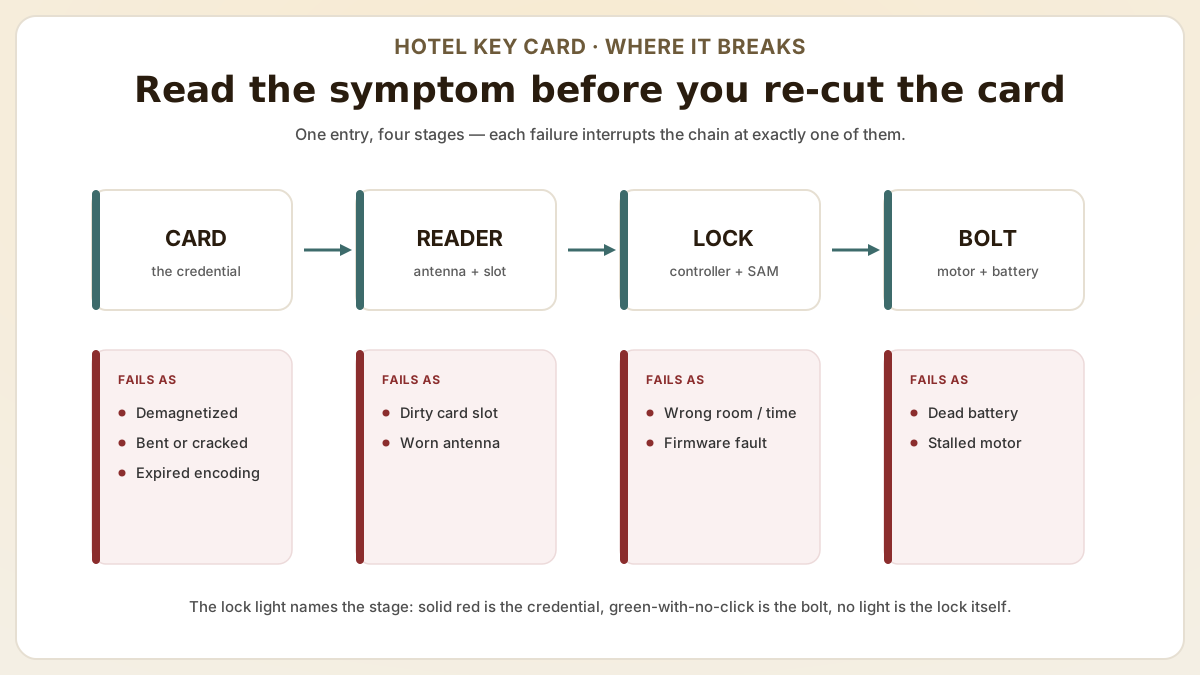
When a hotel key card stops working, five causes explain over 90% of lockouts — demagnetization, encoding errors, expired room assignments, dirty readers and dead lock batteries — and most resolve at the front desk in under 60 seconds. Read the symptom before you re-cut the card: each failure quietly tells you which of the five it is.
- Identify the top causes of hotel key card failure — demagnetization from smartphones, encoding timeout errors, dirty card readers, and expired room assignments that account for over 90% of guest lockout complaints.
- Step-by-step troubleshooting for front desk staff to resolve key card issues in under 60 seconds, reducing guest wait times and improving satisfaction scores.
- Understand why RFID key cards eliminate the most common failure mode (demagnetization) and how upgrading from magnetic stripe to contactless technology reduces key card complaints by 80% or more.
At a glance
Use these short answers to decide whether this page matches the project before moving into the detail.
Key takeaway
Identify the top causes of hotel key card failure — demagnetization from smartphones, encoding timeout errors, dirty card readers, and expired room assignments that account for over 90% of guest lockout complaints.
Why hotel key cards stop working: the most common causes
It is 11:40 on a checkout-day Friday, and the third guest this hour is back at the front desk with the same four words: 'It worked this morning.' The card takes the blam...
Next step
Ready to move forward? Start your inquiry to get specific answers for this project.
Get RFID key card samples for your hotelWhy hotel key cards stop working: the most common causes
It is 11:40 on a checkout-day Friday, and the third guest this hour is back at the front desk with the same four words: 'It worked this morning.' The card takes the blame, the desk inherits the queue, and the temptation is to keep re-cutting cards until the complaints stop. Resist it. A key-card failure almost always announces which cause it belongs to, and most lockout complaints trace to one of five root causes — a front-desk agent who can name the cause in 30 seconds resolves the issue without escalating to maintenance or the lock vendor. The ranking below is ordered by how often each actually happens at full-service properties running a mix of magstripe and RFID stock.
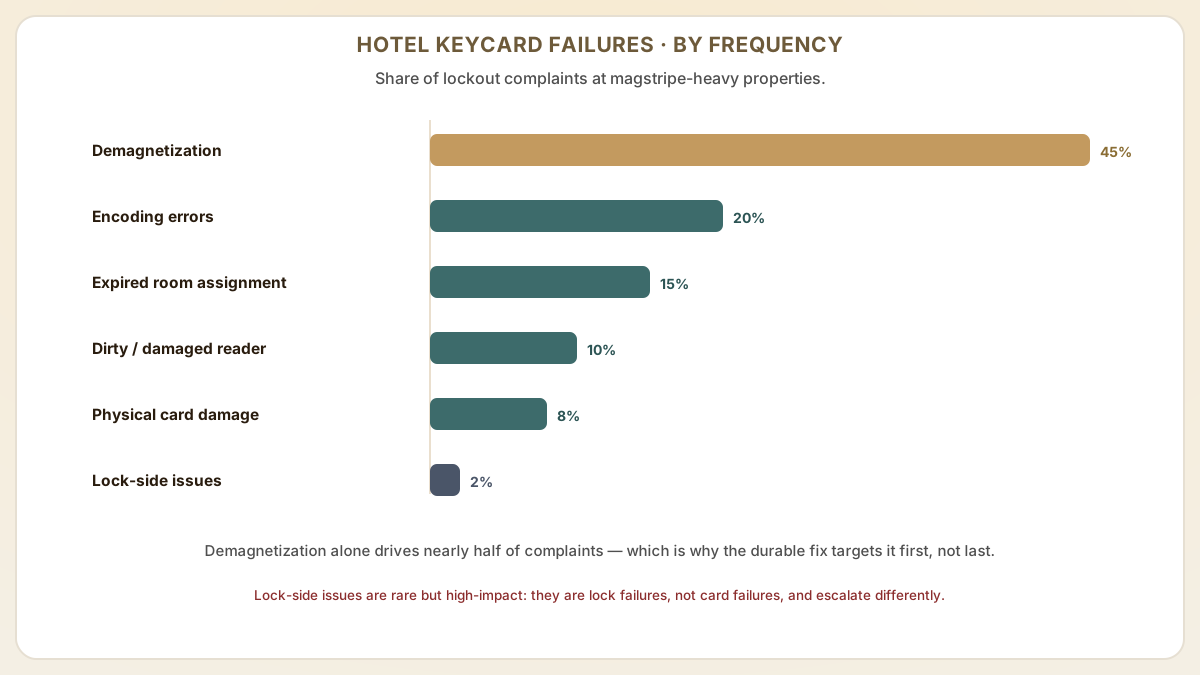
- Demagnetization (≈45% of magstripe-property complaints): magnetic stripe key cards lose their data when placed near smartphones with MagSafe, magnetic wallet clasps, or other magstripe cards. MagSafe arrays generate fields exceeding 3000 Oe at surface contact — strong enough to demagnetize even HiCo (2750 Oe) stripes. This is the single largest driver of 'card worked yesterday but not today' complaints.
- Encoding errors (≈20%): if the front desk encoder has worn antennae, the card was lifted before the write completed, or the PMS had a momentary network drop during encoding, the key data may not have been correctly written. RFID cards encode in 300-500 ms but staff who tap-and-lift can cause partial writes.
- Expired room assignment (≈15%): most hotel PMS systems encode key cards with a check-out time. If a guest extends their stay but the key card is not re-encoded, the card stops working at the original check-out time even though the reservation was extended. Most disputes happen at the 11:00 check-out boundary.
- Dirty or damaged card reader (≈10%): dust, debris, or wear on the door lock's card slot (magstripe) or antenna (RFID) can prevent reliable reads. Symptom pattern: multiple guests fail at the same door while their cards work elsewhere.
- Physical card damage (≈8%): bent cards, cracked chips, scratched magnetic stripes, and cards left in hot cars (interior temperatures above 70°C / 158°F) cause permanent failure. Cards with visible wear should be retired proactively, not after a guest complaint.
- Lock-side issues (≈2% but high-impact): low door-lock battery (most ASSA ABLOY, Salto and Saflok locks alert at 20% but fail at 5-10%), or the lock motor stalling even when the card reads (green light but no door movement). These are lock failures, not card failures, and require different escalation.
How do you handle quick-fix troubleshooting steps for front desk staff?
The order is the whole point: cheapest and most likely first, vendor escalation last. Most properties have at least one agent who opens with the vendor hotline — escalating a card that a quick re-encode at the desk would have fixed. Work the ladder below from the top, and the overwhelming majority of lockouts are resolved long before you reach the lock vendor.
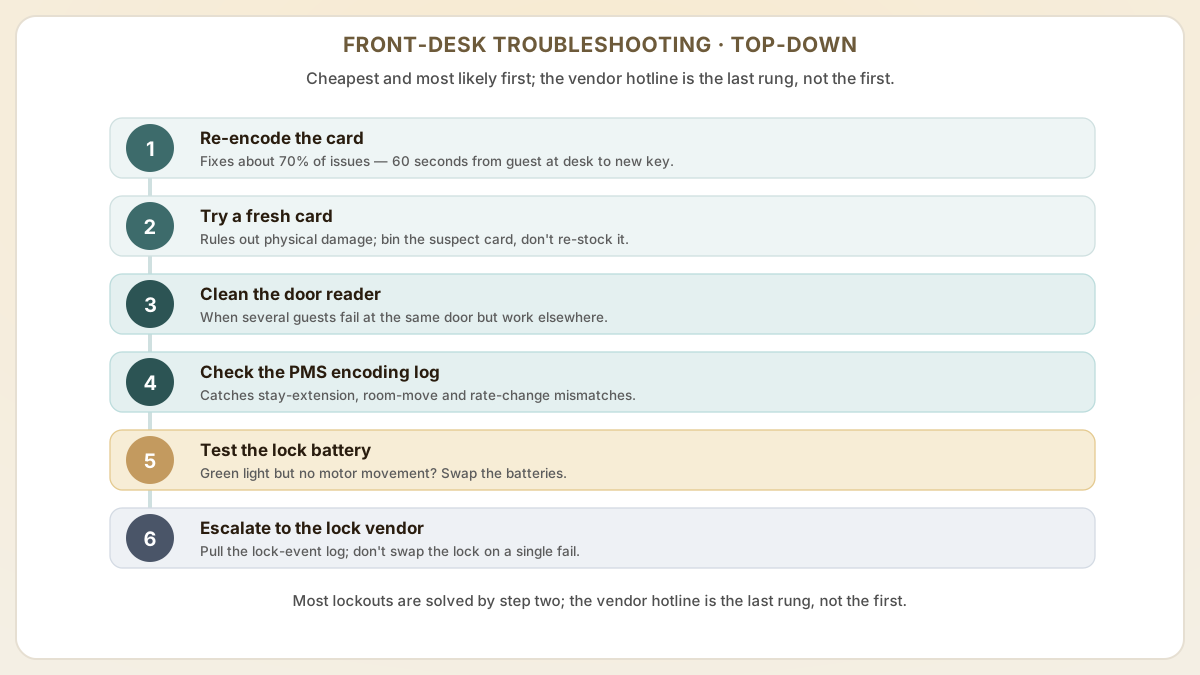
- Step 1Step 1: Re-encode the card. The fastest fix for 70% of issues. Insert a fresh card (or the same card) into the encoder, confirm the room number and check-out date in the PMS, and issue a new key. Time-target: 60 seconds from guest at desk to new card in hand.
- Step 2Step 2: Try a different card. If re-encoding the same card fails again, the card itself may be physically damaged. Use a brand-new card from sealed stock and tag the suspect card for the maintenance bin (don't re-stock it — it'll cause repeat complaints).
- Step 3Step 3: Clean the door lock reader. If multiple guests report failure at the same door, dispatch maintenance to clean the lock's card slot or NFC antenna with a cleaning card or compressed air. Schedule a quarterly preventive cleaning for high-traffic doors (lobby restrooms, pool, gym).
- Step 4Step 4: Check the PMS encoding log. Verify the room assignment, guest profile, and check-out time are correctly reflected. PMS-card mismatches are common after a stay-extension, room-move or rate-change transaction. Most cloud PMS platforms (Mews, Cloudbeds, Opera Cloud) expose an encoding-log endpoint that night-audit can pull on demand.
- Step 5Step 5: Test the lock battery. Door locks with low battery may fail to read cards reliably or read but fail to actuate the bolt motor (green light, no movement). Replace the lock batteries if the same card works on other doors. Most modern hotel locks alert when battery drops below 20% — wire that alert into the maintenance ticketing system, not just the lock itself.
- Step 6Step 6: Escalate to the lock vendor. After steps 1-5, if a single guest still cannot enter their room, capture the lock-event log via the lock vendor's mobile tool (Salto JustIN, ASSA ABLOY VISIONLINE, dormakaba KEY) and open a vendor ticket. Don't replace locks based on a single fail event — the data tells you whether the lock or the credentialing chain is at fault.
What's the long-term fix? upgrading from magstripe to RFID key cards
Troubleshooting faster is still treating the symptom. The durable fix is to delete the most common failure mode entirely — which is exactly what moving from magstripe to RFID does, since a radio chip cannot be demagnetized by a guest's phone. Better still, it is usually a card-level change rather than a lock-level one, and choosing the right RFID chip is where most of that decision actually lives. The comparison below shows what the upgrade quietly removes from your complaint log.
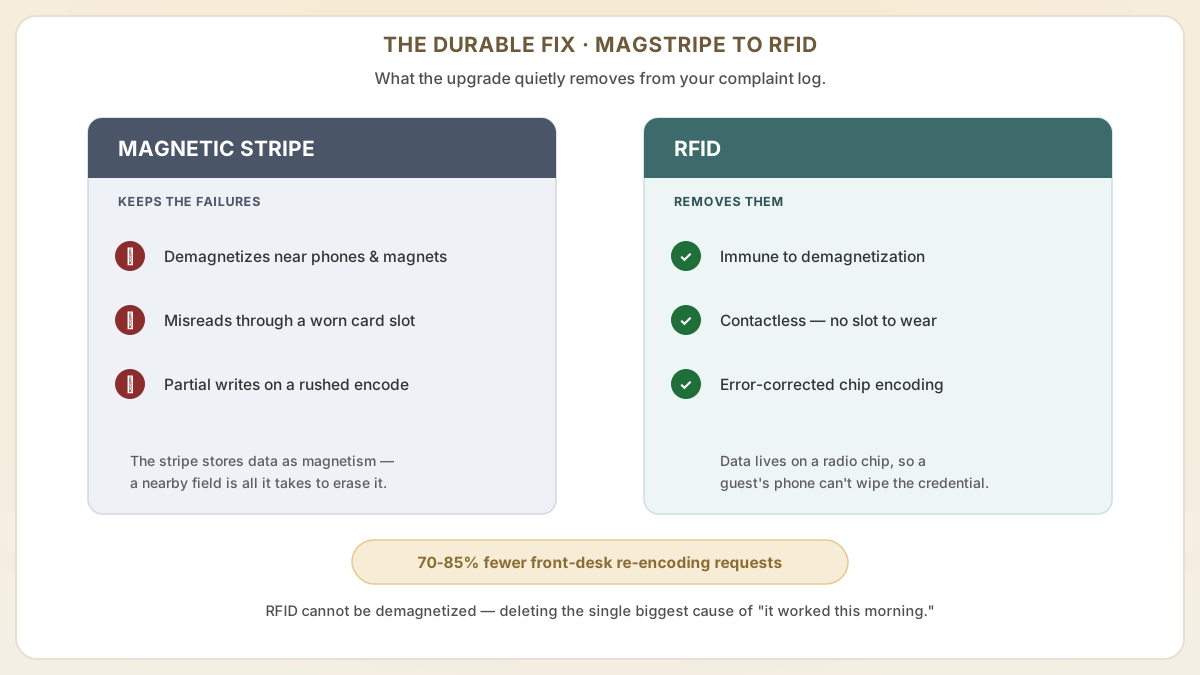
- RFID key cards use radio frequency communication instead of a magnetic stripe, which means they cannot be demagnetized by smartphones, magnets, or other cards. Instantly eliminating the most frequent cause of key card complaints.
- Contactless RFID locks do not require physical card insertion, removing the wear-related failure mode of dirty or worn card slots that cause misreads on magstripe locks.
- RFID cards use digital data stored on a chip with error-correction capabilities, making the encoding process more reliable and less susceptible to the partial-write errors that plague magstripe encoding.
- Hotels that have upgraded from magstripe to RFID report 70-85% reduction in key card re-encoding requests at the front desk, freeing staff to focus on guest service rather than troubleshooting. AHLA member surveys consistently show 'room access' moves from a top-3 complaint category to outside the top-10 within 90 days post-migration.
- Proud Tek supplies RFID key cards compatible with all major lock brands including Assa Abloy, Dormakaba, SALTO, and Onity, making the card-level upgrade straightforward even without replacing lock hardware on newer installations.
What the door-lock lights actually mean (and why staff get them wrong)
Most front-desk troubleshooting scripts skip lock-light interpretation entirely, even though the LED pattern usually names the failure cause within two seconds — the fastest free diagnostic in the building. Lock vendors use different colour conventions, but the underlying state machine is consistent across ASSA ABLOY, dormakaba, Salto and Onity, so train staff on the pattern, not the colour. The legend below maps each light to what it means and what to do about it.
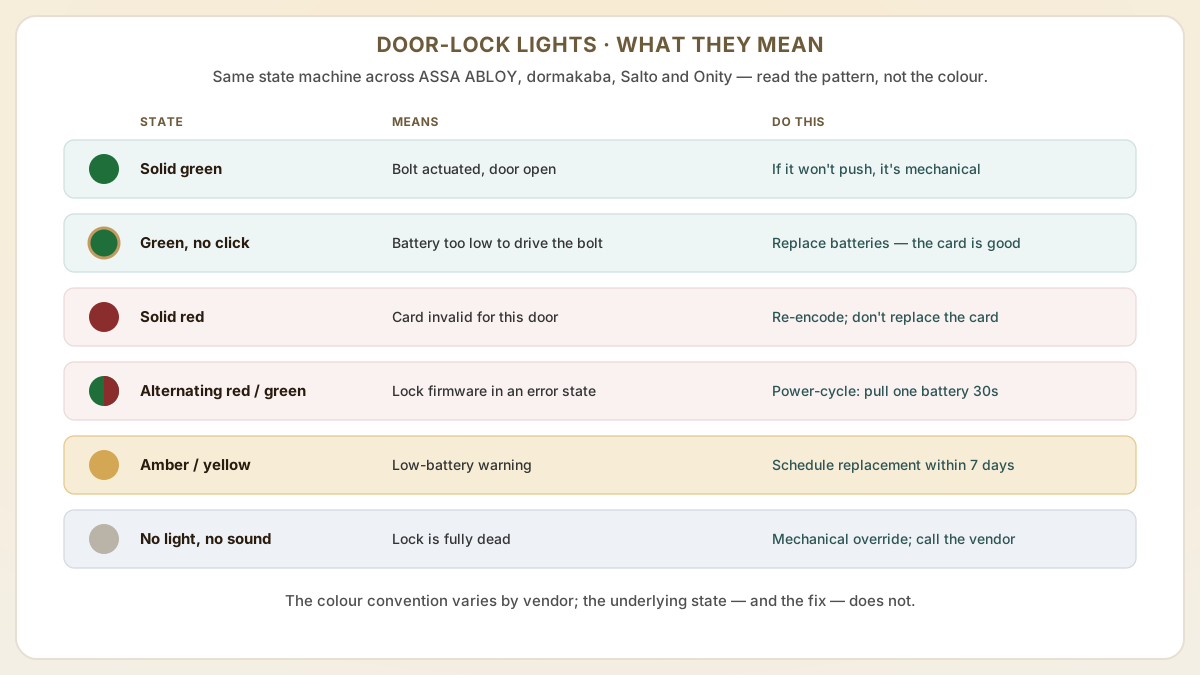
- Solid green (or two short greens): card authenticated and bolt motor actuated. Door is unlocked. If the guest still cannot push the door open, the issue is mechanical (latch alignment, door swelling) — not the card.
- Green LED but no audible bolt-motor click: card is valid, lock electronics are fine, but battery voltage has dropped below the motor-actuation threshold (~4.8V on most AA-powered locks while the read circuit still works at 3.3V). Replace lock batteries immediately; the card is good.
- Solid red or three short reds: card is invalid for this door. Common causes — wrong room number encoded, check-out time has passed, or the card was encoded against a different SAM (after a lock controller swap). Re-encode the card; do not replace it.
- Alternating red/green or rapid flashing: lock firmware is in an error state (often a low-battery soft-fault or a recent firmware update that did not complete). Power-cycle the lock by removing one battery for 30 seconds; if it persists, escalate to maintenance.
- Yellow/orange LED on Salto / amber on VingCard Essence: low-battery warning. Card will continue to work for a finite number of opens (typically 100-500) before failing. Schedule battery replacement within 7 days, do not wait for hard failure.
- No LED, no sound: lock is fully dead — battery exhausted, card-reader circuit fried by ESD or moisture, or the antenna cable internally disconnected. Use mechanical override key (every modern hotel lock has one) to gain access, then dispatch lock-vendor service.
When card troubleshooting hides a deeper problem
If you run a high-functioning property with trained staff and the keycard complaint rate still won't drop below 5-10% of stays, the cause is rarely 'bad cards'. At that point the card is the symptom, not the disease, and the real culprit usually sits upstream — somewhere nobody thought to look, because everyone was busy blaming the plastic. Below are five upstream patterns we see at properties that escalate to vendor support after exhausting front-desk troubleshooting.
- Procurement is rotating between two or three suppliers and one of them ships off-spec stock: card thickness varies between 0.74-0.78 mm vs the ISO 7810 0.76 mm spec, which jams encoder hoppers and detunes the lock antenna. Lock the supplier list and audit incoming shipments to a fixed thickness and antenna-tuning tolerance.
- Building infrastructure is creating RF interference: a newly installed elevator VFD (variable-frequency drive), HVAC inverter, or LED retrofit can emit broadband harmonics overlapping the 13.56 MHz HF band, raising read errors property-wide. Symptom: failures cluster near specific structural columns or by floor. Diagnose with an RF spectrum analyzer; remediate with shielded conduit or relocating the noise source.
- PMS-to-lock integration is silently downgrading credentials: some integrations fall back to a 'compatibility mode' encoding when they cannot reach the lock vendor's cloud, producing cards that work on most locks but fail on a few. Pull the integration's fallback log monthly and test cards from each fallback path.
- Brand-mandated security updates without staff training: a property pushed to AES-128 encoded cards (DESFire EV3) without training the night audit to use the new encoder workflow. The night-shift cards encode 'successfully' but with a stale key set. Symptom: failures concentrate on guests who checked in between 23:00 and 07:00. Audit shift-by-shift training records, not just the all-hands count.
- Card aging beyond the documented service life: cards in inventory for 3+ years can develop antenna-coil microfractures from temperature cycling. Symptom: 8-15% of stock fails initial encoding. Implement first-in-first-out card stock rotation and retire any inventory older than 24 months even if it visually looks fine.
Useful next pages
Use these linked product, guide and comparison pages to keep the next click specific and practical.
Hotel RFID key card resources
Learn more about hotel key card technology and sourcing from Proud Tek.
Failure-rate references
External data we used to baseline industry-typical magstripe vs RFID failure rates.
Lock vendor support portals
When card-side troubleshooting is exhausted, escalate via the lock vendor's official support channel.
FAQ
Why does my hotel key card stop working when I put it near my phone?
If your hotel uses magnetic stripe key cards, the magnets inside smartphone cases (especially MagSafe arrays at 3000+ Oe) and the electromagnetic fields from phone speakers can erase the data stored on the magnetic stripe. This is called demagnetization and it is the most common reason hotel key cards fail. RFID key cards are immune to this problem because they store data on an electronic chip rather than a magnetic stripe.
How can hotels reduce key card failure rates without replacing their locks?
The most impactful change is switching from LoCo (low coercivity, 300 Oe) magnetic stripe cards to HiCo (high coercivity, 2750 Oe) cards, which resist demagnetization much better but still fail against MagSafe-class fields. Beyond that, upgrading to RFID cards on lock systems that already support both technologies eliminates demagnetization entirely. Regular encoder maintenance, weekly cleaning, and staff training on proper encoding procedures (card flat, hold for full write cycle) also reduce failure rates significantly without any hardware replacement.
What is the cost difference between magstripe and RFID hotel key cards?
RFID key cards cost approximately 2-3 times more per card than basic magnetic stripe cards. However, the reduced re-encoding labor, fewer guest complaints, lower card replacement rate, and improved guest satisfaction scores typically deliver a positive ROI within 6-12 months for properties with more than 50 rooms.
What should staff do if the card reads but the door does not unlock?
This is a lock-side fault, not a card fault. The lock's read circuit is working (you see the green LED) but the bolt motor is not retracting. The two most common causes are low battery (motor draws more current than the read circuit; voltage drops below ~4.8V cause read-OK-but-no-actuate) and a misaligned mortise mechanism after door swelling/seasonal change. Replace the batteries first; if the issue persists across battery changes, dispatch maintenance to check door alignment and the lock's clutch assembly. Don't issue a third card — the card is fine.
What is the typical magstripe vs RFID failure rate per stay?
Industry data points (PrintPlast/Statista) put magstripe failure at 15-20% per guest stay, with demagnetization (~35% of incidents) and time-expiration/encoding errors (#1 root cause) leading the list. RFID typically runs under 2% per stay — driven mostly by physical card damage and rare encoder/PMS issues, not by demagnetization. The 8-10x failure-rate gap is the single best ROI argument for upgrading magstripe properties; at a 200-room/80%-occupancy hotel, the difference is roughly 1,800 fewer front-desk re-encoding interactions per month, which is 15-25 hours of recoverable front-desk labor.
How do we tell whether failures cluster around a specific door, a specific shift, or a specific batch of cards?
Build a small lockout-incident log with three fields: door number, time, and card batch (the supplier's lot number printed on the card sleeve). After four weeks the pattern is usually obvious — failures by door point to lock or RF environmental issues; failures by shift point to staff training or encoder driver state on a specific PC; failures by card batch point to supplier quality. The log takes 10 seconds per incident to populate and pays back in saved escalations within a month. Most modern PMS platforms now expose an 'access events' export that auto-populates this log; ask your PMS vendor for the specific endpoint.
Sources & references
Primary standards, OEM datasheets and regulatory documents cited by this article. All URLs were verified on the access date shown below.
Proud Tek is a Shenzhen-based RFID & NFC manufacturer supplying hotel chains, transit operators, event venues and retail brands worldwide. Every order includes free samples, RF testing and dedicated project support.
Get a Quick Quote
Tell us about your project and we'll respond within one business day. Fields marked (asterisk) are required.