
RFID Card Demagnetization Myth
Can an RFID Card Be Demagnetized? The Real Fix
Quick answer
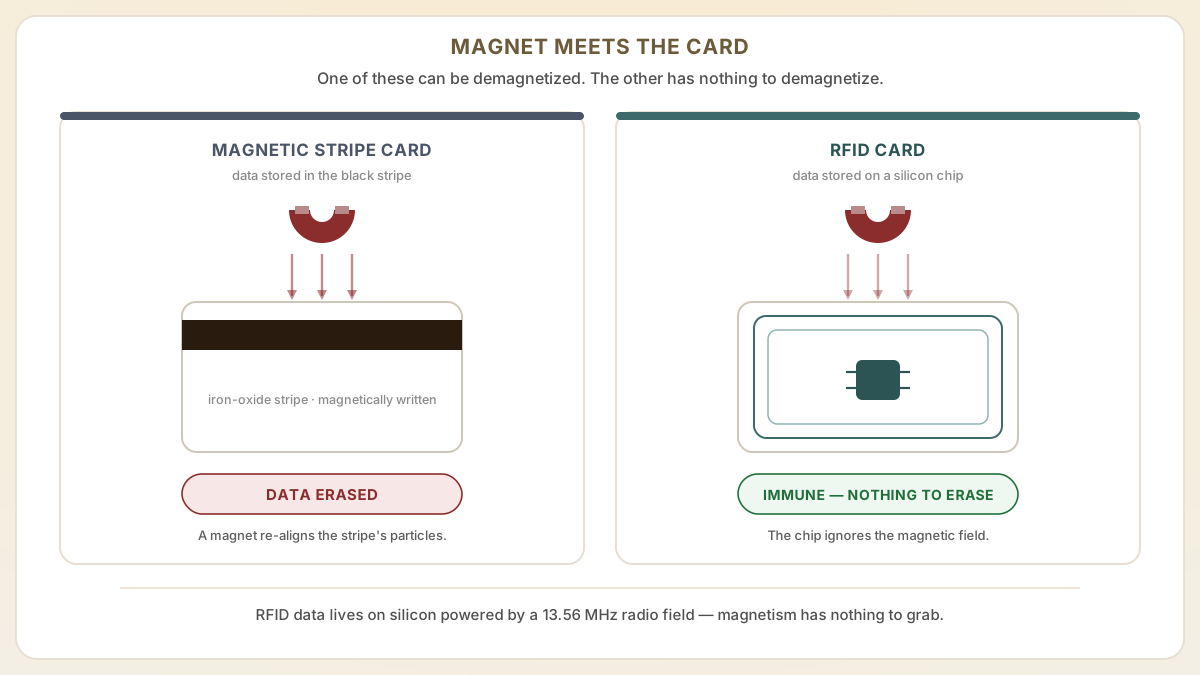
No — an RFID card cannot be demagnetized. A contactless card stores its data on a silicon chip energized by a 13.56 MHz radio field, not on a magnetic stripe, so there is no magnetic medium to erase. If your card quit working, the real cause is a cracked antenna, expired encoding, or the reader — never a magnet.
- RFID cards contain no magnetic data storage, so they cannot be demagnetized — not by a phone, not by a fridge magnet, not by an MRI. If your RFID card stopped working, the cause is mechanical, administrative, or reader-side.
- Learn the actual reasons RFID cards fail: chip damage from bending, antenna cracking, encoding expiration, and reader-side issues that mimic demagnetization symptoms.
- Understand the difference between magnetic stripe cards (which can be demagnetized) and RFID cards (which cannot), and why upgrading from magstripe to RFID eliminates demagnetization problems permanently.
At a glance
Use these short answers to decide whether this page matches the project before moving into the detail.
Key takeaway
RFID cards contain no magnetic data storage, so they cannot be demagnetized — not by a phone, not by a fridge magnet, not by an MRI. If your RFID card stopped working, the cause is mechanical, administrative, or reader-side.
Why RFID cards cannot be demagnetized
An RFID card has no magnetic stripe, no iron oxide, and no magnetic memory — so there is physically nothing on it to demagnetize. Yet somewhere right now, a guest is sta...
Next step
Ready to move forward? Start your inquiry to get specific answers for this project.
Order RFID replacement cardsWhy RFID cards cannot be demagnetized
An RFID card has no magnetic stripe, no iron oxide, and no magnetic memory — so there is physically nothing on it to demagnetize. Yet somewhere right now, a guest is standing at a front desk holding up a hotel key card and a phone, certain the phone wiped the card. It is one of hospitality's most common help-desk complaints, and one of the rare ones where the guest, the front-desk agent, and the top search results all confidently agree on an explanation that happens to be physically impossible. Here is what actually broke — and why the magnet was never the culprit.
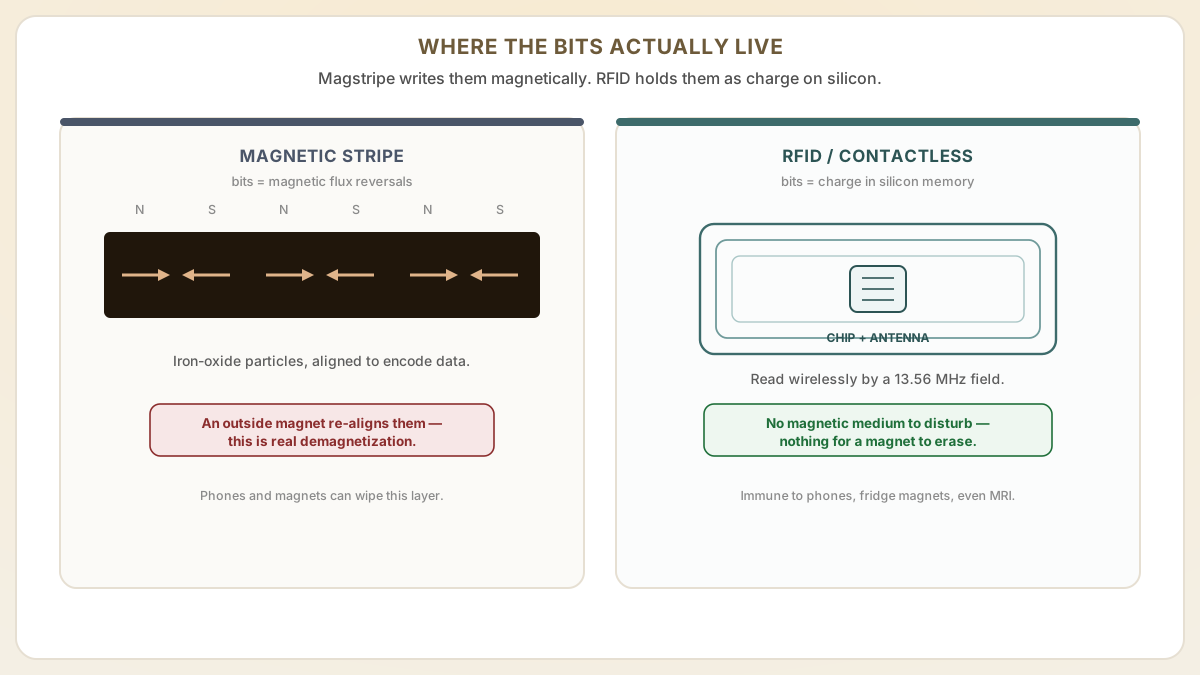
- RFID cards store data on a silicon microchip connected to a metal antenna coil. When the card enters a reader's RF field, the antenna harvests energy and powers the chip, which transmits its stored data wirelessly. No magnetic medium is involved in data storage or transmission.
- Demagnetization is a phenomenon specific to magnetic stripe (magstripe) technology, where a magnetic field erases or scrambles data encoded on the stripe's iron oxide particles. RFID chips have no iron oxide, no magnetic stripe, and no vulnerability to magnetic fields.
- The confusion arises because many hotels and office buildings still use magstripe cards or dual-technology (magstripe + RFID) cards. When the magstripe portion stops working near a phone or magnet, users assume the entire card (including the RFID chip) is demagnetized, but the RFID chip is unaffected.
- Even exposing an RFID card to a powerful neodymium magnet or MRI-level magnetic field will not erase, damage, or alter the data stored on the RFID chip. The chip's silicon-based memory is immune to magnetic influence.
What actually causes RFID cards to stop working
When an RFID card genuinely fails, the cause is almost always mechanical or administrative — never magnetic. Five failure modes account for nearly every dead card, and each leaves a different fingerprint. Here they are, in rough order of how often they land on a help desk.
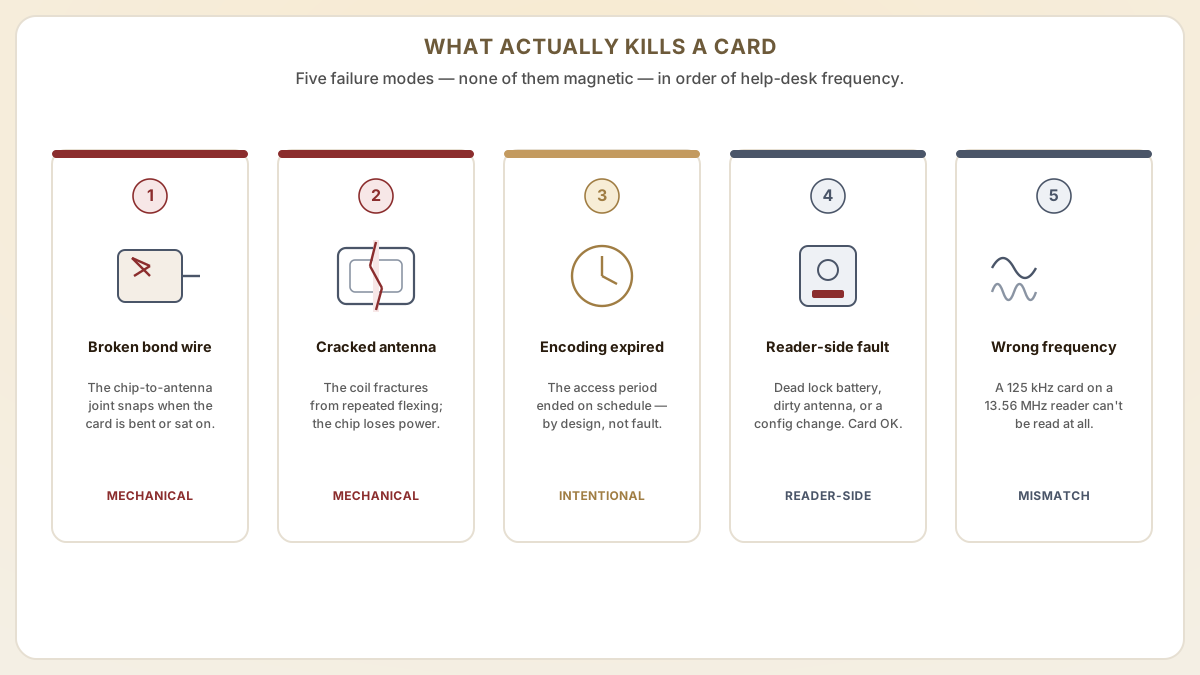
- Physical chip damage: if the card is bent severely, sat on, or punctured, the tiny bond wire connecting the chip to the antenna can break, rendering the card non-functional. This is a mechanical failure, not demagnetization.
- Antenna cracking: the copper or aluminum antenna coil embedded in the card can fracture if the card is repeatedly flexed, creased, or subjected to impact. A broken antenna means the chip cannot receive power and cannot communicate.
- Encoding expiration: in hotel and access control applications, the data encoded on the RFID chip often includes an expiration time. When the encoded access period ends, the card stops opening doors as designed, not because of failure but because of intentional programming.
- Reader-side issues: a dead battery in a door lock, a dirty reader antenna, or a software configuration change can prevent successful card reads. The card is fine; the reader is the problem.
- Incompatible card: if someone mistakenly presents a 125 kHz proximity card to a 13.56 MHz reader (or vice versa), the read will fail because the frequencies do not match. This is a compatibility issue, not card damage.
How to test and troubleshoot a non-working RFID card
You can isolate almost any RFID card failure in about two minutes, with no special equipment. The goal is to prove whether the chip is alive before anyone orders a replacement — because a surprising share of "dead" cards turn out to be dead readers. Work these checks in order and stop at the first one that explains the symptom.
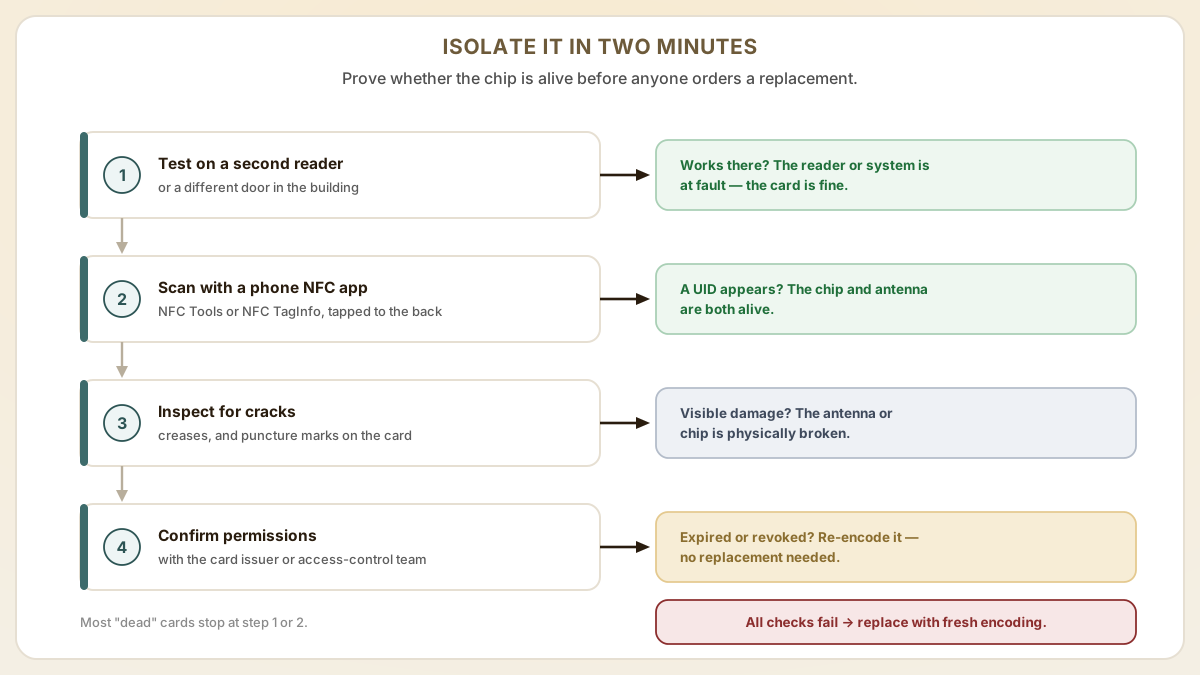
- Test on a different reader. If the card works on a different door or reader, the issue is reader-side (dead battery, dirty antenna, or configuration error), not card-side.
- Use a smartphone NFC reader. For 13.56 MHz RFID cards, free apps like NFC TagInfo (Android) or NFC Tools can verify whether the chip is alive and reporting its UID. If the app detects the chip, the card is physically functional.
- Visual inspection: look for visible creases, cracks, or puncture marks on the card that could indicate antenna or chip damage from mechanical stress.
- Check with the card issuer. Confirm that the card's access permissions have not expired, been revoked, or been reassigned in the access control software. This is the most common cause of a working RFID chip that does not open doors.
- If the card is confirmed damaged, the fix is a replacement card with fresh encoding. Not a demagnetization repair, which does not apply to RFID technology.
What can actually damage an RFID card (and what cannot)
RFID chips are immune to magnets, but they are not immune to physics: heat, bending, punctures, and solvents all kill cards, while magnets, X-rays, and other cards do not. Knowing which everyday situations actually shorten card life — and which are pure urban legend — tells a facility manager when to replace a card versus re-encode it. The list below runs roughly in order of how often each failure shows up in help-desk tickets, and the genuinely dangerous items are the boring ones, not the magnets everyone worries about.
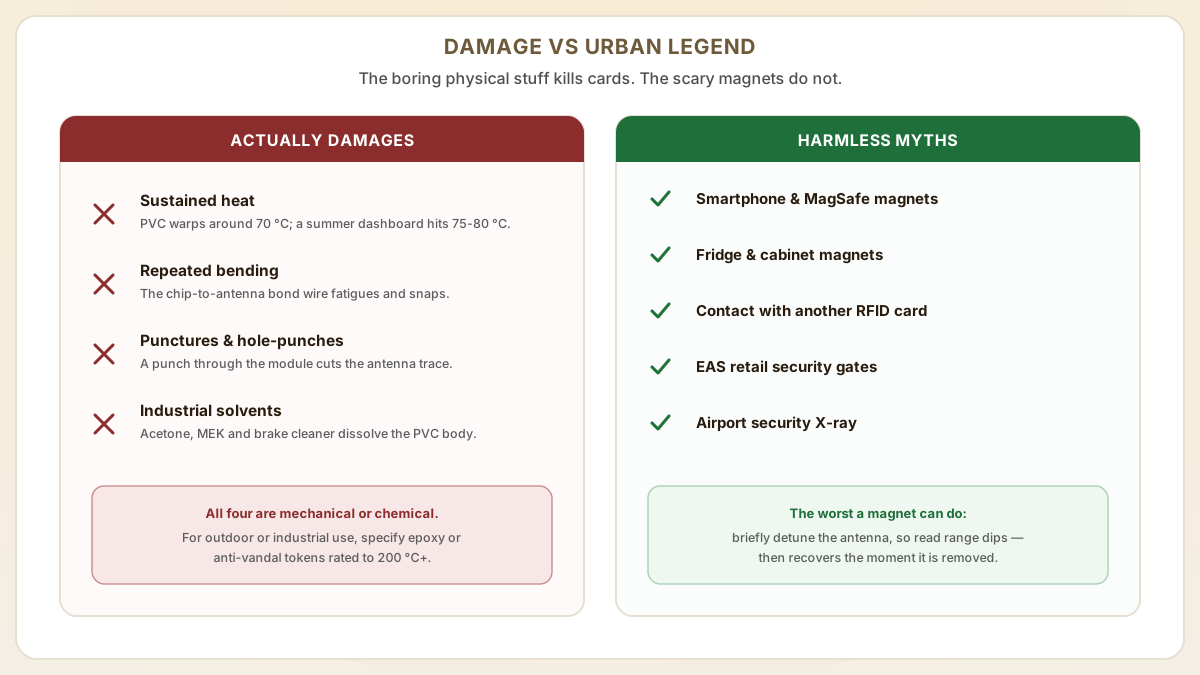
- Sustained heat above the card's plastic glass-transition temperature. Standard PVC cards begin to deform around 70 °C. Leaving a card on a car dashboard in summer (interior temperatures regularly hit 75-80 °C in direct sun) can warp the antenna trace until the chip-to-antenna bond breaks. PET and ABS cards survive higher temperatures but still degrade above 100 °C. Anti-vandal RFID tokens use polycarbonate, PPS, or epoxy housings rated up to 200 °C+ for industrial environments.
- Repeated bending and torsion. The bond wire between chip and antenna in a contactless card is roughly 25 micrometers (0.001 in) wide. Cards conscripted into bottle-opener, scraper, or door-wedge duty typically fail at the chip-antenna joint within weeks. ID cards stored in a back pocket sit through hundreds of bend cycles per week and have measurably shorter mean time to failure than cards worn on lanyards or in rigid badge holders.
- Punctures, bites, and aggressive label removal. Hole-punching a card to attach a clip almost always cuts the antenna trace if the punch lands on or near the chip module. Best practice is to use slot-punch holes only along the long edge at least 5 mm from the embedded module, or to use card-friendly badge clips that grip the edge.
- Industrial chemicals and prolonged solvent contact. Brake cleaner, MEK, acetone, and some petroleum solvents will dissolve the PVC body and expose the chip and antenna. This is rarely an issue for office or hotel cards but matters for outdoor and industrial deployments — specify epoxy-encapsulated or anti-vandal RFID tokens for those scenarios.
- What does NOT damage an RFID card. Smartphone magnets (including the MagSafe magnet ring), the magnet on a refrigerator, contact with another RFID card, walking through an EAS retail security antenna, airport security X-ray, or normal handling. The most-feared scenarios are the least-supported by physics, which is why so many troubleshooting tickets resolve at the encoding or reader-config layer rather than the card itself.
When the card really is dead — replacement workflows for hotels, offices, and warehouses
Once a card is confirmed dead, the only real question is how fast you can put a working credential back in the user's hand — often before they finish explaining the problem. The right workflow depends on the venue type and the credential family in use. The patterns below come from common front-desk, facility, and warehouse SOPs and are built to keep total downtime under a single shift.
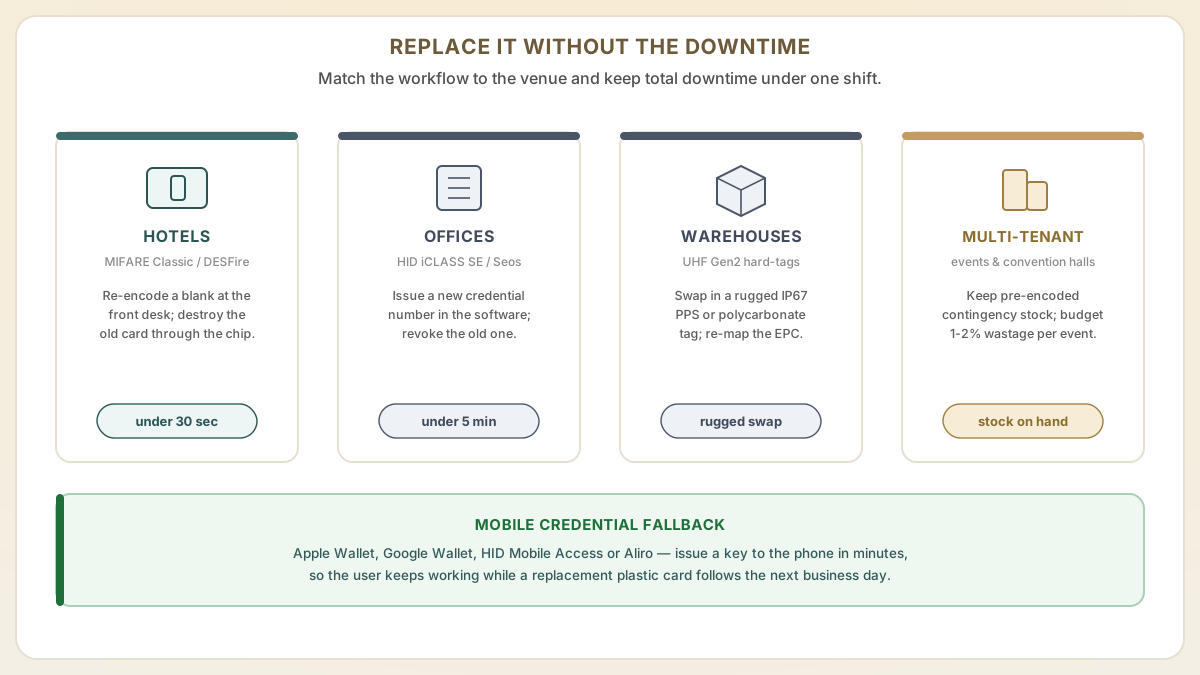
- Step 1Hotels (MIFARE Classic / DESFire / proprietary key systems). Front desk re-encodes a fresh blank to the same room and key set in under 30 seconds using the on-property encoder (Salto, ASSA ABLOY VingCard, dormakaba Saflok, Onity). Defective cards should be physically destroyed (cut in half through the chip module) before discard so they cannot be re-cloned even if the chip survives. Order replacement blanks from the original card supplier in 500-card minimums to keep per-card cost in the $0.30-0.60 range.
- Step 2Offices (HID iCLASS SE / Seos / DESFire EV3 access control). The cardholder requests a new credential through the access control software, the badging desk encodes a new card or fob with the same employee ID and revokes the old credential in the system. Total time to issue a new badge is usually under 5 minutes for an established program. Always reissue rather than reuse the same credential number — security audit logs become unreliable if the same number is shared across two physical cards.
- Step 3Warehouses and industrial sites (UHF Gen2 worker / asset cards). Replace damaged hard-tags with rugged, IP67-rated PPS or polycarbonate cards. Don't reuse the EPC number unless your WMS is built to handle re-association. For driver IDs that travel across yards in extreme weather, specify cards rated to your worst-case environmental conditions rather than the standard PVC office card.
- Step 4Multi-tenant buildings and convention centers. Maintain a small printed-and-encoded contingency stock per tenant or event, ideally pre-printed with the suite or booth number to avoid awkward generic 'Visitor 0042' printing. For temporary visitor passes, treat damage as expected and budget 1-2% wastage per event.
- Step 5Mobile credentials as a fallback. Apple Wallet keys, Google Wallet keys, HID Mobile Access, and Aliro mobile credentials let a tenant continue working immediately after a card fails — the building issues a digital credential to the phone within minutes from the access portal, and a replacement plastic card can follow in the next business day. Many access programs now offer mobile credentials precisely to absorb the lost-card disruption.
Useful next pages
Use these linked product, guide and comparison pages to keep the next click specific and practical.
RFID card products and guides
Learn about RFID card technology and order replacement cards.
Authoritative RFID and contactless references
Industry sources for the technology comparison and credential physics covered above.
Hotel key card supply
Lock-compatible RFID key cards for hotel access systems.
FAQ
My hotel key card stopped working after I put it near my phone. Is it demagnetized?
If your hotel key card uses a magnetic stripe (the black or brown stripe on the back), then yes, your phone's magnets likely erased the magstripe data. However, if the card is contactless RFID (no stripe, you tap it on the lock), it was not demagnetized. The issue is something else, such as an expired room assignment or a lock battery issue. Check with the front desk to determine which technology your key card uses.
Can I remagnetize an RFID card?
No, because RFID cards are not magnetic and were never magnetized in the first place. There is nothing to remagnetize. If your RFID card stopped working, it needs to be either re-encoded (if the chip is intact) or replaced (if the chip or antenna is physically damaged). There is no home remedy or remagnetization device that applies to RFID technology.
Should I switch from magnetic stripe cards to RFID to avoid demagnetization?
Yes. Upgrading from magstripe to RFID cards eliminates the demagnetization problem entirely, which is the single most common cause of card failure complaints. RFID cards are immune to magnets, do not require physical insertion into readers (reducing wear), and support encrypted security that magstripe cannot match. Proud Tek supplies RFID cards compatible with all major access control and hotel lock systems.
Will the magnets in my MagSafe wallet, AirTag, or Apple Watch damage my RFID hotel key or office badge?
No — the magnets are not strong enough to affect a 13.56 MHz RFID chip. That includes MagSafe accessories, AirPods cases, AirTags, Apple Watch bands, and Apple Wallet sleeves — and even if they were, the chip stores its data in semiconductor memory rather than on a magnetic medium. The genuine concern with MagSafe is on hybrid cards: if the same plastic card has both an RFID chip and a magnetic stripe, the magnet can erase the magstripe portion while the RFID half continues to work normally. The other concern is detuning rather than damage — a strong magnet held against the antenna can shift the resonant frequency and reduce read range temporarily, but the card returns to normal as soon as the magnet is removed. There is no permanent harm.
How can I prove to a vendor or front desk that the card itself is fine and the issue is on their reader or system?
Two quick tests work for almost all 13.56 MHz RFID cards. First, install a free NFC reader app on any Android phone (NFC Tools or NFC TagInfo by NXP), open it, and tap the card to the back of the phone near the camera. If the app reports a UID and chip type, the silicon and antenna are both alive and the card is physically functional. Second, ask to test the card on a different reader — a different door in the same building, a different room key encoder, or a known-good production reader. If the card works on a second reader, you've isolated the failure to the original reader, the door panel firmware, the database record for that card, or the network link between the reader and the access controller. Most front desks and facility teams accept either of these as evidence and will move directly to a reader battery, lock motor, or system-side fix instead of replacing the card.
Sources & references
Primary standards, OEM datasheets and regulatory documents cited by this article. All URLs were verified on the access date shown below.
- NFC Forum — NFC Technology (Technical Overview)
Contactless cards operate on a 13.56 MHz radio field per ISO/IEC 14443, storing data on a chip rather than a magnetic medium.
- NXP — RFID / NFC product overview
Manufacturer reference for the 13.56 MHz MIFARE, NTAG and ICODE silicon chip families used in contactless cards.
Proud Tek is a Shenzhen-based RFID & NFC manufacturer supplying hotel chains, transit operators, event venues and retail brands worldwide. Every order includes free samples, RF testing and dedicated project support.
Get a Quick Quote
Tell us about your project and we'll respond within one business day. Fields marked (asterisk) are required.