
Event Technology
How to Set Up RFID Event Access Control
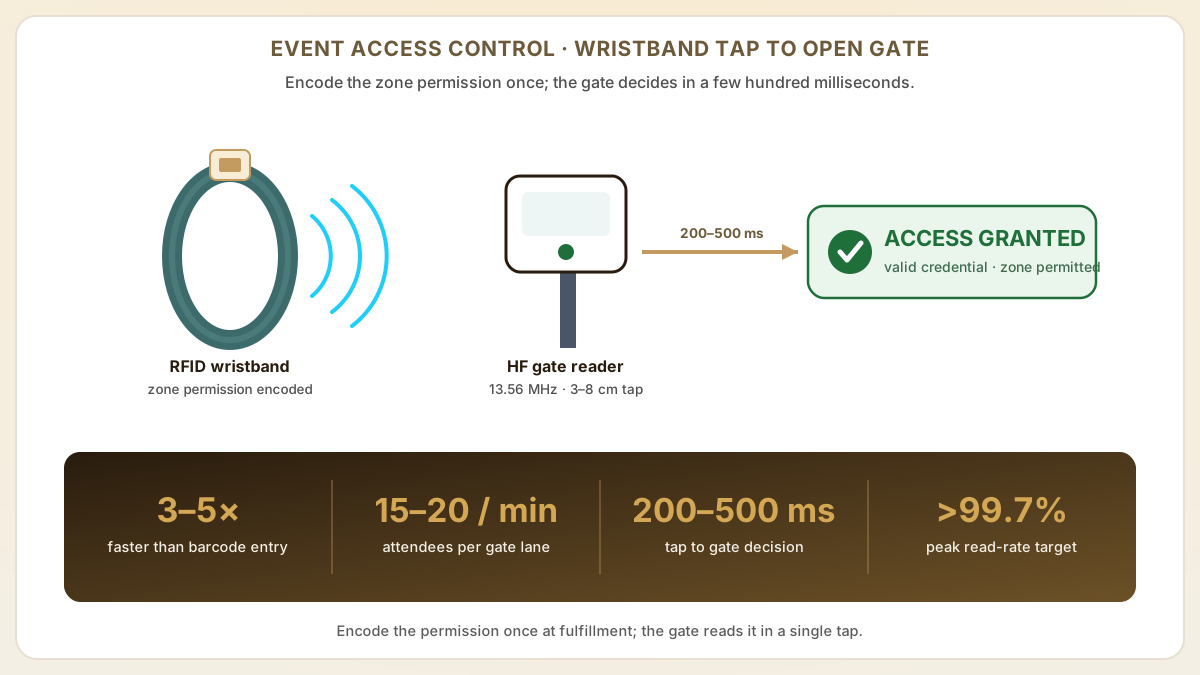
Quick answer
RFID event access control processes 15-20 attendees per lane per minute, 3-5x faster than barcode scanning, so entry queues drop from minutes to seconds. This guide covers hardware planning, credential encoding, gate configuration, real-time occupancy monitoring and post-event analytics — because the gate is the one part of your event everyone remembers.
- RFID access control processes attendees 3-5x faster than barcode scanning, reducing entry queue times from minutes to seconds at peak gates.
- Zone-level access permissions encoded on RFID wristbands enable granular crowd management across VIP, backstage, general admission and restricted areas.
- Real-time occupancy dashboards powered by RFID gate data give safety teams instant visibility into zone populations for capacity compliance.
At a glance
Use these short answers to decide whether this page matches the project before moving into the detail.
Key takeaway
RFID access control processes attendees 3-5x faster than barcode scanning, reducing entry queue times from minutes to seconds at peak gates.
What is system architecture?
Doors open, and within minutes the plaza compresses into a single wall of people leaning toward the gates. Somewhere in that wall a reader decides a perfectly valid wris...
Next step
Ready to move forward? Start your inquiry to get specific answers for this project.
Plan your access control setupWhat is system architecture?
Doors open, and within minutes the plaza compresses into a single wall of people leaning toward the gates. Somewhere in that wall a reader decides a perfectly valid wristband belongs to a stranger, the lane stalls, and the phones come out — the 'chaos at the gates' write-up drafts itself. RFID access control is the machinery that keeps that scene from happening, or, configured badly, the machinery that causes it. An RFID event access control system consists of four layers: credentials (wristbands or badges), readers (at gates and zone boundaries), a controller network (connecting readers to the server) and the access control software (managing permissions and logging events).
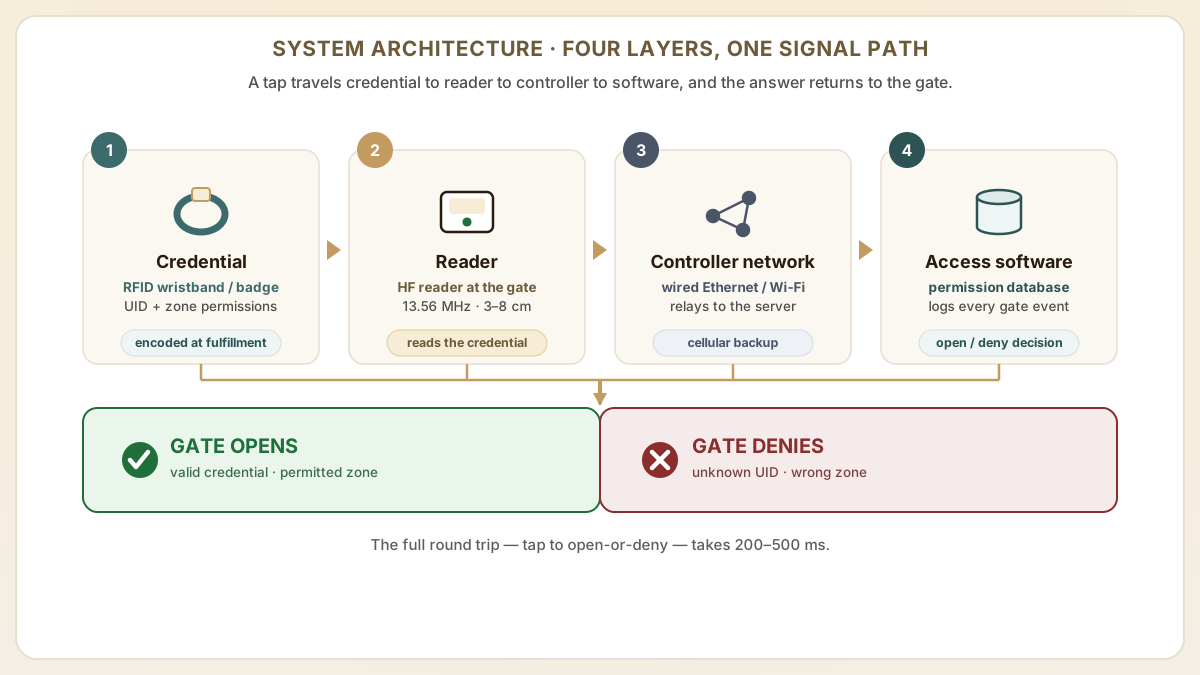
The system works by encoding access permissions onto each RFID wristband during registration or fulfillment. When an attendee taps their wristband at a gate reader, the reader sends the credential data to the controller, which checks permissions against the access control database and signals the gate to open or deny entry. The entire process takes 200-500 milliseconds.
- Credentials: RFID wristbands, badges or cards encoded with attendee ID and access zone permissions.
- Readers: Fixed-mount HF readers (13.56 MHz) at gates, doorways and zone boundaries. Typical read range is 3-8 cm for tap-based access.
- Network: Wired Ethernet (preferred for reliability) or Wi-Fi connecting readers to the central server. Cellular backup for outdoor venues.
- Software: Cloud-based or on-premise access control platform managing attendee records, zone definitions, permissions and real-time monitoring.
How do hardware planning and gate layout work?
The number and placement of RFID readers determines throughput capacity and coverage. Under-provisioning readers creates bottlenecks; over-provisioning wastes budget. Use attendee arrival modeling to size the system correctly.
| Gate type | Readers per lane | Throughput per lane | Typical placement | Hardware per gate |
|---|---|---|---|---|
| Main entrance | 1 HF reader + LED indicator | 15 – 20 attendees/min | Entry gates, turnstiles | Reader, tripod mount, barrier arms |
| VIP / backstage | 1 HF reader + display | 10 – 15/min (with visual verify) | Restricted area entries | Reader, screen, barrier or door strike |
| Zone boundary | 1 – 2 HF readers (in + out) | 20 – 30/min (tap-and-go) | Stage areas, camping zones | Readers, posts, optional counters |
| Exit-only | 1 UHF reader (optional) | Passive count only | Main exits | UHF reader, antenna panel |
How do credential encoding and registration workflows work?
Access permissions must be written to each RFID wristband before the attendee arrives at the gate. The encoding can happen at fulfillment (mail-out), at on-site registration or at the gate itself.
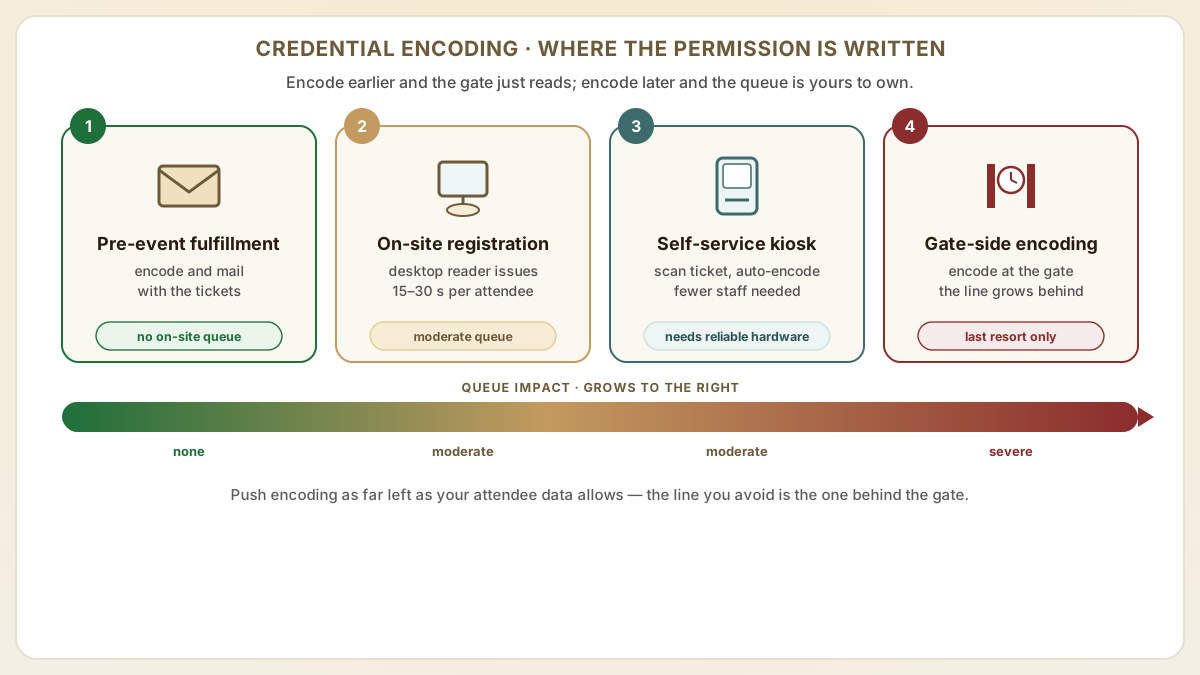
- Step 1Pre-event fulfillment encoding: Wristbands are encoded and mailed to attendees with their tickets. This eliminates on-site registration queues but requires accurate attendee data at time of shipment.
- Step 2On-site registration: Attendees present their ticket (digital or print), are issued a wristband and the access permissions are encoded in real time using a desktop reader connected to the registration system.
- Step 3Self-service kiosk encoding: Attendees scan their ticket barcode at a kiosk, which dispenses and encodes an RFID wristband automatically. Reduces staffing needs but requires reliable kiosk hardware.
- Step 4Gate-side encoding: the last resort, where encoding happens at the gate reader itself while the line behind it grows. It is the slowest method and should be reserved for day-of ticket upgrades or VIP additions — not anyone's opening move.
- Step 5Encoding data format: Typically includes attendee UID, ticket type code, access zone bitmask and event date. MIFARE DESFire stores this in an encrypted application file; MIFARE Classic uses dedicated sectors.
How do you manage real-time monitoring and capacity?
One of the most valuable features of RFID access control is real-time zone occupancy data. Every gate tap generates a timestamped event that feeds into a monitoring dashboard visible to event operations and safety teams.
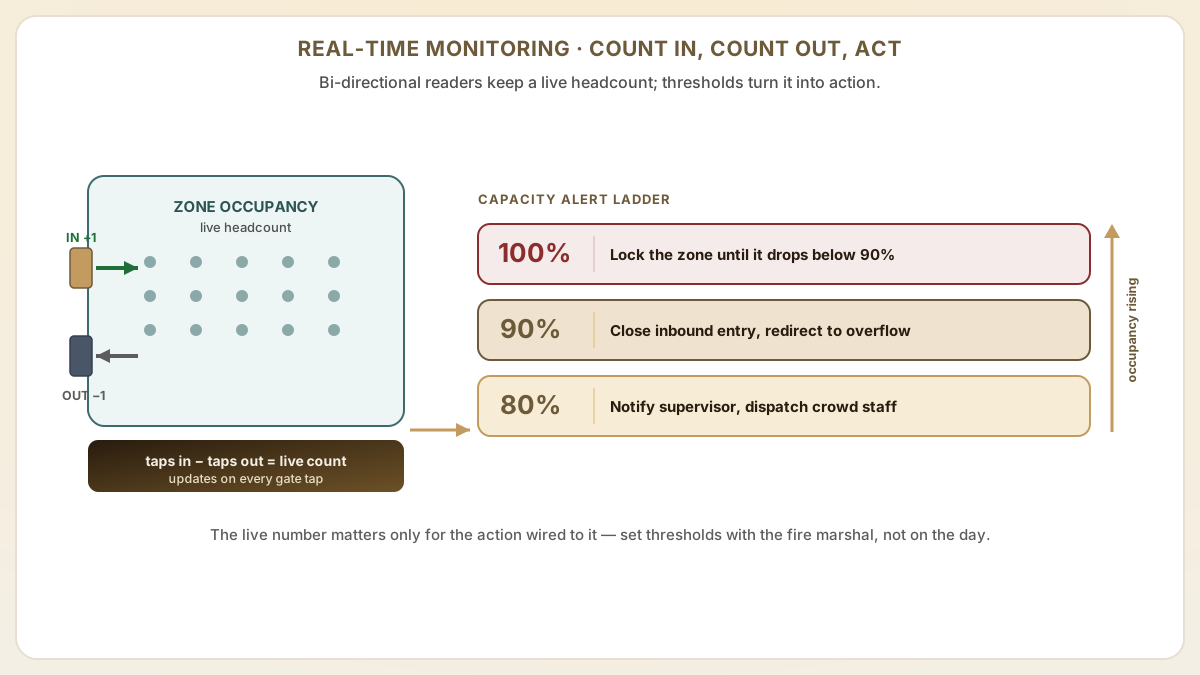
- Occupancy counters: Bi-directional readers at zone boundaries count taps in and out, providing real-time zone population figures.
- Capacity alerts: Set threshold alerts (80 percent, 90 percent, 100 percent of zone capacity) that trigger notifications to operations staff and can automatically restrict further entry.
- Flow rate monitoring: Track arrival rates at main gates to predict queue buildup and dynamically open additional lanes.
- Heat maps: Aggregate tap data into time-of-day visualizations showing crowd movement patterns across the venue.
- Safety compliance: Real-time occupancy data satisfies fire marshal and local authority requirements for capacity monitoring at permitted events.
How do post-event analytics and reporting work?
RFID access data collected during the event provides valuable analytics for future event planning, sponsor reporting and operational improvement.
- Arrival curve analysis: Identify peak arrival times to optimize gate staffing and opening schedules for future events.
- Zone dwell time: Calculate average time attendees spend in each zone to evaluate stage scheduling and vendor placement.
- Attendee journey mapping: Reconstruct anonymized movement patterns across zones to understand how attendees navigate the venue.
- VIP utilization: Measure actual VIP area usage rates to justify premium ticket pricing and right-size VIP zones.
- Re-entry rates: Track how often attendees leave and re-enter the venue to inform parking, shuttle and re-entry gate planning.
What benchmarks should guide reader sizing and read-rate targets?
Reader sizing and read-rate targets are the two numbers that most directly determine whether your gate operations succeed. Industry deployments at major festivals provide concrete benchmarks worth designing against.
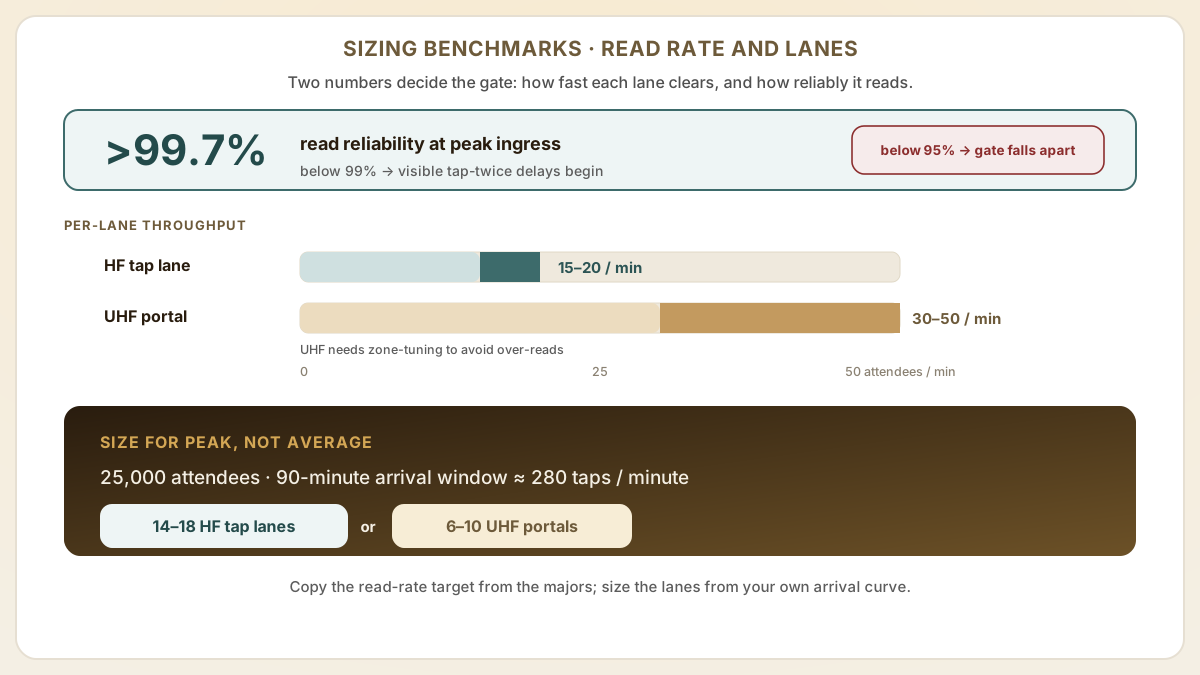
- Read-rate target at gate: aim for >99.7% read reliability at peak ingress, the published benchmark used at Coachella, Lollapalooza and Tomorrowland. Below 99% you start to see visible 'tap-twice' delays that cascade into queue backups; below 95% the gate experience falls apart.
- Reader gate validation latency: <300 ms from tap to accept/reject light. UHF Gen2v2 anti-collision protocols can read 100+ tags per second; the bottleneck is almost always the server lookup, not the chip read. Local UID whitelist caches at each reader bring this under 100 ms.
- Throughput planning: 15-20 attendees per minute per HF tap lane is the planning standard; UHF walk-through portals can hit 30-50/min/lane but require strict zone-tuning to avoid over-reads. For a 25,000-attendee festival arriving in a 90-minute window, that's a peak rate of ~280/min — meaning 14-18 HF lanes or 6-10 UHF portals.
- Industry case data: a 25,000+ guest, three-day festival published by Get Systems segmented zones into VIP, GA, backstage and vendor-only with capacity alerts at each — automated alerts trigger when a specific zone approaches its safe occupancy ceiling, providing a defensible safety story for permitting authorities.
- Coachella's RFID infrastructure budget exceeds $2M annually for the access-and-cashless stack. Mid-scale events should benchmark per-attendee infrastructure cost ($8-15 per attendee for a 25K event is the typical range) rather than copy the absolute number.
What gate-setup mistakes cause the most queue meltdowns?
Most gate failures at events are not RFID problems — they are setup choices made before doors open. These five mistakes account for the majority of public 'long line' complaints attributed to access control.
- No gate dry-run with production wristbands: finding out whether your wristbands actually read on the morning of doors leaves zero time to fix encoding bugs or reader miscalibration — and it always turns out to be the encoding. Run a full gate dry-run with at least 200 production wristbands and the actual server stack 7-10 days before doors.
- Single-WAN dependency for the validation server: events that route every gate read to a cloud server over a single 4G modem lose the entire gate when a tower congests. Always have a wired primary + cellular failover, plus offline-mode caching at each reader (a reader cached with the morning's whitelist can keep operating for 30+ minutes during a network outage).
- Under-provisioning re-entry lanes: events focus reader budget on entry but forget that re-entry can be 30-40% of total taps over a multi-day event. Plan re-entry capacity at 50% of entry capacity, dedicated lanes (not shared with first-time entry), with bi-directional readers at zone boundaries.
- Wristband encoding done at registration desk instead of pre-fulfillment: on-site encoding takes 15-30 seconds per attendee and turns a 90-minute arrival window into a 3-hour queue. Pre-encode at the factory or shipping fulfillment center; reserve on-site encoding only for walk-up sales and replacement wristbands.
- No zone-occupancy capacity alerts: real-time occupancy is the highest-leverage analytics use of RFID, but only if alert thresholds (80%, 90%, 100% of permit capacity) are wired to actual operational responses (close zone, redirect to overflow, dispatch crowd-management staff). Build the alert table with the fire marshal during permitting, not the day before.
Useful next pages
Use these linked product, guide and comparison pages to keep the next click specific and practical.
Event RFID wristband products
RFID wristbands pre-configured for event access control systems in various materials and chip options.
Access control hardware
NFC/RFID readers for gate installation and desktop encoding.
FAQ
How many RFID gate readers do I need for my event?
Calculate based on expected peak arrival rate. Each reader lane processes 15-20 attendees per minute. If you expect 5,000 attendees arriving in a 90-minute window, you need a peak capacity of ~55 taps/minute, which requires 3-4 lanes minimum. Add 50 percent buffer for reliability.
What happens if the network goes down during the event?
Most event RFID systems support offline mode where gate readers cache access decisions locally and sync when connectivity resumes. For critical events, use wired Ethernet for primary connectivity and cellular backup. On-chip stored permissions (vs. server-lookup) also enable offline operation.
Can I use the same RFID wristbands for both access control and cashless payment?
Yes. MIFARE DESFire chips support multiple applications on a single chip, so one wristband can carry both access permissions and payment credentials — the basis of a [cashless RFID wristband](/products/rfid-wristbands/cashless-payment-rfid-wristband/) deployment. This requires integration between the access control and payment platforms, which most enterprise event tech providers support.
How do I handle VIP upgrades on the day of the event?
At a help desk or VIP registration point, staff use a desktop reader to update the access zone permissions on the attendee's existing wristband. With MIFARE DESFire, this is a write operation to the access application that takes 1-2 seconds. The attendee keeps their original wristband.
Should I use HF tap or UHF walk-through portals at gates?
HF tap (the 'wave your wrist at the reader' model) is the default — well-understood by attendees, deterministic gate behavior, low false-accept risk. UHF walk-through portals can hit higher throughput (30-50/min/lane) but require careful zone tuning to avoid reading wristbands of attendees who are merely passing by. Best practice for large events: HF tap at primary entry gates (where deterministic single-credential reads matter), UHF portals at exit/re-entry counters and zone boundaries (where bulk passive counting is the goal).
How do I plan capacity alerts that satisfy the fire marshal?
Build the alert thresholds during the permitting process with the fire marshal in the room. Typical thresholds are 80% (notify zone supervisor + dispatch additional crowd-management staff), 90% (close inbound entry to that zone, redirect to overflow), 100% (lock the zone until counted occupancy drops below 90%). The RFID system should publish a real-time occupancy dashboard the fire marshal or local authority can view live during the event — that visibility is often the difference between a 'permitted' and 'denied' application for high-density events.
Sources & references
Primary standards, OEM datasheets and regulatory documents cited by this article. All URLs were verified on the access date shown below.
Proud Tek is a Shenzhen-based RFID & NFC manufacturer supplying hotel chains, transit operators, event venues and retail brands worldwide. Every order includes free samples, RF testing and dedicated project support.
Get a Quick Quote
Tell us about your project and we'll respond within one business day. Fields marked (asterisk) are required.