
RFID Troubleshooting
RFID Reader Not Detecting Tags? A Field Guide
Quick answer
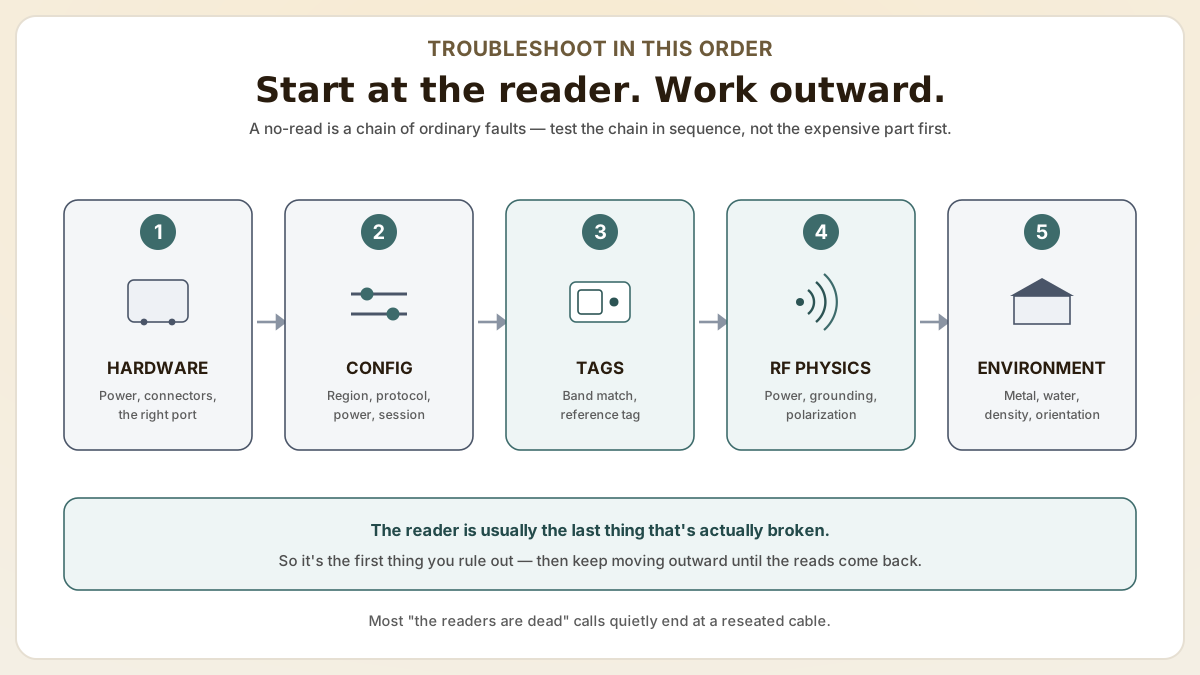
An RFID reader that suddenly detects nothing is almost never a dead reader — it is a chain of ordinary faults you isolate in a fixed 5-step order: connections, configuration, tag compatibility, RF physics, then the environment. Testing that chain in sequence beats guessing at the expensive part.
- Systematic 5-step diagnostic process to isolate whether the detection failure originates from the reader, antenna, cables, tags, software, or environment.
- Common configuration mistakes that prevent tag detection: wrong frequency region settings, disabled antenna ports, incorrect tag protocol selection, and power levels set below usable thresholds.
- Environmental factors that cause intermittent detection failures: metal interference, liquid proximity, tag orientation mismatches, and dense-tag populations that trigger collisions.
At a glance
Use these short answers to decide whether this page matches the project before moving into the detail.
Key takeaway
Systematic 5-step diagnostic process to isolate whether the detection failure originates from the reader, antenna, cables, tags, software, or environment.
Step 1: Verify reader hardware and connections
Almost every 'the readers are completely dead' call arrives with the same conviction: something expensive has failed and the whole deployment is sunk. Often enough, you...
Next step
Ready to move forward? Start your inquiry to get specific answers for this project.
Contact Proud Tek for RFID tag supportStep 1: Verify reader hardware and connections
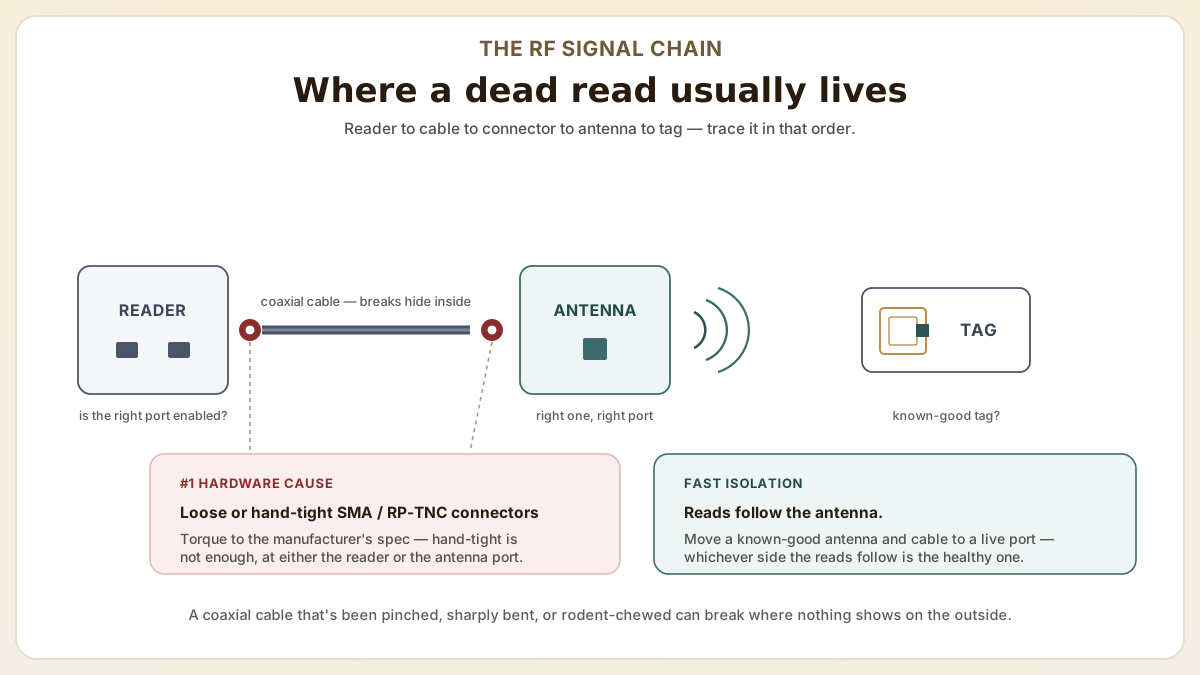
Almost every 'the readers are completely dead' call arrives with the same conviction: something expensive has failed and the whole deployment is sunk. Often enough, you ask the caller to walk over and reseat the antenna cable, and the tags quietly come back. A reader that detects nothing is rarely one catastrophic fault — it is usually a chain of ordinary things (a loose connector, a config toggle flipped by a firmware update, a frequency mismatch, a slab of metal that wasn't on the line last week), and the fastest fix is to test that chain in order instead of guessing. Work outward from the reader: hardware and connections first, then software, then the tags, then RF physics, then the room itself. The signal chain below shows where reads actually die — most often at a connector a torque wrench can fix.
- Check that the reader is powered on and showing normal status LED indicators. Refer to the reader manufacturer's LED code chart to identify error states (e.g., solid red may indicate a firmware fault or antenna disconnect).
- Inspect all antenna cable connections for tight coupling at both the reader port and antenna port. Loose SMA or RP-TNC connectors are the most common hardware cause of read failure. Hand-tight is not enough; use a torque wrench to the manufacturer's specification.
- Verify that the correct antenna is connected to the correct reader port. Multi-port readers (4-port or 8-port) only interrogate the ports that are enabled in software. Connecting an antenna to a disabled port produces zero reads.
- Test with a different antenna cable to rule out cable damage. Coaxial cables that have been pinched, bent sharply, or rodent-chewed may have internal breaks invisible from the outside.
Step 2: Check reader software and configuration
Once the cables are torqued and the right antenna is on the right port, the failure tends to move somewhere less satisfying: the configuration, where nothing is physically broken and the reader is simply doing exactly what its settings told it to. Four settings cause most of it — region, protocol, power, and session — and every one of them fails silently, as the map below lays out.
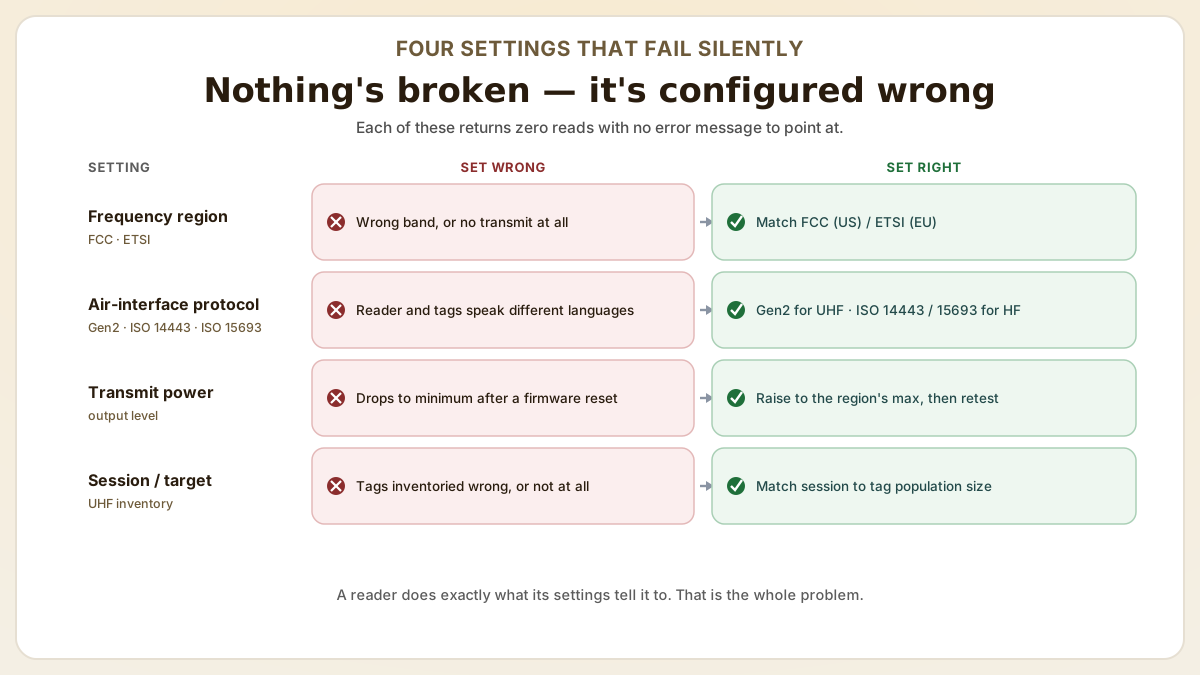
- Confirm the reader's frequency region setting matches your regulatory jurisdiction (FCC for US, ETSI for EU, etc.). A reader set to the wrong region may transmit on frequencies that do not match your tags, or may not transmit at all if the selected region requires different regulatory parameters.
- Verify that the correct air interface protocol is selected. EPC Gen2 for UHF tags, ISO 14443 for HF proximity tags, or ISO 15693 for HF vicinity tags. A protocol mismatch means the reader and tags are speaking different languages.
- Check the transmit power setting. Some readers default to minimum power after a firmware update or factory reset. Increase transmit power to the maximum allowed for your region and test again.
- Review the reader's session and target settings (for UHF). Incorrect session parameters (e.g., Session 0 with a small tag population versus Session 2 with a large population) can cause tags to be inventoried incorrectly or not at all.
Step 3: Test tag compatibility and condition
If the hardware and configuration both check out, the reader is probably fine and the tags are the suspects. The fastest proof is a swap: read a known-good reference tag, and if it answers while your deployed tags stay silent, the fault lives on the tag side — wrong chip, wrong frequency band, or physical damage. Most of these cases come down to a band mismatch, which the UHF vs HF frequency guide and the map below both make quick to rule out.
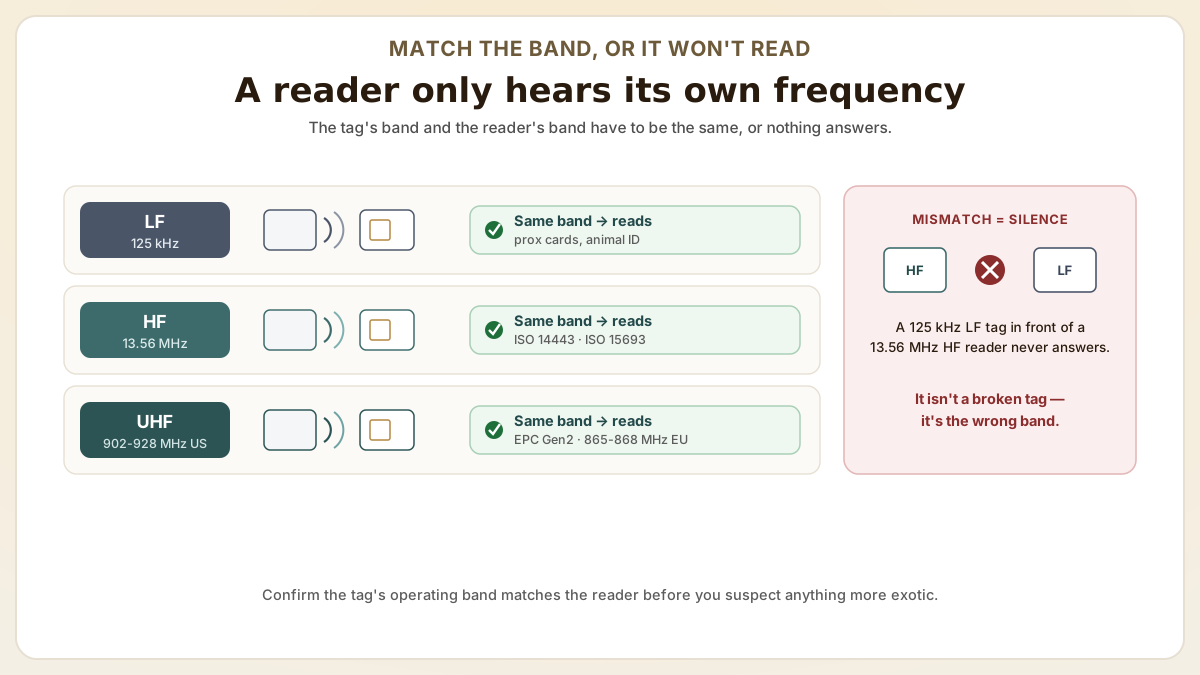
- Test with a known-good reference tag from the reader manufacturer or a tag confirmed to work with your system. If the reference tag reads but your deployed tags do not, the issue is tag-side (wrong chip, wrong frequency, or physically damaged tags).
- Verify tag frequency band. Confirm that your tags operate in the same frequency range as your reader. A common mistake is mixing 125 kHz LF tags with 13.56 MHz HF readers, or using EU-frequency UHF tags with a reader configured for the US band.
- Inspect tags for physical damage. Cracks, deep creases, punctures, or delamination can break the antenna or chip connection. Test multiple tags from different locations; if some read and others do not, individual tag damage is the likely cause.
- For UHF tags on metal or near liquid, test the same tags in free air (away from any surface) at close range. If they read in free air but not on the asset, the mounting environment is the issue. Switch to anti-metal or standoff tags.
Step 4: Power, grounding, and antenna polarization checks
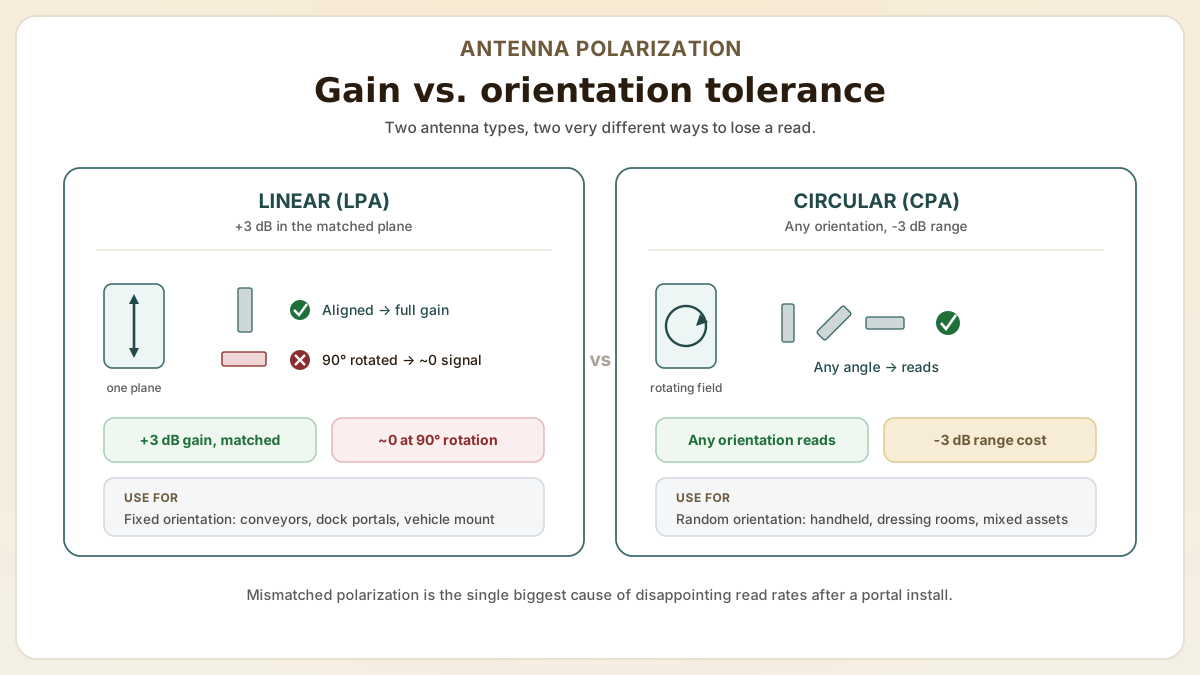
When the basics are right and tags still won't read, the next layer is RF physics. The three most common causes of intermittent or low-rate reads in production environments are inadequate reader power, poor grounding that adds noise to the antenna circuit, and a polarization mismatch between the antenna and the tags. Industry troubleshooting guides consistently put 80-90% of unresolved field issues into one of these three buckets. Polarization is the one that most often turns a portal install into a disappointment, so the antenna comparison below is worth a close look — and if the real question is raw distance, the UHF read-range explainer works through the power-and-cable math in depth.
- Power-supply sizing. Modern fixed UHF readers (Impinj R700, Zebra FX9600, Honeywell IF61) draw 30-60 W under full transmit, well above what a single PoE 802.3af port (15.4 W) can deliver. Underpowered readers throttle transmit power silently and produce a dropping read rate over time as the supply sags. Use PoE+ (802.3at, 30 W) or PoE++ (802.3bt, 60-90 W) — or a dedicated 24 V DC supply on a known-good run — for fixed readers, and verify actual draw with a clamp meter rather than trusting nameplate labels.
- Grounding and ground loops. RFID antennas are extraordinarily sensitive to small ground potential differences. A reader grounded at one panel and an antenna grounded at a different building service can create a ground loop that injects noise into the antenna circuit and silently kills read rate. Standard practice is single-point grounding for the entire RFID system, with shielded antenna cable bonded only at the reader end. Add ferrite beads on long cable runs and confirm with a multimeter that the antenna shield and reader chassis are at the same potential.
- Antenna polarization match. Linear polarized antennas (LPA) deliver 3 dB more gain in the matched orientation but lose almost all signal at 90 degrees rotation. Circular polarized antennas (CPA) are tolerant of any tag orientation but lose 3 dB of effective range. Use LPA for fixed-orientation conveyor lines, dock door portals where pallets always present labels in one orientation, or vehicle mount applications. Use CPA for hand-stacked retail dressing-room reads, asset rooms with mixed orientations, or anywhere tags can rotate freely. Mixing the wrong polarization with the wrong application is the single biggest cause of disappointing read rates after a portal install.
- Cable loss math. Coax cable loss at UHF frequencies is significant — RG-58 loses about 0.5 dB per meter at 900 MHz, RG-213 about 0.18 dB per meter, LMR-400 about 0.15 dB per meter. A 10 m run of RG-58 costs you 5 dB of effective transmit power, equivalent to halving the read range. Spec LMR-400 or better for runs over 5 m, and keep total cable loss below 3 dB end-to-end whenever possible. Verify with a network analyzer or by measuring actual reflected-power return loss at the reader.
- Reader-to-reader and reader-to-Wi-Fi interference. UHF readers (902-928 MHz US, 865-868 MHz EU) sit close to the 902-928 MHz Wi-Fi side-channels and to many ISM-band cordless devices. Two readers within 10 m of each other on overlapping channels collide constantly. Deploy with channel coordination (Impinj Atlas, Zebra Reader Management Service, or manual hop-table planning) and physically separate readers by at least 6-10 m for high-density installations. Also check for nearby DECT phones, IoT hubs on the 900 MHz ISM band, and 802.11ah Wi-Fi which can interfere with reader receive sensitivity.
Step 5: Environmental and material interference patterns
After power and polarization, the largest performance variable is the physical environment around the read zone. RFID is RF, and metal, water, dense organic matter, and certain plastics all interact with the field in predictable ways. Understanding which environment the system is in lets you choose the right tag, antenna, and read-zone geometry instead of fighting symptoms. The four interference modes below each have a known fix — and none of them is 'buy a bigger reader.'
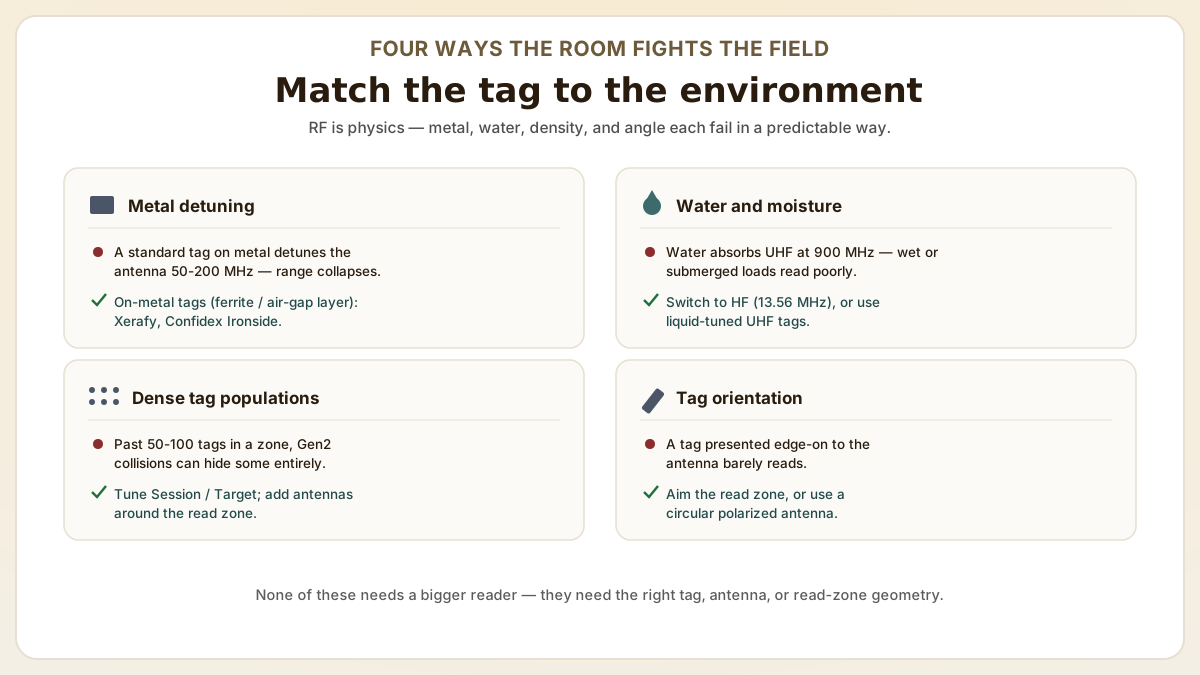
- Metal detuning. Placing a standard UHF or HF tag directly on metal shifts the antenna's resonant frequency by 50-200 MHz, typically away from the reader's operating band, and effectively kills read range. The fix is on-metal-rated tags (Xerafy, HID Global Trusted Tag Services, Confidex Ironside, Avery Dennison AD-238m6) which include a ferrite or air-gap layer that isolates the antenna from the metal surface. For HF access readers mounted on door frames, use spacer kits from the reader vendor.
- Water and high-moisture environments. Water absorbs UHF energy aggressively at 900 MHz. Tagged items submerged or wrapped in saturated material (fresh produce, wet cardboard, ice) read poorly. Switch to HF (13.56 MHz) where read range is intentionally short and water absorption is far lower, or use specialty UHF tags with closer-coupled antennas designed for liquid-adjacent operation. For food and beverage cold-chain, IP67/IP68 anti-vandal hard-tags (Confidex Captura Ironside, Xerafy MICRO Industrial) survive freeze-thaw cycles intact.
- Dense tag populations. When more than 50-100 tags share a read zone, Gen2 air-interface collisions reduce inventory speed and can hide some tags entirely. Configure the reader Session and Target settings (Session 0/1 for low-population conveyor reads, Session 2/3 for high-population dock door portals) and use multiple antennas on different sides of the read zone. Atlas-class readers (Impinj R700) and Zebra FX9600 expose Q-value tuning that matters at populations above 200 tags.
- Dense-reader environments. In warehouses with multiple dock doors, adjacent readers operating on the same channel desensitize each other through near-field coupling. Use Dense-Reader Mode (DRM) on the reader, manually plan channel allocation across portals, and physically baffle adjacent read zones with RF-absorbing material if needed. Atlas RFID Store and Impinj both publish dense-reader deployment guides.
- Tag orientation and presentation geometry. Even with a perfectly matched polarization, a tag presented edge-on to the antenna delivers little to no read. In manufacturing and warehouse environments, design the read zone so tags pass through the antenna's main beam in the favorable orientation — vertical tags through a vertical-polarized portal, or use a circular polarized antenna if orientation is genuinely random. A pre-deployment site survey with a handheld reader and known tags is far cheaper than discovering a 60% read rate in production.
Useful next pages
Use these linked product, guide and comparison pages to keep the next click specific and practical.
RFID tags and labels for reliable detection
Explore high-performance RFID tags designed for challenging environments.
Reader vendor troubleshooting references
Manufacturer documentation for the diagnostic steps above.
FAQ
My RFID reader was working yesterday but stopped today. What changed?
The most common causes of sudden read failure are these four. (1) A loose antenna cable connector that vibrated free, (2) a reader firmware or configuration change pushed by the system administrator, (3) a new piece of metal equipment placed near the read zone causing interference, or (4) a reader power supply issue. Work through the hardware checks first, then software, then environment, following the systematic process above.
Why does my reader detect some tags but miss others in the same batch?
Inconsistent detection within a batch usually indicates tag orientation issues (tags at unfavorable angles relative to the antenna polarization), tag damage during handling (cracked antennas on specific units), or dense-read collisions where too many tags respond simultaneously. Test the missed tags individually at close range to determine whether they are damaged, then evaluate orientation and population density if individual tags are healthy.
Can environmental temperature affect RFID reader performance?
Yes. Extreme cold can reduce reader sensitivity and battery performance (in handheld readers), while extreme heat can trigger thermal throttling that reduces transmit power. Most fixed readers are rated for 0 to 50 degrees Celsius. If your environment exceeds these limits, use industrial-rated readers designed for extreme temperatures.
How do I check whether the reader's antenna and cable are healthy without specialized test equipment?
Three quick tests get you most of the way without a vector network analyzer. First, swap suspect antenna and cable with a known-good pair from another active port and see if the read rate transfers — if reads follow the antenna, the antenna is fine and the cable is suspect, and vice versa. Second, use the reader's built-in port diagnostics (Impinj Speedway/R700, Zebra FX9600, and Honeywell IF61 all expose port-level reflected-power or VSWR readings in their reader management web UI) — VSWR above 2.0 indicates a connector or cable problem. Third, visually and physically inspect both ends of every connector for bent center pins, loose collars, water intrusion, and overtight torque damage. Tighten with a torque wrench to the manufacturer's spec rather than by hand.
When should I choose a circular polarized antenna over a linear polarized antenna?
Choose circular polarized (CPA) when tag orientation is unknown or random — handheld scanning of mixed product, dressing-room reads, asset rooms with stacked items, and any presentation where the tag could be at any angle. Choose linear polarized (LPA) when the tag orientation is fixed and predictable — conveyor belts where labels always face the same way, dock door portals where pallets always present the long edge to the antenna, and vehicle-mount readers where signage is consistent. LPA gives you about 3 dB more effective gain in the matched direction, which translates to roughly 40% more read range, but loses almost all signal at 90 degrees rotation. CPA accepts any orientation but at a 3 dB cost compared to a perfectly aligned LPA. Most retail and warehouse portals use CPA because the operational cost of unread tags exceeds the lost range.
Sources & references
Primary standards, OEM datasheets and regulatory documents cited by this article. All URLs were verified on the access date shown below.
- GS1 — EPC UHF Gen2 Air Interface Protocol
Primary specification for the EPC Gen2 UHF air interface referenced in the configuration step.
- Atlas RFID Store — What Affects RFID Read Range?
Industry field guide on antenna gain and polarization, transmit power, cable loss, and metal/water environment effects.
Proud Tek is a Shenzhen-based RFID & NFC manufacturer supplying hotel chains, transit operators, event venues and retail brands worldwide. Every order includes free samples, RF testing and dedicated project support.
Get a Quick Quote
Tell us about your project and we'll respond within one business day. Fields marked (asterisk) are required.